You’re three minutes into your morning routine. The beans are in the hopper, you press the button, and instead of the reassuring hum of grinding, you get a sputter, a loud clatter, or silence. Most people panic and start shopping for a replacement. But a grinder that acts up isn’t always a dead grinder. Often, it’s a fixable problem hiding in plain sight.
This guide walks through the most common coffee burr grinder problems and fixes with a simple diagnostic approach: look at the symptom, trace it to the cause, and apply the specific fix. You’ll learn how to diagnose grind inconsistency, jams, electrical failures, and noise issues without taking the whole machine apart. You’ll also know when it’s genuinely time to replace the unit versus when a 15-minute cleaning will solve everything.
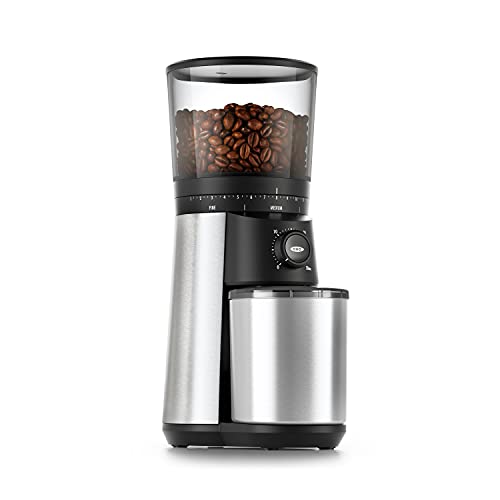
OXO
OXO Brew Conical Burr Electric Coffee Bean…
- 40mm stainless steel conical burrs: Precision grinding system produces uniform coffee grounds to ensure even extraction for rich,…
- 15 grind settings (plus 43 micro-adjustments): Easily customize your coffee grind—from fine for espresso to coarse for French pres…
- One-touch start: The Conical Burr Coffee Grinder remembers your last setting. Just push to grind—no need to reset each time.
As an Amazon Associate I earn from qualifying purchases.
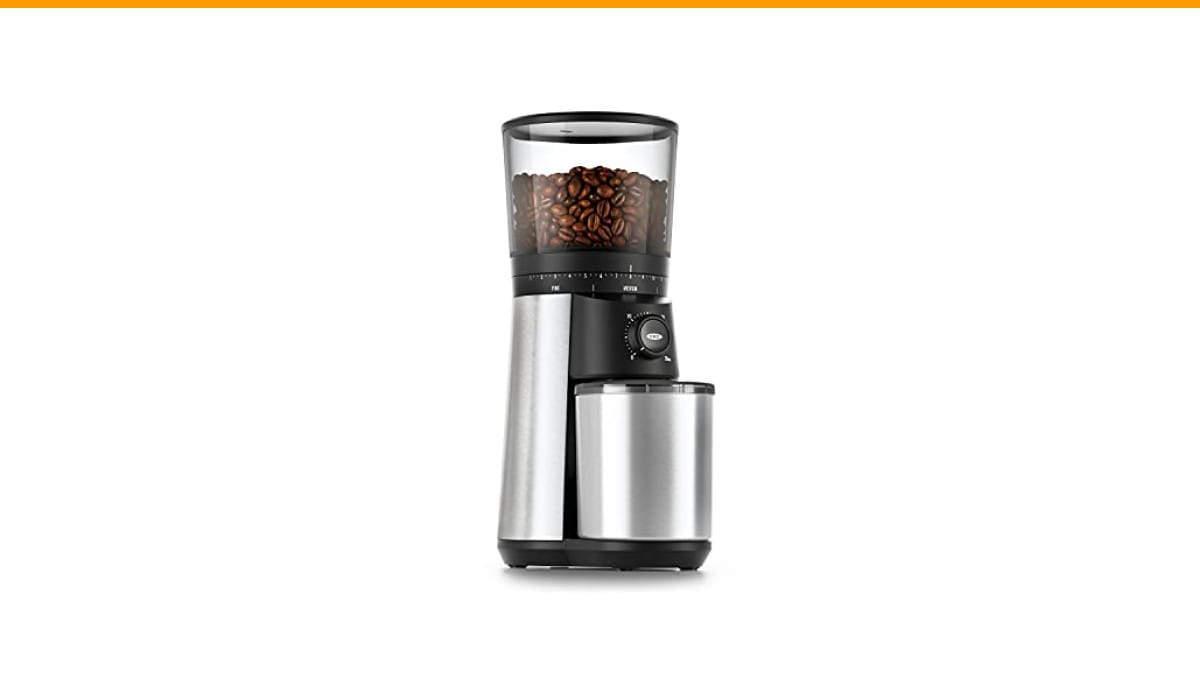
If you’re currently shopping and want a solid baseline for what a reliable grinder should feel like, the OXO Brew Conical Burr Grinder handles most of these failure modes well. It has a 40mm stainless steel conical burr set, 15 grind settings with 43 micro-adjustments, and a large 12-ounce hopper. It’s not the fanciest grinder on the market, but it’s a dependable reference point for the fixes below.
Diagnose the Problem: A Quick Symptom Checker
Before you touch a screwdriver, figure out which category your problem falls into. This saves you from fixing the wrong thing. Here’s a simple decision tree based on what you actually observe.
- Grind looks uneven or tastes bad (sour/bitter shots): This is a burr alignment, burr wear, or bean level issue. Not an electrical problem.
- Grinder stalls, slows down, or stops mid-grind: Check for bean bridging, foreign objects, or motor torque issues first. Electrical failure is less common.
- Grinder won’t turn on at all, or powers off after a few seconds: This points to a tripped thermal cutoff, a misaligned hopper safety switch, or a power supply fault.
- Loud noises, rattling, or vibration: Metal-on-metal sounds indicate worn burrs or foreign debris. Rattling usually means a loose part or the popcorning effect.
- Static cling and messy grounds: That’s a humidity and grind retention problem, not a mechanical failure. It’s annoying but easy to fix.
Once you’ve placed your symptom, read the matching section below. Each one walks through the cause and the fix in order of likelihood.
Grind Size Inconsistency (The #1 Complaint)
This is the most common coffee burr grinder problem. You set the dial to espresso, and your shot runs in 15 seconds. You set it to French press, and you get a muddy brew. The culprit is almost always one of two things: burr alignment/wear, or the bean level in the hopper.
Check Burr Alignment and Wear
Conical burrs have two parts: a stationary outer ring and a rotating inner cone. They need to sit flush against each other. If the burr carrier is loose or the burrs are worn, the gap between them changes as they spin. That creates a mix of fine powder and coarse chunks.
Here’s how to test for wear. Take the burrs out and look at the cutting edges. A sharp burr has defined, angular ridges. A worn burr looks smooth and shiny on the edges, almost polished. If they’re worn, replace them. Burr replacement is cheap—usually $20 to $40—and it transforms an old grinder.
New burrs also need a break-in period. They’re sharp out of the box, which causes some inconsistency for the first 2 to 3 pounds of coffee. This is called burr seasoning. If your grinder is new, run a few pounds of cheap beans through it before you judge the grind quality. It’s not a defect; it’s normal mechanical settling.
The ‘Popcorning’ Effect and Bean Level
Here’s a subtle issue most people miss. When the bean level in the hopper gets low (below about a quarter full), the beans start bouncing around the chamber. This is called popcorning. The beans don’t feed evenly into the burrs, so they grind in bursts. You get a few seconds of fine grind, then a few seconds of coarse grind.
The fix is simple: keep the hopper at least a third full, or use a single-dose bellows attachment that forces beans down. Some grinders have a hopper weight or a spring-loaded lid that solves this. If yours doesn’t, just add more beans. It’s not a mechanical failure; it’s physics.
If you’re comparing grind quality across machines, check out our burr grinder vs blade comparison to see why burr grinders handle this better in the first place.
Grinder Jams, Stalls, or Slows Down
Your grinder starts fine, then slows to a crawl, or stops completely with a loud clicking sound. This is the second most common coffee burr grinder problem. It’s rarely a dead motor. It’s usually a mechanical obstruction.
Bean Bridging and Foreign Objects
Bean bridging happens when beans form an arch above the burrs and stop feeding. The motor runs, but no beans go through. You’ll hear a high-pitched whine instead of the crunching grind. The fix is to remove the hopper, stir the beans with a chopstick, and let them fall through. That breaks the bridge.
Foreign objects are a different story. A tiny pebble from a bad batch of beans, or a piece of chaff, can jam between the burrs. You’ll hear a metallic grinding or clicking noise. Do not keep running the grinder. That will chip the burr edges. Unplug the unit, remove the burrs, and inspect the chamber. Most jams are cleared by brushing out the debris.
Motor Torque vs. Mechanical Failure
Here’s a distinction that saves you from replacing a good motor. A grinder that slows down under load isn’t necessarily failing. Electric motors lose speed when they encounter resistance. If you’re grinding very dark, oily beans, they create more friction. The grinder slows down, but it’s still grinding fine.
Test it safely: run the grinder empty. If it spins up to speed quickly and sounds smooth, the motor is fine. The issue is the beans are too oily or too hard. If it runs slow even empty, or if it smells like burning plastic, you have a motor bearing issue or a failing thermal component.
Grinder Won’t Turn On or Powers Off Mid-Grind
This symptom is scary because it feels electrical. But most of the time, it’s a simple safety mechanism doing its job.
Safety Switches and Thermal Cutoffs
Most electric grinders have a hopper safety switch. The machine won’t run unless the hopper is properly seated and locked into place. If your grinder suddenly won’t start, check the hopper alignment first. A slightly crooked hopper can break the circuit. Remove it and reseat it firmly.
The other common culprit is the thermal cutoff. If you’ve been grinding for a long time, or if the grinder jammed, the motor heats up. A thermal cutoff trips to prevent a fire. The grinder powers off and won’t restart until it cools down. Give it 15 to 30 minutes. If it works afterward, you just overheated it. If it trips again immediately, you have a jam that needs clearing.
Electrical vs. Mechanical Faults
If the safety switches are fine and the grinder is cool, the problem is electrical. Check the power cord for damage, and test the outlet with another appliance. If the outlet works, the issue is internal—likely a blown fuse or a failed switch. At this point, unless you’re comfortable with a multimeter, it’s time to call a repair shop or replace the unit. The cost of diagnosing internal electrical faults often exceeds the price of a new budget grinder.
Excessive Noise, Vibration, and Static
These issues don’t stop the grinder, but they ruin the experience. Let’s tackle them in order.
Metal-on-Metal Sounds vs. Rattling
If you hear a high-pitched screech or harsh scraping, that’s metal-on-metal contact. This means the burrs are touching when they shouldn’t be. It happens when the burr carrier is loose, or when a foreign object is stuck between the burrs. Stop grinding immediately. Remove the burrs and inspect them for chips or debris.
Rattling is different. It’s a loose screw, a vibrating hopper lid, or the popcorning effect we discussed earlier. Tighten any visible screws, and check the hopper fit. Most rattles are cosmetic, not functional.
Static Cling and Grounds Retention Fixes
Static builds up when dry coffee rubs against plastic. The grounds stick to the container, the lid, and your hands. It’s worse in dry climates and worse with plastic grinders. The fix isn’t mechanical; it’s environmental.
Add a drop of water to the beans before grinding. One drop, not a spray. That adds enough moisture to kill the static without affecting the grind. Alternatively, wait a minute after grinding before opening the container. The static dissipates on its own. If your grinder has a metal catch cup, it will naturally have less static than a plastic one.
Grind retention—the grounds that stay inside the machine—is a related issue. You can purge it by running a few beans through after you’ve ground your dose. This pushes out the retained grounds. It’s a small waste, but it keeps your next batch consistent.
The Maintenance Schedule That Prevents 90% of Issues
Most of the problems above are caused by neglect. A regular cleaning routine prevents jams, static, and grind inconsistency. It’s not glamorous, but it works.
Cleaning, Seasoning, and Lubrication (What’s Safe)
Clean the burrs and chamber every 2 to 4 weeks, depending on how much you grind. Use a stiff brush and a vacuum. Do not use water on the burrs; it causes rust. For a deeper clean, use grinder cleaning tablets (like Grindz) which are food-safe and absorb oils.
Regarding lubrication: do not oil the burrs. Oil attracts coffee oils and turns into a sticky paste that clogs everything. The motor bearings are sealed and don’t need maintenance. The only thing you might lubricate is the burr carrier thread or the hopper lock mechanism, and only with a food-grade silicone grease. A tiny amount. If you’re unsure, skip it. A dry thread is better than a contaminated one.
Here’s a quick comparison of cleaning methods:
| Method | Frequency | Best For | Risk Level |
|---|---|---|---|
| Brush + Vacuum | Every 2-4 weeks | Daily maintenance, removing chaff and loose grounds | None |
| Cleaning Tablets (Grindz) | Monthly | Removing coffee oil residue and stale odors | Low (run beans after to purge) |
| Rice (uncooked) | Rarely | Absorbing oils, but risky—hard rice can chip burrs | High; not recommended |
| Full Disassembly | Every 3-6 months | Deep cleaning, checking burr alignment and wear | Medium (requires careful reassembly) |
For a step-by-step walkthrough, see our guide on how to clean a coffee grinder. It covers the disassembly process for most common models.
Fix vs. Replace: The Cost-Benefit Analysis
Here’s the honest math. If your grinder is under $50, a repair usually isn’t worth it. The labor cost of a shop repair will exceed the value of the machine. If it’s a $150+ grinder, replacing burrs ($30) or fixing a jam is absolutely worth it.
Consider the age of the machine. A grinder with 5+ years of daily use has likely worn its burrs and motor bearings. Replacing burrs gives it a new life, but if the motor is struggling, that’s a sign of end-of-life. If you’re constantly fixing things, it’s time to upgrade.
If you decide to replace, the OXO Brew Conical Burr Grinder is a solid middle-ground choice. It’s not a commercial-grade machine, but for home use, its stainless steel burrs and adjustable settings handle the issues we’ve discussed without constant babysitting. Check the current price on Amazon if you’re considering it.
FAQ: Quick Answers to Urgent Questions
Why is my grinder producing a lot of fine powder?
That’s usually worn burrs. As the cutting edges dull, they crush the bean instead of slicing it, creating fines. Replace the burrs. If the grinder is new, it might just need seasoning.
Can I put water in the hopper to clean it?
No. Water on the burrs causes rust. Use a dry brush and vacuum. If you must wipe the hopper, remove it and wash it separately, letting it dry completely before reattaching.
My grinder smells like burning plastic. What’s wrong?
That’s the thermal cutoff reacting to an overheated motor. Turn it off immediately. Let it cool for 30 minutes. If it happens again, you likely have a jam that’s forcing the motor to work too hard.
Is it normal for the grinder to slow down with dark roast beans?
Yes. Dark roasts are oilier and denser, creating more friction. The motor slows down but should still grind. If it stalls completely, you need to break up the beans or clean the burrs.
How often should I replace the burrs?
For home use, every 500 to 800 pounds of coffee. That’s roughly every 2 to 3 years for a daily drinker. If you notice inconsistent grind size or a significant drop in speed, check the burr edges for wear.
What to Do Next
You don’t need to be a technician to fix most grinder problems. You just need to look at the symptom and work through the causes in order.
- Start with the hopper safety switch if the grinder won’t turn on.
- Check for bean bridging before assuming a motor failure.
- Clean the burrs every month to prevent jams and static.
- Replace worn burrs instead of buying a new machine.
- Keep the hopper at least one-third full to avoid popcorning.
- Use a drop of water to kill static cling.
- Give the motor a 30-minute cooldown if it overheats.
Most of these fixes take under ten minutes. The next time your grinder acts up, you’ll know exactly where to look.
Products related to this article
Sponsored / affiliate links. As an Amazon Associate I earn from qualifying purchases. I may earn additional commission from eligible campaigns.
 Coffee Espresso Machine Handle Replacement Parts, Cafe Bracket Handle for Lidl Silvercrest CM4621 CM4218 KF5002 KF500S Barista (for 51mm Portafilter Basket - Not included)
 Quick Heating Cup Warmer, Three Temperature Settings, Splashproof and Portable, for Coffee, Milk, Lightweight ABS Material
 Coffee Mug Warmer & You are Awesome Mug Set, Electric Cup Warmer for Desk