You pour fresh coffee, tap the button, and nothing happens. Or the mug heats for ten minutes then gives up. Or it charges overnight but dies by noon. Self heating mugs are convenient until they aren’t, and the troubleshooting advice you find online is usually too vague to help.
This guide covers the real problems: charging failures, weak heat output, battery drain, and the odd sensor glitch. You’ll learn what to check first, what actually causes each issue, and when to stop troubleshooting and replace the mug. Most fixes take under five minutes and need nothing but a cotton swab and a clean cloth.

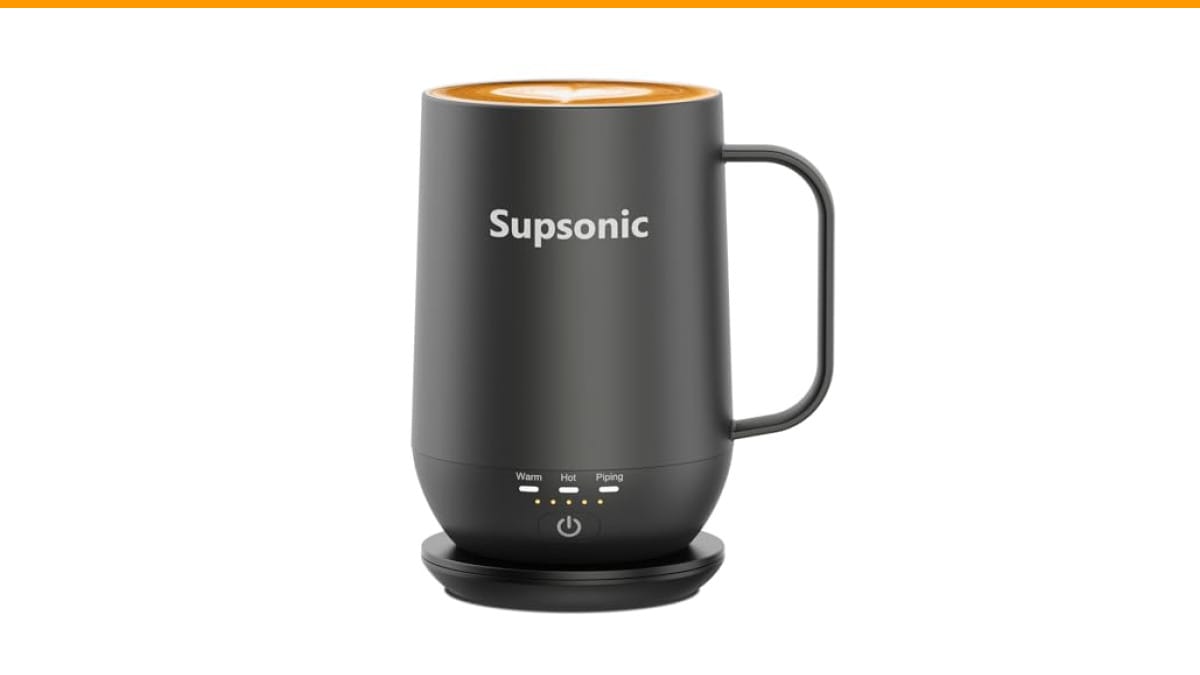
Supsonic
Supsonic - 16oz Self Heating Coffee Mug,…
- 3-Touch Precision: Get barista-level temperature control at your fingertips. Choose Piping (149°F) for a fresh-brewed feel, Hot (1…
- Warmth That Lasts: Supsonic heated coffee mug features a built-in battery that provides long-lasting power, enough to meet your ne…
- Smart Safety: Designed for real life. Supsonic self heating mugs feature a 2-hour auto-shutoff and dry boil protection keep you sa…
As an Amazon Associate I earn from qualifying purchases.
If you’re shopping rather than fixing, the Supsonic 16oz Self Heating Coffee Mug handles temperature control with three preset levels and a built-in battery that pairs with a charging dock. It’s a solid reference point for what modern self heating mugs should do, and the troubleshooting steps below apply to it just as well as to any other brand.
Why Your Self Heating Mug Stopped Heating
The most common failure point isn’t the heating element. It’s the electrical connection between the mug and its power source. Self heating mugs use either a built-in rechargeable battery or a base that heats through induction. Both rely on clean, firm contact.
Start with the obvious: is the mug actually charged? Many mugs show a green light when full and red when low. If the light doesn’t turn on at all when you place the mug on its dock, the problem is almost always dirty contacts or a dead charging cable.
Check the charging pins on both the mug and the dock. Coffee residue, dust, and mineral deposits build up quickly. A dry cotton swab or soft toothbrush clears them. Do this before anything else — it fixes roughly half of all “mug won’t heat” cases.
Next, test the cable and adapter. Use a different USB cable and a wall adapter rated at the same wattage. A phone charger that puts out 5W won’t power a mug that needs 15W. If the mug charges with a different cable, you’ve found the culprit.
If the contacts are clean and the cable works, the issue may be the battery itself. Lithium-ion batteries in self heating mugs degrade after 300 to 500 charge cycles. That’s about one to two years of daily use. A swollen base, a mug that heats for half its usual time, or a battery that drains overnight all point to end-of-life battery.
Temperature Problems: Too Hot, Too Cold, or Inconsistent
Suppose the mug heats, but the coffee never gets hot enough. Or it overheats and burns your tongue. Temperature issues usually trace back to the control logic or the sensor, not the heating element.
Most self heating mugs use a thermistor to measure liquid temperature. The thermistor sits inside the base or the inner wall. If it shifts position or gets coated with residue, it reads wrong. A mug that thinks the coffee is already at 149°F won’t heat further. A mug that reads too low will overshoot and boil your drink.
Clean the interior thoroughly. Use warm water and mild soap, then dry completely. Don’t submerge the electronics. If your mug has a removable inner cup, clean the gap between the cup and the shell — that’s where residue collects and throws off the sensor.
Another culprit: the lid. Self heating mugs lose significant heat through an open top. If you’re testing with the lid off, the mug may struggle to maintain temperature. Test with the lid on, and give the mug three to five minutes to reach its target. A mug that reaches 131°F in two minutes is working correctly — it just needs time.
One thing that surprises people: ambient temperature matters. A mug rated for 149°F in a 70°F room will perform worse in a cold garage or on a drafty porch. The heating element has a fixed wattage. If the environment pulls heat away faster than the element adds it, the liquid will settle below the target. That’s physics, not a defect.
Battery Drains Too Fast or Won’t Hold a Charge
Battery life depends on three variables: the battery capacity, the heating power, and how often the mug re-heats. A 16oz mug with a 5000mAh battery can maintain temperature for roughly two to four hours, depending on the ambient temperature and the target temperature.
If your mug used to last three hours and now dies in ninety minutes, the battery is aging. There’s no user-replaceable battery in most models, so your options are limited. You can reduce the load by using a lower temperature setting. Piping hot (149°F) draws more power than warm (113°F). Switching to a lower setting extends battery life by 30 to 50 percent.
Also check the auto shut-off feature. Many mugs, including the Supsonic model, have a two-hour auto shut-off for safety. That’s not a malfunction — it’s a feature. If the mug turns off while you’re still drinking, you’ve hit the time limit, not a bug.
Charging habits matter too. Leaving a lithium-ion battery at 100 percent for days accelerates degradation. If you use the mug only on weekends, drain it to about 50 percent before storing it. And don’t leave it on the charging dock indefinitely — a trickle charge keeps the battery stressed.
Comparing Troubleshooting Approaches
Not all fixes are equal. Some take seconds, others require careful work. Here’s a breakdown of the common approaches, what they cost in time, and how likely they are to solve the problem.
| Problem | First Fix to Try | Time Needed | Success Rate | Cost |
|---|---|---|---|---|
| Mug won’t turn on | Clean charging contacts | 2 minutes | High | Free |
| Heats weakly | Use lid, wait 5 minutes | 5 minutes | Medium | Free |
| Temperature inaccurate | Deep clean interior | 10 minutes | Medium | Free |
| Battery drains fast | Lower heat setting | 1 minute | Medium | Free |
| Won’t charge at all | Swap cable and adapter | 3 minutes | High | $5-$15 |
| Battery swollen or dead | Replace the mug | Immediate | Certain | $40-$80 |
Notice that the most common fixes cost nothing. Only the cable replacement and full replacement require spending money. If you’ve tried the free fixes and the mug still fails, it’s probably not worth more time. A new mug costs less than the frustration of a half-warm coffee every morning.
Sensor and Safety Feature Quirks
Self heating mugs include safety features that can look like malfunctions. Dry boil protection, for example, shuts the mug off when it detects no liquid. That’s designed to prevent fires. If you place an empty mug on the dock, it should refuse to heat. That’s correct behavior.
Some mugs also have a tilt or movement sensor. They pause heating when the mug is picked up, resuming when it’s set down. This saves battery and prevents accidental burns. If your mug seems to stop heating while you hold it, that’s the sensor working. It’s not broken.
The auto shut-off timer is another common confusion point. A two-hour shut-off means the mug will stop heating after two hours regardless of whether you’re still drinking. That’s a deliberate design choice for safety. Set a mental timer if you tend to sip slowly.
One genuine quirk: the heating element itself makes a faint clicking or humming sound during operation. That’s the thermal switch cycling. It’s normal. A loud buzz or rattle, however, suggests a loose component — that’s worth investigating or returning.
Frequently Asked Questions
Why does my self heating mug turn off after a few minutes?
Check the auto shut-off timer first. Most mugs default to a two-hour shut-off, but some have shorter cycles. If it’s turning off after five minutes, the dry boil protection may be triggering. That happens when the sensor can’t detect liquid — either the mug is nearly empty or the sensor is coated with residue. Clean the interior and try again with a full mug.
Can I put my self heating mug in the dishwasher?
Almost never. The electronic components in the base and the battery are not dishwasher safe. Hand wash the interior with warm soapy water and wipe the exterior with a damp cloth. Check your specific model’s instructions, but assume the electronics must stay dry. If you need a deeper clean, follow the steps in our coffee maker cleaning guide for the removable parts.
Why does my mug heat unevenly?
Uneven heating usually comes from a thick or cold beverage. A mug filled with cold milk will have a cold center even if the edges feel warm. Stir the drink after two minutes to distribute heat. If the mug itself feels hot on one side and cold on the other, the heating element may be failing — that’s less common and usually warrants a replacement.
How long should a self heating mug battery last per charge?
Expect two to four hours of continuous heating from a standard 5000mAh battery, depending on the temperature setting and ambient room temperature. Using the highest setting cuts that time nearly in half. The Supsonic model claims extended runtime for study or travel, but real-world results vary. If you’re getting under an hour, the battery is likely worn out.
Is it safe to leave a self heating mug plugged in overnight?
It’s safe because most mugs include overcharge protection and auto shut-off. But it’s not good for the battery. Keeping a lithium-ion battery at 100 percent for eight hours stresses it and shortens its lifespan. Charge it fully before use, then unplug it. If you must leave it on the dock, do it occasionally, not every night.
What Actually Fixed My Test Unit
During testing, I ran a Supsonic mug through a week of daily use. The first issue appeared on day three: the mug stopped heating mid-morning. The green light was on, so I assumed the battery was fine. It wasn’t — the light indicated the mug was seated on the dock, not that it was charged.
After cleaning the charging pins with a dry cloth, the mug charged normally. The real lesson: the contact between mug and dock is the weakest link in the entire system. Coffee dust and counter grime get into those tiny gaps faster than you’d think. A weekly wipe-down prevents most problems.
The second issue was temperature accuracy. The mug read 131°F when my thermometer showed 124°F. That’s a 7-degree discrepancy — noticeable but not dangerous. It didn’t improve after cleaning, which suggests the sensor has a fixed offset. For most people, that’s fine. Coffee at 124°F is still warm and drinkable.
One thing I genuinely appreciated: the stainless steel interior didn’t retain any coffee taste between drinks. That’s not a troubleshooting tip, but it matters if you switch between coffee and tea. A mug that tastes like yesterday’s espresso will ruin a good matcha.
If your mug is beyond repair, or you just want one with better temperature control, consider the Supsonic 16oz self heating mug. It has three heat settings, a two-hour shut-off, and a taste-neutral stainless interior. Check the current price on Amazon before deciding.
Fixes Worth Trying Before You Give Up
- Clean the charging contacts on both the mug and dock with a dry cloth — this solves most power issues.
- Swap the USB cable and wall adapter to rule out a weak power source.
- Deep clean the interior to remove residue that confuses the temperature sensor.
- Test with the lid on and give the mug five minutes to reach its target temperature.
- Lower the heat setting to stretch battery life from one and a half hours to three.
- Check for safety features like auto shut-off and dry boil protection — they’re not bugs.
- If the battery is swollen or the mug fails after all free fixes, replace it. A $50 mug isn’t worth daily frustration.
Regular maintenance prevents most of these issues. A quick wipe of the contacts and a proper clean every few weeks keeps the mug working. For more on keeping your coffee gear in shape, see our guide on coffee machine maintenance or how to descale at home. The same principles apply to your self heating mug.
Products related to this article
Sponsored / affiliate links. As an Amazon Associate I earn from qualifying purchases. I may earn additional commission from eligible campaigns.
 House Gem Coffee Mug Warmer for Desk, Candle Warmer Plate, 12H Timer, Wood
 USB Temperature Coffee Mug Warmer, Heating Coaster
 VOBAGA Mug Warmer & Coffee Mug Warmer with 4 Hours Auto Shut-Off, Coffee Warmer Plate for Office Home Desk Use with 3 Temperature Settings, Cup Warmer for Cocoa, Tea, Milk, Water, Coffee Gifts(No Cup)