You poured the coffee, pressed the button, and waited. Ten minutes later, the mug is warm to the touch but your coffee went cold anyway. It’s a specific kind of frustration, because the whole point of a self-heating mug is that you never have to drink lukewarm coffee again.
Most self-heating mugs fail for a handful of repeatable reasons. The battery didn’t charge, the charging contacts are dirty, the mug didn’t seat properly on the dock, or the safety timer tripped. This guide walks through each failure point in order, from most common to least, so you can skip the guesswork and get back to hot coffee.

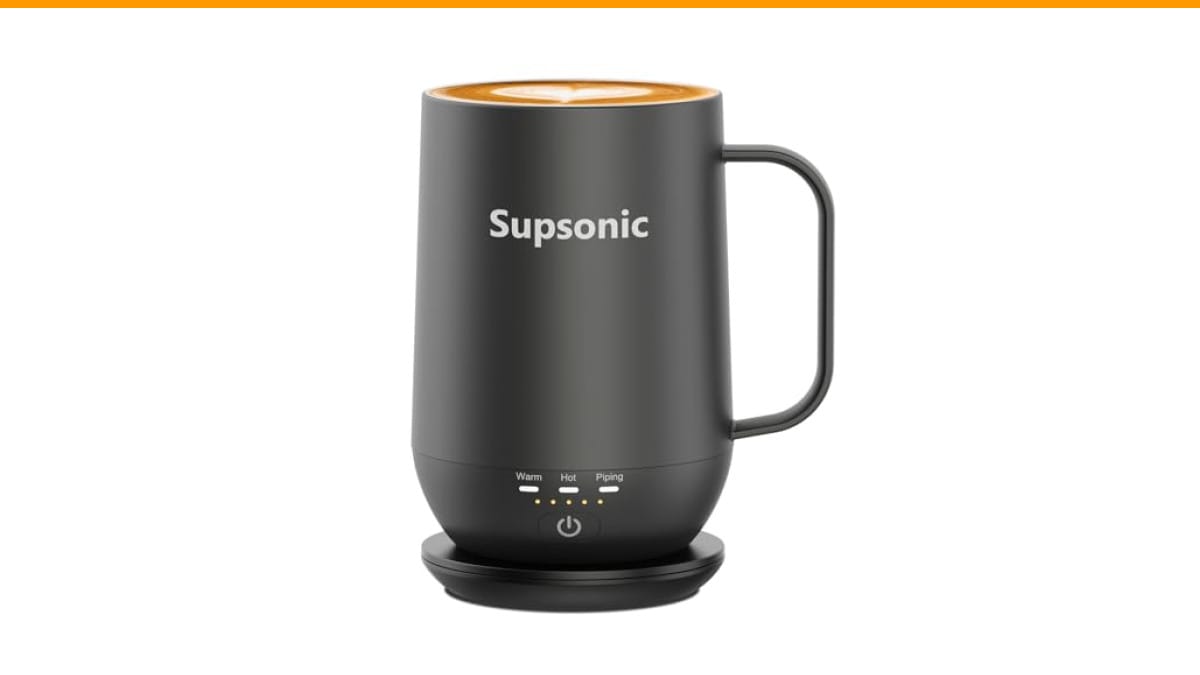
Supsonic
Supsonic - 16oz Self Heating Coffee Mug,…
- 3-Touch Precision: Get barista-level temperature control at your fingertips. Choose Piping (149°F) for a fresh-brewed feel, Hot (1…
- Warmth That Lasts: Supsonic heated coffee mug features a built-in battery that provides long-lasting power, enough to meet your ne…
- Smart Safety: Designed for real life. Supsonic self heating mugs feature a 2-hour auto-shutoff and dry boil protection keep you sa…
As an Amazon Associate I earn from qualifying purchases.
If you’re shopping for a replacement rather than troubleshooting, the Supsonic 16oz Self Heating Coffee Mug is a solid option with direct-contact heating that reaches 149°F and a battery that keeps drinks hot away from the dock. But first, let’s fix the one you already own.
Why Your Self Heating Coffee Mug Isn’t Getting Warm
The heating element inside these mugs is a resistive coil that draws power from a lithium battery. When the mug stops heating, the problem is almost never the coil itself. It’s the power path leading to it.
Work through these steps in order. Each one takes under a minute.
Step 1: Check the Charging Contacts
Look at the bottom of the mug and the top of the charging dock. You’ll see small metal pins or pads. Over time, coffee drips, dust, and hard water residue build up on these surfaces. That film acts like an insulator, and the dock thinks the mug isn’t there.
Clean both sets of contacts with a dry cloth or a cotton swab dipped in rubbing alcohol. Let them dry completely before setting the mug back on the dock. This fixes a surprising number of cases where a self heating coffee mug not heating turns out to be a dirty connection.
Step 2: Verify the Dock Connection
Set the mug on the dock and look for a light indicator. Most docks show a red light while charging and green when full. If no light appears, the mug isn’t seated correctly. Rotate it slightly until the contacts align and the light turns on.
Some mugs need a firm press to break through oxidation on the contacts. Push down gently for two seconds, then release. If the light still doesn’t come on, try a different USB cable and wall adapter. Many docks use standard USB power, and a weak adapter won’t deliver enough current.
Step 3: Reset the Battery
Lithium batteries have a protection circuit that shuts them down if they drain too low or overheat. If your mug sat unused for months, the battery may have entered this sleep state. The fix is a hard reset.
Plug the dock into power, place the mug on it, and leave it alone for 30 minutes. Don’t press any buttons. If the battery was merely depleted, this restores it. If nothing happens after that, the battery protection circuit may need a professional look.
Step 4: Check the Auto Shut-Off Timer
Most self-heating mugs, including the Supsonic model, include a 2-hour auto shut-off for safety. If your mug heated fine earlier and then stopped, this timer is the likely culprit. Press the power button to restart the heating cycle. This isn’t a malfunction—it’s a feature working as designed.
Step 5: Test the Heating Modes
Some mugs have multiple temperature settings. The Supsonic S2 offers Piping (149°F), Hot (131°F), and Warm (113°F). If the mug feels warm but not hot, you may have selected the Warm mode. Cycle through the modes by pressing the button again. The lowest setting is for milk or gentle warming, not for keeping black coffee at drinking temperature.
Comparing Self-Heating Mug Technologies
Not all self-heating mugs work the same way. Understanding the difference helps you diagnose problems and choose a replacement that fits your habits.
| Technology | How It Works | Common Failure Point | Best For |
|---|---|---|---|
| Direct Contact (Supsonic S2) | Heating element in the mug base touches the liquid directly | Battery drain, dirty contacts | Fast, even heating up to 149°F |
| Induction Coaster | Coaster generates a magnetic field that heats a metal plate in the mug | Misalignment between mug and coaster | Keeping mugs warm on a desk, no battery needed |
| USB Heating Pad | Simple resistive pad under the mug | Low wattage, slow heating | Budget setups, not for travel |
If you’re comparing options, the Supsonic model’s built-in battery is the key difference from induction coasters. You can carry it to a meeting or into the car without losing heat. That convenience comes with a trade-off: the battery eventually needs replacement, and the charging discipline matters more than with a passive coaster.
For related troubleshooting on other kitchen gear, check our guide on coffee maker water flow issues if you’re dealing with a separate drip machine problem.
Battery Life and Charging Habits That Prevent Future Failures
The most common cause of a self heating coffee mug not heating is a battery that never gets a full charge. These mugs draw noticeable current, and people treat them like a regular mug. They use it, set it down, and forget the dock.
Build a routine: put the mug on the dock every time you leave your desk. Even a 15-minute top-up during lunch extends the runtime significantly. Letting the battery hit zero repeatedly shortens its lifespan, just like your phone.
One more tip: don’t leave the mug on the dock all night, every night, if the dock has no overcharge protection. The Supsonic dock includes auto shut-off, but cheaper models may not. If you’re unsure about your model, unplug it after the indicator shows a full charge.
If your mug is older and the battery holds less charge than it used to, that’s normal degradation. Most of these mugs last 2-3 years with daily use before the battery needs replacing. Some models have replaceable batteries; others don’t. Check your manual before attempting any disassembly.
Three Mistakes That Kill Self-Heating Mugs
People run into the same avoidable problems over and over. Skip these and your mug will last longer.
- Washing the mug in the dishwasher. The heating element and battery are sealed, but the seal degrades with repeated dishwasher cycles. Hand wash only. The stainless steel interior on models like the Supsonic is easy to rinse clean anyway.
- Using the wrong power adapter. A 5W phone charger might not deliver enough current to charge the mug’s battery while it’s also heating. Use the adapter that came with the mug, or one rated for at least 10W.
- Ignoring the charging light. If the light doesn’t turn on when you set the mug down, something is wrong. Don’t assume it’s charging. Fix the connection before you need the mug.
If your coffee tastes off after cleaning, that’s a separate issue. Our guide on bitter coffee after cleaning covers why residue lingers and how to fix it.
Frequently Asked Questions
Why is my self heating mug warm but not hot?
You’re likely on the lowest temperature setting. Check the mode indicator. If your mug has three settings, the middle or highest is for coffee. The lowest setting is meant for milk or gentle warming, and it won’t get black coffee to a satisfying temperature.
How long does the battery last on a self heating mug?
It depends on the model and the temperature setting. On the highest setting, expect 1-2 hours of continuous heating. On the lowest setting, some mugs stretch to 3-4 hours. The Supsonic S2 pairs with a charging dock, so you can extend runtime indefinitely by returning the mug to the dock between sips.
Can I put a self heating mug in the dishwasher?
No. The heat, water pressure, and detergent will damage the seal around the battery and heating element. Hand wash with mild soap and water. Dry the bottom thoroughly before placing the mug on the charging dock.
Does the mug heat the drink or just keep it warm?
Most self-heating mugs maintain temperature rather than boil cold liquid. They’re designed to keep a hot drink hot, not to warm up cold coffee. The Supsonic model heats up to 149°F, which is hot enough for fresh-brewed coffee but not boiling. If you pour in cold liquid, give it 5-10 minutes to come up to temperature.
Why does my mug stop heating after two hours?
That’s the auto shut-off safety feature. It prevents the mug from running indefinitely if you forget to turn it off. Press the power button to restart the heating cycle. This is standard on most modern mugs, including the Supsonic S2.
What To Do Next
Start with the simplest fix: clean the contacts and check the charging light. That resolves most cases where a self heating coffee mug not heating is the complaint. If the mug charges but still won’t heat, cycle through the temperature modes and check the auto shut-off timer.
If you’ve tried all five steps and the mug still won’t heat, the battery or heating element has likely failed. At that point, a replacement is more practical than a repair. The Supsonic 16oz Self Heating Coffee Mug offers a 2-hour auto shut-off, dry boil protection, and a stainless steel interior that won’t hold flavors from previous drinks. Check the current price on Amazon if you’re ready to upgrade.
A working self-heating mug changes your daily routine in a small but real way. You stop watching the clock and start drinking coffee at the temperature you actually like. That’s worth the few minutes of troubleshooting to get there.
For more coffee gear help, see our comparison of burr vs blade grinders if you’re also thinking about upgrading your grind setup.
Products related to this article
Sponsored / affiliate links. As an Amazon Associate I earn from qualifying purchases. I may earn additional commission from eligible campaigns.
 House Gem Coffee Mug Warmer for Desk, Candle Warmer Plate, 12H Timer, Wood
 USB Temperature Coffee Mug Warmer, Heating Coaster
 VOBAGA Mug Warmer & Coffee Mug Warmer with 4 Hours Auto Shut-Off, Coffee Warmer Plate for Office Home Desk Use with 3 Temperature Settings, Cup Warmer for Cocoa, Tea, Milk, Water, Coffee Gifts(No Cup)