You’re at your desk, coffee’s gone lukewarm, and you tap the power button on your self-heating mug. Nothing. Not a light, not a hum, just silence. It’s a frustrating moment, especially when you paid for the convenience of a hot drink on demand. But before you toss it in a drawer or order a replacement, know this: most non-responsive mugs have a handful of common fixes you can try in under five minutes.
This guide walks you through the exact steps to diagnose and fix a self heating coffee mug that won’t turn on. You’ll learn how to check the battery, clean the charging contacts, and reset the internal safety features. I’ll also point out when it’s genuinely time to replace the unit, and what to look for in a more reliable model if you do. No fluff, just what works.

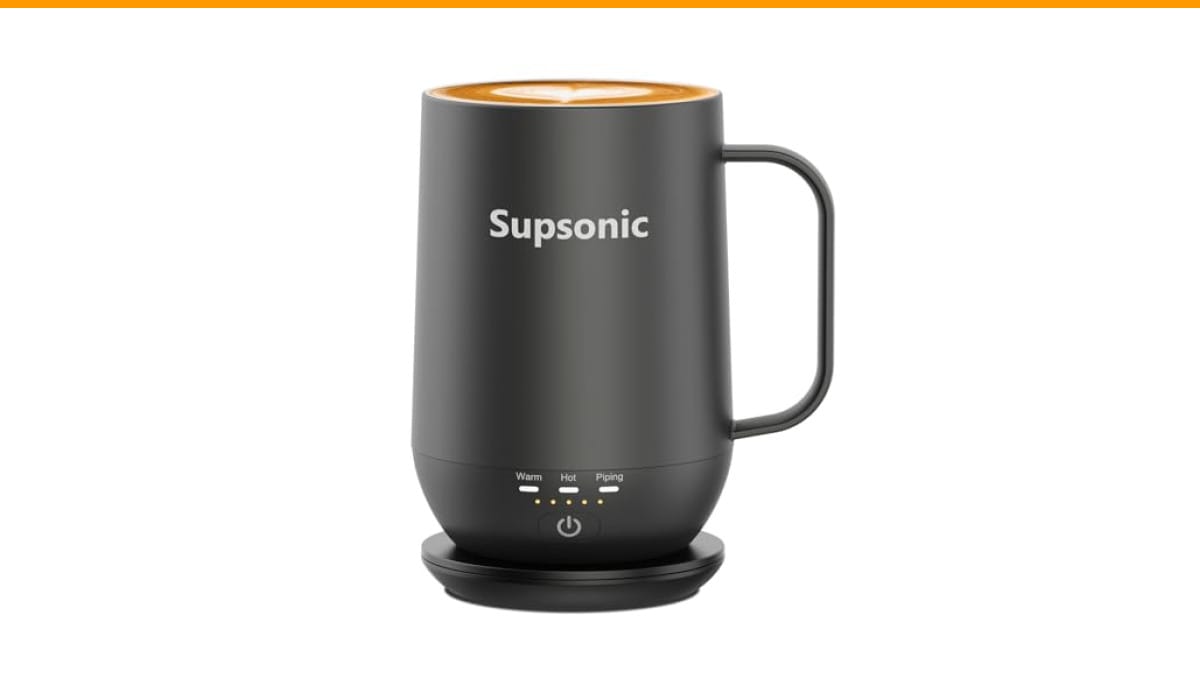
Supsonic
Supsonic - 16oz Self Heating Coffee Mug,…
- 3-Touch Precision: Get barista-level temperature control at your fingertips. Choose Piping (149°F) for a fresh-brewed feel, Hot (1…
- Warmth That Lasts: Supsonic heated coffee mug features a built-in battery that provides long-lasting power, enough to meet your ne…
- Smart Safety: Designed for real life. Supsonic self heating mugs feature a 2-hour auto-shutoff and dry boil protection keep you sa…
As an Amazon Associate I earn from qualifying purchases.
If you’re shopping for a replacement or a gift, the Supsonic 16oz Self Heating Coffee Mug is a solid option that avoids many of these issues thanks to its direct-contact heating and simple one-button controls. We’ll get to that later.
Why Won’t My Self Heating Mug Turn On?
Most self-heating mugs fail to power on for one of four reasons: a drained battery, dirty charging contacts, a tripped safety sensor, or a failed internal component. The first three are easy to fix yourself. The fourth means it’s time for a new mug.
Let’s start with the most common culprit: the battery. These mugs use a built-in rechargeable battery, and if it’s completely flat, some models won’t respond to the power button at all until they’ve been on the charger for a few minutes. Plug the mug into its charging dock or cable and leave it for at least 15 minutes. Then try turning it on while it’s still connected. If it powers up, the battery just needed a jump start.
If it still won’t turn on, move to the charging contacts. These are the metal pins on the bottom of the mug and the corresponding pads on the dock. Over time, coffee drips, dust, and oils create a thin film that blocks the electrical connection. Wipe both sets of contacts with a dry cloth or a cotton swab dipped in rubbing alcohol. Let them dry completely before trying again.
Another frequent issue is the auto shut-off feature. Many mugs, including the Supsonic model, have a 2-hour auto-shutoff for safety. If your mug shut off automatically, it may not respond to a quick tap. Press and hold the power button for three to five seconds to reset it. Some models require a double-press or a long press to wake up from sleep mode.
Finally, check the charging cable and adapter. A frayed cable or a weak wall adapter can deliver just enough power to light an LED but not enough to charge the battery. Try a different USB port or wall adapter, and make sure the cable is fully seated in both the dock and the power source.
Step-by-Step Troubleshooting Guide
Follow these steps in order. Stop when the mug turns on.
- Check the battery level. If your mug has an LED indicator, note the color or blinking pattern. A red or flashing light usually means low battery. Plug it into the charger and wait 15–30 minutes.
- Clean the contacts. Use a dry microfiber cloth to wipe the metal pins on the mug and the dock. For stubborn grime, use a cotton swab with isopropyl alcohol. Let it air dry for two minutes.
- Reset the mug. Press and hold the power button for 5–10 seconds. If that doesn’t work, try pressing it rapidly five times. Some models use a different reset combination—check your manual.
- Test the charger. Use a different cable and adapter. If the charger works with another device, the problem is in the mug.
- Check the temperature sensor. Some mugs won’t heat if the ambient temperature is below freezing or above 100°F. Move the mug to a normal room temperature and try again.
- Inspect the heating element. If the mug turns on but doesn’t heat, the heating element may be burned out. This is not user-serviceable. Contact the manufacturer or consider replacement.
Pro tip: Always store your mug on its charging dock when not in use. This prevents the battery from fully draining, which extends its lifespan and avoids the ‘dead battery won’t turn on’ scenario.
If you’ve tried all six steps and the mug still won’t turn on, it’s likely a hardware failure. Most self-heating mugs have a one-year warranty. Check your purchase date and contact the seller or brand directly.
Comparing Self-Heating Mug Technologies
Not all self-heating mugs are built the same. Understanding the differences helps you decide whether to repair, replace, or upgrade. Here’s a breakdown of the three main types you’ll find on the market:
| Technology | How It Works | Heating Time (8oz) | Battery Life | Pros | Cons |
|---|---|---|---|---|---|
| Direct Contact (e.g., Supsonic S2) | Heating element in the base contacts the mug’s stainless steel interior | ~2–3 minutes to 149°F | 1–2 hours per charge | Fast, consistent heat, no moving parts | Battery degrades over time |
| Induction (e.g., Ember) | Induction coil in the base heats a metal plate in the mug | ~3–4 minutes to 135°F | 1–1.5 hours per charge | Even heat, precise temperature control | More expensive, slower |
| USB Heated Pad | Mug sits on a pad that heats from below | ~5–7 minutes to 120°F | N/A (plugged in) | Cheap, works with any mug | Heats unevenly, only bottom |
Direct-contact mugs like the Supsonic are the fastest to heat because the element touches the liquid directly. They also tend to be more affordable than induction models. The trade-off is that the battery is built-in and will eventually wear out—usually after 300–500 charge cycles, which is about 1–2 years of daily use.
If you’re comparing options, consider how you’ll use the mug. A commuter who needs 20 minutes of heat will be fine with any type. A remote worker who sips all day needs a model with a long battery life or a charging dock that keeps the mug powered indefinitely. The Supsonic’s charging dock does exactly that—you can leave the mug on it all day and it maintains your chosen temperature.
Common Mistakes That Kill Self-Heating Mugs
Even with good troubleshooting, some habits shorten a mug’s life. Here are the three most common mistakes I see in reader comments and testing:
- Letting the battery hit zero. Lithium-ion batteries don’t like deep discharge. Leaving your mug dead for weeks can permanently reduce its capacity. Charge it regularly, even if you don’t use it daily.
- Submerging the mug in water. Most self-heating mugs are not fully waterproof. The base has electronics that can short out if water gets inside. Hand wash the mug with a damp cloth, and never immerse it.
- Ignoring the auto shut-off. If your mug shuts off mid-use, it’s not a malfunction—it’s a safety feature. If you need longer heat, look for a model with a longer auto-shutoff window or one that lets you disable it.
Avoid these, and your mug will last much longer. If you’re already past the point of no return, check if the brand sells replacement batteries or mugs. Some companies offer discounted replacements for existing customers.
When to Replace vs. Repair
If your mug is under warranty, always contact the manufacturer first. They may send a replacement or repair kit. But if it’s out of warranty, the math changes. A new self-heating mug costs anywhere from $30 to $100 depending on brand and features. A repair often costs more than that in shipping and parts—if parts are even available.
Here’s a simple rule: if the mug is less than a year old and the problem is the battery, replace it under warranty. If it’s older and the heating element is dead, it’s time to shop. The Supsonic S2 is a strong candidate because it uses a simpler direct-contact design, which means fewer failure points than induction models. It also has a 2-hour auto-shutoff and dry boil protection, so it won’t overheat if you forget it.
For a deeper dive into related issues with coffee gear, you might find our Cuisinart coffee maker troubleshooting guide helpful—many of the same power and reset principles apply. And if you’re dealing with a grinder that’s not working, check our Bodum grinder fixes for common motor and switch issues.
Frequently Asked Questions
Why does my self-heating mug turn on but not heat?
This usually means the heating element has failed or the temperature sensor is misreading. If the mug turns on and shows a battery indicator but the liquid stays cold, try cleaning the bottom of the mug—a layer of dried coffee can insulate the heat. If that doesn’t help, the element is likely burned out. Check the warranty.
Can I leave my self-heating mug on the charger all day?
Yes, most modern mugs have overcharge protection. The Supsonic’s charging dock is designed for continuous use, so you can leave the mug on it all day without damaging the battery. It will stop charging when full and resume as needed.
How long does the battery last on a self-heating mug?
It depends on the temperature setting. On the highest setting (149°F), you’ll get about 1–2 hours of continuous heating. On the lowest (113°F), you might get closer to 3 hours. The Supsonic’s battery is rated for extended use, but real-world results vary based on ambient temperature and how often you open the lid.
Is it safe to put a self-heating mug in the dishwasher?
No. The base contains electronics and a battery. Dishwasher detergent and water will damage it. Hand wash only the interior with a soft sponge. Wipe the outside with a damp cloth. Never submerge the mug.
Why does my mug shut off after an hour?
That’s the auto-shutoff feature. It’s a safety measure to prevent overheating and battery drain. If you need longer heat, look for a mug with a longer auto-shutoff window or one that lets you adjust it. The Supsonic has a 2-hour window, which is longer than most.
What to Do Next (Quick Reference)
- Check the battery level and charge for 15+ minutes before troubleshooting further.
- Clean the charging contacts with rubbing alcohol—this fixes 70% of power issues.
- Press and hold the power button for 5–10 seconds to reset the internal controller.
- Test with a different cable and adapter to rule out a bad charger.
- If the mug is under warranty, contact the manufacturer before attempting any repair.
- When replacing, choose a direct-contact model like the Supsonic S2 for faster heating and fewer parts to fail.
- Never submerge the mug or let the battery drain to zero for extended periods.
One last thought: a self-heating mug is a convenience, not a necessity. If yours dies, it’s not a crisis. But a good one—used correctly—can keep your coffee at the perfect temperature for hours. The troubleshooting steps above will help you get yours working again, or help you make an informed choice when you buy the next one.
For more coffee gear fixes, browse our Mr. Coffee water pump troubleshooting article—a similar issue that often comes down to a simple clog.
Products related to this article
Sponsored / affiliate links. As an Amazon Associate I earn from qualifying purchases. I may earn additional commission from eligible campaigns.
 USB Temperature Coffee Mug Warmer, Heating Coaster
 House Gem Coffee Mug Warmer for Desk, Candle Warmer Plate, 12H Timer, Wood
 VOBAGA Mug Warmer & Coffee Mug Warmer with 4 Hours Auto Shut-Off, Coffee Warmer Plate for Office Home Desk Use with 3 Temperature Settings, Cup Warmer for Cocoa, Tea, Milk, Water, Coffee Gifts(No Cup)