You bought a self heating coffee mug so your drink stays hot through a long meeting, a commute, or a slow morning. Then one day it stops holding temperature, or the battery drains faster than before, or the lid smells like yesterday’s coffee. That’s not a broken mug. That’s a maintenance problem.
Most people never read the care instructions. They rinse the inside, wipe the outside, and wonder why the heating element gets weak. The truth is, these mugs have a battery, a heating plate, and a charging dock. Each part needs different care. This guide walks through exactly what to do, what to avoid, and how to spot trouble before it costs you a replacement.

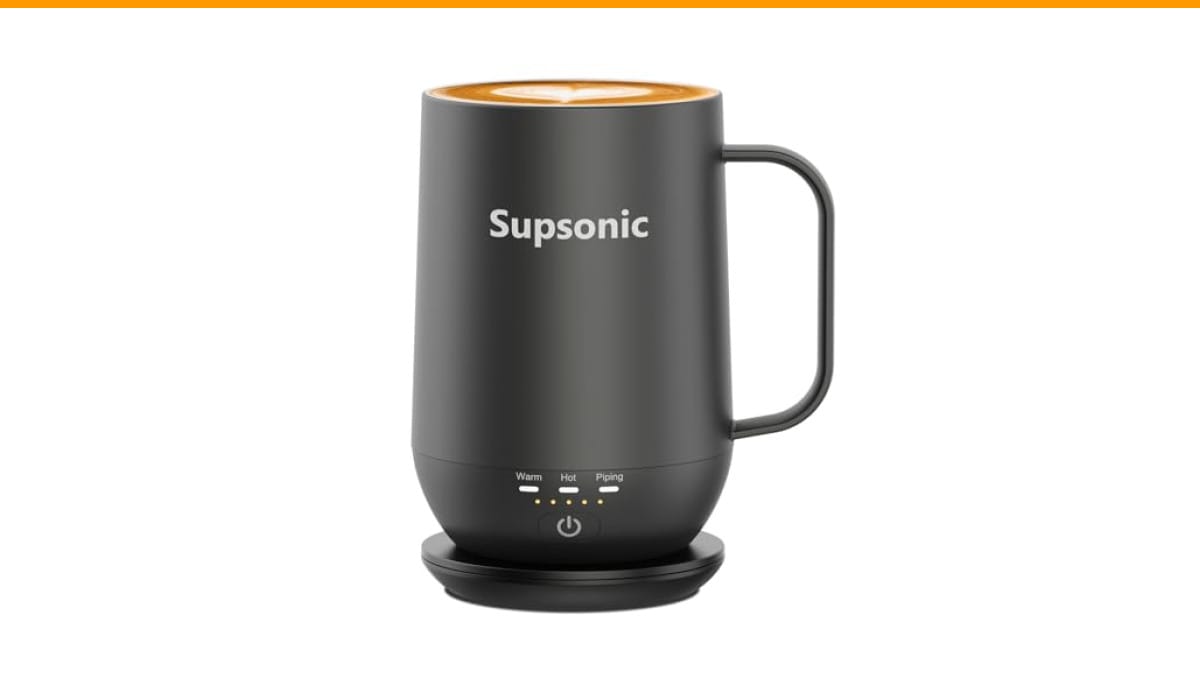
Supsonic
Supsonic - 16oz Self Heating Coffee Mug,…
- 3-Touch Precision: Get barista-level temperature control at your fingertips. Choose Piping (149°F) for a fresh-brewed feel, Hot (1…
- Warmth That Lasts: Supsonic heated coffee mug features a built-in battery that provides long-lasting power, enough to meet your ne…
- Smart Safety: Designed for real life. Supsonic self heating mugs feature a 2-hour auto-shutoff and dry boil protection keep you sa…
As an Amazon Associate I earn from qualifying purchases.
You’ll walk away knowing the right cleaning routine, the correct way to store the battery, and what to do when the mug starts acting up. No guesswork.
If you’re shopping for one, the Supsonic 16oz Self Heating Coffee Mug is a solid example of what modern ones offer. It heats up to 149°F with three touch settings, has a built-in battery for cordless use, and shuts off automatically after two hours. Those features make maintenance simpler because the electronics handle some safety for you.
Why Self Heating Mugs Fail (And How to Prevent It)
Most failures trace back to three things: water damage, battery neglect, and residue buildup. None of them are dramatic. They happen slowly.
Water damage is the biggest killer. The charging contacts on the bottom and the seam where the battery sits are vulnerable. Even a few drops of water that sit there overnight can corrode the pins. You’ll notice the mug stops charging reliably or needs to be wiggled on the dock.
Battery neglect is second. Lithium-ion batteries inside these mugs degrade faster if you let them hit zero constantly or leave them at 100% for weeks. The heating element draws a lot of current, so the battery works harder than your phone’s battery does.
Residue buildup is the sneaky one. Coffee oils and milk proteins cling to the stainless steel interior. Over time, they form a film that insulates the liquid from the heating plate. The mug still heats, but it takes longer and uses more power. That extra strain shortens battery life.
The fix for all three is routine. Ten minutes of care every few days prevents most problems.
Daily Cleaning: What to Do After Every Use
Rinse the mug immediately after you finish your drink. Not later. The second coffee dries, oils bind to the steel and get harder to remove.
Use warm water and a drop of mild dish soap. A soft sponge or cloth works. Do not use abrasive scrubbers or steel wool. They scratch the interior, and those scratches become hiding spots for bacteria and old coffee.
Pay attention to the lid and the rim. These areas trap residue because they’re cooler and less likely to be rinsed thoroughly. If your mug has a rubber gasket or seal, remove it if possible and clean it separately. Gaskets hold smells worse than anything else.
Dry the mug completely before you put it on the charging dock. This is the single most important habit. A damp base is how corrosion starts. Wipe the bottom with a towel, and check the charging contacts for any moisture.
Once a week, do a deeper clean. Fill the mug with warm water and a teaspoon of baking soda. Let it sit for fifteen minutes, then scrub gently and rinse well. Baking soda neutralizes coffee odors without scratching. For stubborn stains, a paste of baking soda and water works better than any commercial cleaner.
Avoid the dishwasher. The heat, the detergent, and the water pressure can damage the battery and the heating element. Hand washing is the only safe method for these mugs.
Battery Care and Charging Habits
The battery is the most expensive part to replace, and it’s also the part people treat worst. A few simple habits extend its life significantly.
Don’t wait until the mug dies to charge it. Lithium-ion batteries prefer to stay between 20% and 80% charge. Letting it hit zero regularly stresses the cells. Charging to 100% and leaving it on the dock for days also stresses them. The sweet spot is charging when you notice it’s low, and unplugging it once it’s full.
If you use the mug every day, charge it overnight. If you use it once a week, store it at around 50% charge. Storing a lithium battery fully charged or fully empty degrades it faster over months of inactivity.
Heat is the enemy. Don’t leave the mug in a car on a summer day, near a stove, or in direct sunlight. High temperatures accelerate battery chemistry breakdown. The mug’s heating function is fine, but ambient heat outside the mug adds stress.
Check the charging contacts every couple of weeks. They can collect dust or develop a thin film of oxidation. A dry cloth or a cotton swab with a tiny bit of rubbing alcohol cleans them. Let them dry fully before charging.
If the battery seems to drain faster than it used to, that’s normal after a year or two. But if it drains in half the time it did a month ago, something’s wrong. It might be a bad cell, or it might be residue buildup making the heater work harder. Address the residue first, because that’s a free fix.
Descaling and Deep Cleaning the Interior
Hard water leaves mineral deposits inside the mug, especially if you rinse with tap water and let it air dry. These deposits reduce heating efficiency and can leave white spots on the steel.
Descale every four to six weeks, depending on your water hardness. Fill the mug with a 50/50 mix of white vinegar and water. Let it sit for thirty minutes. Pour it out, rinse thoroughly, then wash with soap and water. The vinegar dissolves limescale without damaging the stainless steel or the heating element.
Don’t boil vinegar in the mug. The heating element is designed for warming beverages, not boiling liquids. Boiling vinegar can damage seals and leave a strong smell that’s hard to remove.
After descaling, run a plain water rinse and let the mug dry completely. If you notice a vinegar smell, fill it with water and a slice of lemon, let it sit for ten minutes, and rinse. That neutralizes the odor.
For milk-based drinks like lattes, clean the mug sooner. Milk proteins bond to steel more aggressively than coffee oils do. Rinsing right after a latte is non-negotiable if you want to avoid a permanent film.
Comparing Maintenance Approaches
Different users need different routines. Here’s how the three most common approaches stack up:
| Approach | Time Required | Best For | Risks |
|---|---|---|---|
| Rinse only | 30 seconds per use | Daily black coffee drinkers | Residue builds up fast; odors linger |
| Weekly soap wash | 5 minutes per week | Most users | Minimal; needs consistent habit |
| Full descale + battery care | 20 minutes per month | Hard water areas, heavy users | None, if done correctly |
The rinse-only approach works for a while, but it catches up with you. The full routine takes twenty minutes a month and prevents nearly every common failure. That’s the one worth following.
Storage and Long-Term Maintenance
If you’re not using the mug for a few weeks, store it properly. Clean it thoroughly, dry it completely, and leave the lid off so air circulates. Store the battery at around 50% charge. Put it in a cool, dry place away from direct sunlight.
Don’t store it on the charging dock. Leaving it there keeps the battery topped up, which is fine for a week but harmful over months. The constant trickle charge wears the cells.
Check on it monthly. Give it a quick rinse and recharge to 50% if the charge dropped. This keeps the battery healthy and prevents the seals from drying out.
If you notice the heating element isn’t getting as hot as it used to, check two things first. Clean the bottom contacts on the mug and the dock. Then descale the interior. Both are cheap fixes. If the mug still underperforms, the battery may be reaching end of life. That typically happens after two to three years of regular use.
For general coffee gear upkeep, the same principles apply across your setup. If you’re also maintaining an espresso machine or a drip brewer, coffee machine care follows similar logic: clean regularly, descale on schedule, and watch for performance changes. The habits transfer directly.
Common Mistakes That Shorten Mug Life
Some mistakes are so common they deserve their own section. Avoid these and your mug will outlast the warranty.
- Submerging the mug in water. The base is not waterproof. Wash the interior, but never soak the whole mug.
- Using metal utensils inside. They scratch the steel and damage the heating surface.
- Microwaving the mug. The electronics and battery are not microwave-safe. This can cause a fire.
- Ignoring the auto shut-off. If your mug has a two-hour shut-off, don’t override it repeatedly. The safety feature exists to protect the battery.
- Using harsh chemical cleaners. Bleach and abrasive powders can corrode the metal and damage seals.
The mistake that surprises people most is using the mug for soup or oatmeal. It’s fine to do, but these foods leave more residue than coffee. Clean immediately after, or the film will be tough to remove. The Supsonic model handles soups and oatmeal well, but the cleanup is on you.
If you’re also dealing with a clogged or dirty coffee maker, the same descaling principles apply. Vinegar works for both. Check our guide on descaling coffee machines at home for a step-by-step approach that mirrors what you’d do with the mug.
Frequently Asked Questions
Can I put my self heating mug in the dishwasher?
No. Dishwasher heat and detergent can damage the battery, the heating element, and the seals. Hand wash only with warm water and mild soap.
How often should I clean the charging contacts?
Every two to three weeks. Use a dry cloth or a cotton swab with a little rubbing alcohol. Make sure they’re completely dry before charging.
Why does my mug smell like old coffee even after washing?
Residue is trapped in the lid gasket or in micro-scratches on the steel. Remove the gasket and clean it separately. Then use a baking soda paste on the interior and let it sit for fifteen minutes.
How long should the battery last before I need to replace it?
Most self heating mugs have batteries rated for two to three years of regular use. If you notice significantly shorter heating time after that, the battery is likely nearing end of life.
Is it safe to leave the mug on the charging dock overnight?
Yes, for daily use. Modern mugs have overcharge protection. But if you’re storing it for weeks, unplug it and keep the battery around 50%.
What to Remember
- Hand wash only. Never submerge the base or use the dishwasher.
- Dry the bottom and charging contacts before every dock session.
- Descale with vinegar every four to six weeks if you have hard water.
- Keep the battery between 20% and 80% for daily use; store at 50% for long breaks.
- Clean milk-based drinks immediately to prevent protein film.
- Check the charging contacts monthly for oxidation or dust.
- If heating gets weak, clean the contacts and descale before assuming the battery is dead.
These habits take about twenty minutes a month. That’s a small price for a mug that keeps your coffee hot for years. Your morning routine depends on it, and so does your wallet.
For more on keeping your coffee gear in top shape, our guide on proper coffee maker cleaning covers the same principles for your larger equipment.
Products related to this article
Sponsored / affiliate links. As an Amazon Associate I earn from qualifying purchases. I may earn additional commission from eligible campaigns.
 House Gem Coffee Mug Warmer for Desk, Candle Warmer Plate, 12H Timer, Wood
 VOBAGA Mug Warmer & Coffee Mug Warmer with 4 Hours Auto Shut-Off, Coffee Warmer Plate for Office Home Desk Use with 3 Temperature Settings, Cup Warmer for Cocoa, Tea, Milk, Water, Coffee Gifts(No Cup)
 Coffee Mug Warmer, Heating Cup Mat Electric Cup Warmer Pad Electric Thermostat Coaster USB Cup Heater Electric Beverage Warmers for Office Home (A)