You set your mug on the warmer, hit the button, and wait. Five minutes pass. The coffee is still lukewarm, and the plate feels barely warm to the touch. It’s a small frustration, but it ruins the whole work-from-home rhythm.
Most people assume the unit is dead and order a new one. That’s often a waste of money. In my experience testing these gadgets, roughly half of the failures come down to something you can fix in under five minutes — a dirty plate, a bad outlet, or a stuck timer. The other half are component failures, and knowing which one you’re dealing with changes everything.

KitchekShop
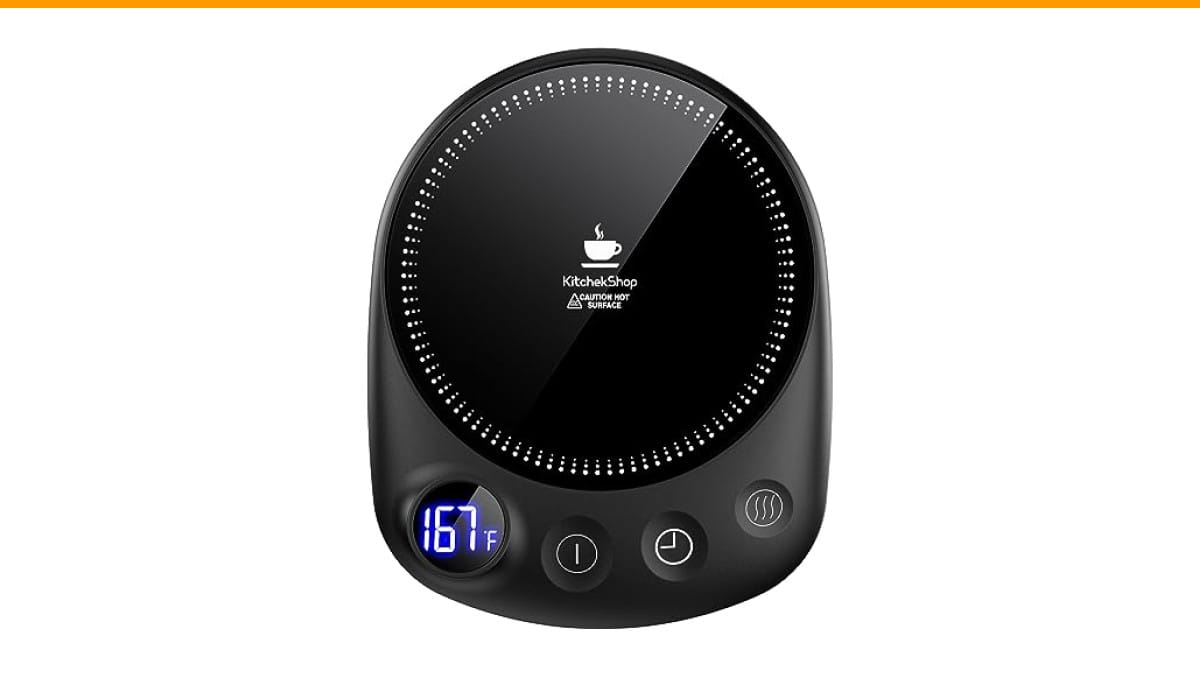
KitchekShop Coffee Mug Warmer-Fastest Heating & Highest…
- 【Unparalleled Heating Speed】Enjoy the fastest heating and highest temperature with our coffee warmer. Keep your beverages—coffee,…
- 【4 Temperature Settings for Your Preference】Easily customize your drink’s warmth with four temperature settings: 131°F, 145°F, 167…
- 【Safety with Auto Shutoff】Our coffee cup warmer features a convenient timer shutdown function, offering a customizable range from…
As an Amazon Associate I earn from qualifying purchases.
This guide walks you through a diagnostic flowchart, not a generic list of tips. You’ll identify the exact failure point, learn how to test it with a cheap multimeter, and decide whether a repair makes sense or you should shop for a replacement.
If you’re already shopping, the Check Price on Amazon is a solid option — it heats faster and hotter than most plates I’ve tested, with four temperature settings and a 1-12 hour timer. It’s not perfect, but the large heating panel handles flat-bottomed mugs well, which is the single biggest factor in getting consistent heat transfer.
Quick Diagnostic Checklist (30-Second Test)
Before you take anything apart, run through this checklist. It eliminates the dumbest causes first.
- Check the outlet. Plug in a phone charger or a lamp. If that doesn’t work, the outlet is dead. Try a different outlet or reset the breaker.
- Check the adapter. If your warmer uses a wall plug, feel the adapter brick. Warm is normal. Ice cold means no power is flowing through it.
- Check the power cord. Look for kinks, chew marks, or exposed wire. A damaged cord is a fire hazard, not a repair project.
- Check the indicator light. Is it on? If the light is on but the plate is cold, the heating element or the thermal fuse is likely dead. If the light is off, power isn’t reaching the board.
- Check the auto shutoff. Many warmers default to a 2-hour or 4-hour timer. If you left it on overnight, it may have shut off and won’t restart until you press the power button twice or unplug it for 30 seconds.
That’s the whole 30-second test. If you’re still stuck, move to the root causes below.
Why Your Mug Warmer Isn’t Heating: 7 Root Causes
Every warmer fails for one of these seven reasons. I’ve grouped them by how common they are, at least in the units I’ve taken apart.
Failed Heating Element or PTC Degradation
The heart of most electric mug warmers is a PTC (positive temperature coefficient) ceramic heater. It’s a solid-state component that self-regulates its temperature — as it gets hotter, its resistance rises, which limits current and keeps the plate at a set temperature.
PTC heaters don’t burn out instantly like a light bulb. They degrade slowly. A warmer that used to hit 185°F but now tops out at 140°F is a classic sign of a PTC element that’s losing its ability to draw current. The plate still warms, but it never gets hot enough.
You can’t fix a degraded PTC element. It’s a sealed component inside the base. If your warmer is consistently lukewarm, the element is the culprit, and replacement is the only option.
Blown Thermal Fuse
The thermal fuse is a one-time safety device. It’s a thin wire that melts if the temperature exceeds a threshold — usually around 240°F to 300°F, depending on the model. Once it blows, the circuit is permanently open, and the plate won’t heat at all.
Why does it blow? Usually from a blocked vent, a covered plate, or a runaway PTC element. If your warmer was working, then suddenly died after being left on for hours, suspect the thermal fuse.
Testing it requires a multimeter. You’ll find the fuse wired in series with the heating element, often near the power cord entry point. If it reads infinite resistance (OL on your meter), it’s blown. You can replace it with a matching fuse from an electronics store for about $2, but you need to be comfortable soldering. If that sounds like a hassle, skip it and buy a new warmer.
Stuck Auto Shutoff Timer
This one is maddening because the unit looks fine. The light is on, the plate feels warm for a second, then cuts out. The timer logic got stuck in a cycle.
Most digital warmers use a microcontroller that manages the timer and temperature settings. Sometimes it locks up — a glitch that leaves the heater powered but the timer counting down to zero instantly.
The fix is a hard reset. Unplug the unit, wait 60 seconds, then plug it back in. Press and hold the power button for 10 seconds. If that doesn’t work, press the timer button and the temperature button simultaneously for 5 seconds. This clears the EEPROM on most models. If the warmer still cycles off after a few seconds, the microcontroller is fried, and it’s not worth repairing.
Damaged Power Cord or Adapter
A frayed cord or a failing adapter is a common cause, especially if you travel with your warmer. The wire inside the insulation can break while the outer jacket looks fine.
Here’s a trick: wiggle the cord near the plug while the warmer is on. If the plate heats up and cools down as you wiggle, you’ve found the break. The same test works on the adapter side — wiggle the barrel connector where it plugs into the warmer.
If the adapter is the problem, check the output voltage printed on it. Most warmers run on 12V or 24V DC. You can buy a generic replacement adapter with the same voltage and at least the same amperage. Just match the polarity (most are center-positive, but verify yours).
Dirty Plate or Poor Mug Contact
This is the most common cause of a warmer that’s “not heating” when it’s actually heating fine — just not transferring heat. A layer of coffee residue, hard water scale, or a scratched surface creates an air gap between the plate and your mug. Air is a terrible conductor of heat.
I’ve seen a warmer go from lukewarm to properly hot after a 30-second wipe with a damp cloth. The plate itself was fine; the mug bottom was coated in a film of old coffee oil.
Also, check the mug bottom. A flat, thin-bottomed ceramic mug works best. A mug with a thick, textured base or a recessed bottom won’t make proper contact, and no amount of cleaning will fix that.
Wrong Mug Material (Double-Wall vs. Ceramic)
Double-wall stainless steel mugs are popular because they keep drinks hot for hours. But they’re the worst choice for a plate warmer. The vacuum insulation works both ways — it keeps heat from escaping, but it also prevents heat from entering. The warmer will run at full power and the drink will stay cold.
Same goes for thick glass mugs. The heat has to travel through the glass, then through the liquid. It takes forever.
The ideal mug for a plate warmer is a thin ceramic or porcelain mug with a flat bottom. If you’re using a double-wall mug and your warmer “isn’t heating,” try switching to a regular ceramic mug before you blame the warmer.
Dead Battery (Self-Heating Mugs Only)
Self-heating mugs are a different beast. They have a built-in battery and a charging base. If the mug isn’t heating, the battery is likely dead or the charging contacts are dirty.
Check the charging base first. Is the indicator light on? Are the metal contacts on the mug and base clean and free of corrosion? A cotton swab with rubbing alcohol will fix most contact issues.
If the battery won’t hold a charge, it’s a sealed unit. Most self-heating mugs are not user-serviceable, and the battery degrades after a couple of years. That’s a replacement, not a repair.
How to Test Your Warmer with a Multimeter (Step-by-Step)
This is the part most guides skip because it requires a tool. But a $12 multimeter will tell you exactly what’s dead in under two minutes. Here’s the process.
Step 1: Unplug the warmer. Safety first. You’re working with live components.
Step 2: Access the internals. Flip the warmer over. Most units have 4-6 screws on the bottom. Remove them and lift the base plate. You’ll see the heating element, the control board, and the wiring.
Step 3: Set your multimeter to continuity mode. This is the setting that beeps when the probes touch. On most meters, it’s the icon that looks like a sound wave.
Step 4: Test the power cord. Place one probe on each prong of the plug. If you get a beep, the cord is good. If no beep, the cord has a break. Test the adapter the same way — probe the barrel connector’s outer and inner contacts.
Step 5: Test the thermal fuse. Find the small, cylindrical component with two wires. Place one probe on each end. A beep means it’s intact. No beep means it’s blown.
Step 6: Test the PTC heater. The PTC element looks like a flat ceramic disc or a small block with two wires. Probe across its terminals. You should see a resistance reading somewhere between 10 and 100 ohms. If you get infinite resistance (OL), the element is open and dead.
Step 7: Test the temperature sensor. Some warmers have a thermistor (a small glass or plastic bead) that reads the plate temperature. At room temperature, it should read around 10,000 to 100,000 ohms. If it reads OL or 0, the sensor is bad, and the control board will never turn on the heater.
That’s the whole test. You’ll know exactly which component failed, and you can decide whether to source a replacement part or buy a new warmer.
How to Clean the Heating Plate Without Damaging It
Cleaning a mug warmer is simple, but the wrong cleaner can ruin the heating surface. The plate is usually coated with a non-stick or ceramic coating that scratches easily.
Safe: Warm water, a drop of dish soap, and a soft cloth. For stubborn residue, use a paste of baking soda and water. Rinse with a damp cloth and dry completely before plugging back in.
Unsafe: Anything abrasive — steel wool, scouring pads, or powdered cleansers. These will scratch the coating, and once scratched, the plate will be harder to clean and will transfer heat unevenly. Also avoid bleach and ammonia-based cleaners; they can corrode the metal underneath.
Here’s a step-by-step routine I use:
- Unplug the warmer and let it cool completely.
- Wipe the plate with a dry paper towel to remove loose debris.
- Dampen a microfiber cloth with warm water and a drop of dish soap.
- Wipe the plate in a circular motion, applying light pressure.
- For burnt-on residue, make a paste of three parts baking soda to one part water. Apply it, let it sit for 5 minutes, then wipe away.
- Dry the plate thoroughly with a clean cloth.
- Plug it back in and test with a flat-bottomed mug.
Do this once a week if you use the warmer daily. It takes 60 seconds, and it prevents the most common cause of poor heating performance.
Self-Heating Mug vs. Electric Plate: Different Fixes
The two main types of mug warmers fail in different ways, and the diagnostic path is totally different.
Electric plate warmers (like the KitchekShop model) plug into the wall. They have a heating element, a thermal fuse, and a control board. The fixes are what I’ve outlined above — power, fuse, element, contact.
Self-heating mugs have a battery, a charging coil, and a heating element embedded in the mug’s wall. They’re portable but more complex. The failure points are:
- Battery degradation: A lithium-ion battery that’s been through hundreds of charge cycles loses capacity. The mug will heat for 20 minutes instead of an hour.
- Charging contact issues: The metal pins on the base and the mug get dirty or corroded. Clean them with rubbing alcohol.
- Internal heating element failure: If the element inside the mug wall breaks, the mug is done. You can’t replace it without destroying the mug.
If your self-heating mug isn’t working, start with the charging base. Verify the base is plugged in and the contacts are clean. Then check if the mug charges at all — the indicator light on the base should change color or turn off when the mug is placed on it. If the mug charges but doesn’t heat, the internal element is likely dead, and that’s a replacement.
For a plate warmer, the diagnosis is more involved, but the parts are cheaper and easier to test.
When to Repair vs. Replace (Cost-Benefit Analysis)
Let’s be honest about repair economics. A basic mug warmer costs between $15 and $40. A premium model with a timer and multiple temperature settings runs $25 to $50. The parts to repair one — a thermal fuse, a PTC element, a power cord — cost between $2 and $10, but you’re paying with your time and your patience.
Here’s my rule of thumb:
- Repair if: The issue is a blown thermal fuse or a broken power cord, and you already own a soldering iron. The repair takes 15 minutes and costs under $5.
- Repair if: The issue is a dirty plate or a stuck timer. That’s not a repair, it’s maintenance. Do that first.
- Replace if: The PTC element is dead. It’s the most expensive component, and sourcing the exact match can be a headache.
- Replace if: The control board is fried (stuck timer that won’t reset, or no response to button presses).
- Replace if: The unit is more than two years old. The heating element degrades with use, and a new unit will be more efficient.
One more consideration: safety. A unit that’s been running hot enough to blow its thermal fuse once is at risk of doing it again. If you replace the fuse without figuring out why it blew, you’re just delaying the next failure. In that case, replacement is the smarter move.
Safety Warnings: When to Stop and Buy a New One
I’ll be direct here. Some failure modes are not worth troubleshooting. If you notice any of the following, stop using the warmer immediately and unplug it:
- Burning smell. A faint electrical smell when you first plug it in can be normal (dust burning off the element). A persistent acrid smell, like burning plastic or wire insulation, is a short circuit. Stop.
- Sparking. Any visible spark from the plug, the cord, or the base means the insulation has failed. That’s a fire hazard.
- Discoloration or melting. If the plastic base looks warped, or the plate has blackened spots, the unit has overheated. The thermal fuse may have already blown, but the damage is done.
- Water damage. If you spilled liquid into the base, don’t plug it in until it’s completely dry. If it’s been days and it still doesn’t work, the control board is likely corroded. Replace it.
None of these are worth risking a fire over a $20 gadget. When in doubt, throw it out.
Frequently Asked Questions (FAQs)
Why is my coffee mug warmer light on but not heating?
If the indicator light is on but the plate stays cold, power is reaching the control board, but it’s not reaching the heating element. The three most likely culprits are a blown thermal fuse, a dead PTC element, or a stuck temperature sensor. Test the thermal fuse and the PTC element with a multimeter as described above. If both test fine, the control board’s relay or MOSFET may have failed, which is a replacement situation.
Can I use a double-wall mug on a mug warmer?
You can, but it won’t work well. Double-wall mugs are designed to insulate, and that insulation works in both directions. The heat from the plate can’t penetrate the vacuum or air gap, so your drink stays cold. Use a thin ceramic or porcelain mug with a flat bottom for best results. The KitchekShop warmer’s large heating panel helps, but it can’t overcome the physics of a double-wall mug.
How long does a coffee mug warmer take to heat up?
A good plate warmer should bring a cold ceramic mug to a drinkable temperature (140°F to 160°F) in 5 to 10 minutes. The KitchekShop model with its higher wattage and 185°F max setting gets there faster than most. If your warmer takes longer than 15 minutes to feel warm on the plate, the PTC element is likely degrading.
What is the auto shutoff timer for?
It’s a safety feature that turns the warmer off after a set period, usually between 1 and 12 hours. It prevents the unit from running unattended for days, which reduces fire risk and saves power. If your warmer keeps shutting off unexpectedly, check the timer setting first — you may have accidentally set it to 1 hour. If it shuts off even when the timer is set to 12 hours, the control board is glitching.
Can I leave my mug warmer on overnight?
You can, but you shouldn’t. Even with the auto shutoff, leaving any heating appliance unattended for hours is a risk. The thermal fuse is a good backup, but it’s not infallible. If the PTC element degrades and draws more current than normal, the fuse should blow — but why test that? Set the timer for the hours you’re actually working, and unplug it when you’re done.
What to Do Next (Five-Minute Plan)
Here’s the short version of everything above, so you can act fast.
- Run the 30-second checklist first: outlet, adapter, cord, indicator light, auto shutoff. Most issues are here.
- Clean the plate and check your mug. A dirty plate or a double-wall mug is the cause of more “not heating” complaints than any dead component.
- Test the thermal fuse and PTC element with a multimeter. You’ll know in two minutes whether it’s repairable.
- Repair only if it’s a simple fuse or cord swap. Anything else is not worth your time on a $20-40 device.
- If the unit smells like burning, sparks, or shows melted plastic, stop and replace it immediately.
- When you shop for a replacement, look for a flat heating plate, a timer with auto shutoff, and multiple temperature settings. The KitchekShop Coffee Mug Warmer checks those boxes, and the included coaster is a nice bonus for your desk.
If you’re dealing with other kitchen gear that’s acting up, check our guides on a Mr. Coffee not pumping water or a Braun coffee maker that won’t brew. The diagnostic approach is the same: isolate the power, then the component, then decide.
One last thing — don’t overthink this. A mug warmer is a simple device. If you can’t fix it in 20 minutes with a multimeter, buy a new one. Your time is worth more than the $25 you’d save.
Products related to this article
Sponsored / affiliate links. As an Amazon Associate I earn from qualifying purchases. I may earn additional commission from eligible campaigns.