You set your mug on the warmer, press the button, and wait. Five minutes later, your coffee is still lukewarm — not the cozy 150°F you were promised. It’s a frustrating moment, and it happens more often than you’d think. The good news: most mug warmer problems are simple to diagnose and fix at home, without tools or a repair shop.
In this guide, I’ll walk you through the most common causes of mug warmer failure — from a cold plate to a hidden auto-shutoff setting — and give you step-by-step fixes for each. You’ll also learn what to check before you even plug the unit in, and when it’s time to replace the warmer instead of wrestling with it. By the end, you’ll know exactly why your warmer isn’t working and what to do about it.

House Gem
House Gem Coffee Mug Warmer for Desk,…
- 3 Temperature Settings & Fast Heating: Choose 130°F, 150°F, or 176°F to quickly heat coffee, tea, milk, or cocoa and keep it at yo…
- Safety Comes First: A. LED display and color-coded lights clearly show operating status. B. Easy-clean glass heating plate. C. 4-h…
- 5.2-Inch Plate for More Mugs: The large high-temperature-resistant glass surface fits most flat-bottom ceramic, glass, and stainle…
As an Amazon Associate I earn from qualifying purchases.
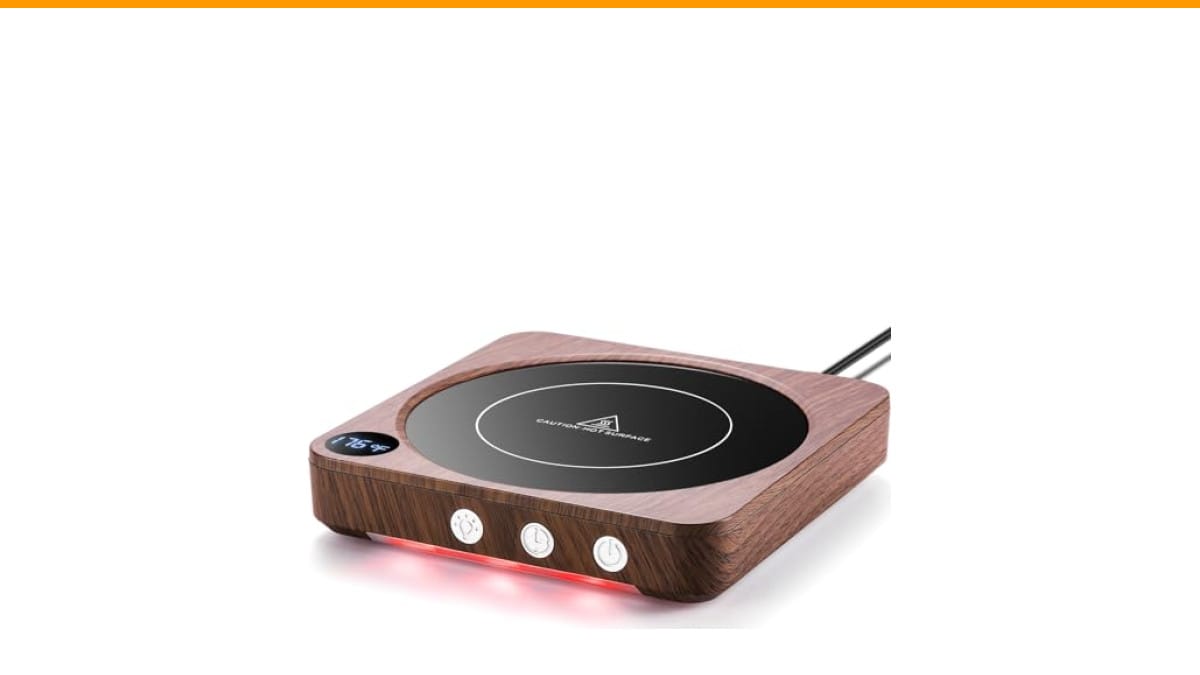
If you’re in the market for a new warmer because yours is beyond saving, the House Gem Coffee Mug Warmer is a solid upgrade. It has three temperature settings (130°F, 150°F, 176°F), a 5.2-inch plate that fits most flat-bottom mugs, and a 2-to-12-hour timer. The LED display shows the current setting, and the plate is glass, so cleanup is easy. It’s a practical choice if you want something reliable with clear controls.
First, Check the Obvious: Power and Connections
Before you take anything apart, verify the basics. A loose cord or a dead outlet causes more ‘broken’ warmers than actual component failures.
- Plug it into a different outlet. The outlet you’re using might be controlled by a wall switch, or it might be worn out. Try a lamp in the same outlet — if the lamp works, the outlet is fine.
- Inspect the power cord. Look for kinks, cuts, or exposed wires. If the cord is damaged, stop using the warmer immediately. A frayed cord is a fire hazard, not a DIY repair.
- Check the LED display. If the display lights up but the plate stays cold, the heating element might be dead. If the display doesn’t light at all, the problem is likely power-related.
One thing I’ve learned from testing several warmers: the power button on some models is a touch sensor, not a physical switch. If your warmer has a touch button and it’s not responding, try pressing and holding it for 3 seconds. Some units require a long press to turn on.
Is Your Mug Actually Making Contact?
The most overlooked issue is poor contact between the mug bottom and the heating plate. Warmers rely on direct conduction — heat transfers from the plate to the mug’s flat bottom. If there’s a gap, the heat goes into the air instead of your coffee.
Check the bottom of your mug. Is it completely flat? Many ceramic mugs have a recessed, unglazed ring around the base, which means only a small circle touches the plate. That reduces heat transfer significantly. For best results, use a mug with a flat, smooth bottom — the kind that sits flush on a table.
Also, wipe the plate and the mug bottom dry. A thin layer of water acts as an insulator, slowing heat transfer. I’ve seen a single drop of water under a mug drop the temperature by 20°F. Dry both surfaces, then set the mug down gently.
If your mug has a curved or textured bottom, it won’t work well with any warmer. That’s not a defect — it’s physics. The House Gem warmer, for example, has a 5.2-inch flat glass plate, and it works best with flat-bottomed ceramic, glass, or stainless steel mugs. Plastic cups are not recommended because they can melt or warp.
Check the Temperature Setting and Timer
Sometimes the warmer is working fine, but the settings are wrong. If your warmer has multiple heat levels, you might have accidentally set it to the lowest one.
On the House Gem, the three settings are 130°F, 150°F, and 176°F. The indicator light changes color — blue for 130°F, purple for 150°F, red for 176°F. If your coffee isn’t hot enough, press the temperature button to cycle to a higher setting. The LED display will show the current target temperature.
Also, check the timer. Most warmers have an auto-shutoff feature. The House Gem defaults to 4 hours, but you can set it anywhere from 2 to 12 hours. If your warmer turns off after a short time, the timer might be set lower than you think. Press the timer button to see the current setting, and adjust it if needed.
One thing to remember: the warmer maintains temperature, it doesn’t boil your coffee. If you want a hotter drink, start with hotter coffee. The warmer will keep it at the set temperature, not reheat it from cold.
What If the Plate Gets Hot but the Coffee Stays Cold?
This is the most confusing failure mode. The plate is warm to the touch, but your coffee is barely warm after 30 minutes. Here’s what’s happening:
- Your mug is too thick or too large. A thick ceramic mug absorbs heat slowly. A large mug (16 oz or more) has more liquid to heat, so the warmer can’t keep up. Use a smaller mug or preheat it with hot water before pouring coffee.
- The plate temperature is lower than the setting. Some warmers don’t reach the advertised temperature. Use a kitchen thermometer to measure the plate surface. If it’s more than 15°F below the setting, the heating element might be weak or failing.
- The warmer cycles on and off. Many warmers have a thermostat that turns the heating element off when it reaches the set temperature. If the mug is large, the plate cools down quickly, and the warmer cycles frequently. This is normal, but it means the average temperature is lower than the peak.
If you’ve ruled out all these factors and the warmer still doesn’t heat your coffee, the heating element may be burned out. That’s not something you can fix at home — it requires replacing the unit.
When to Clean the Plate and the Warmer
A dirty plate can reduce heat transfer. Coffee spills, milk residue, and mineral deposits from water can build up on the glass surface, creating an insulating layer. Cleaning is simple:
- Unplug the warmer and let it cool completely.
- Wipe the plate with a damp cloth and mild dish soap.
- For stubborn residue, use a plastic scraper or a non-abrasive sponge. Don’t use steel wool — it will scratch the glass.
- Dry the plate thoroughly before using it again.
Regular cleaning not only improves performance but also prevents odors. A burnt milk smell on a warmer is hard to get rid of once it’s baked on. I clean my warmer’s plate after every few uses, and it takes less than a minute.
If you’re also dealing with a coffee maker that has mineral buildup, you might want to descale your coffee machine too. The same minerals that clog your espresso machine can leave deposits on a warmer plate.
Common Error Messages and What They Mean
Some digital warmers display error codes. The House Gem doesn’t have error codes, but other models might show ‘E1’ or ‘HH’ on the display. Here’s what they usually mean:
| Error Code | Likely Cause | Fix |
|---|---|---|
| E1 | Thermistor (temperature sensor) failure | Unplug, wait 10 minutes, plug back in. If it persists, replace the unit. |
| E2 | Heating element over-temperature | Let the warmer cool down, check for blockages on the plate, and try again. |
| HH | Heating element short circuit | Immediately unplug. Do not use. Replace the warmer. |
| LL | Low voltage or power supply issue | Try a different outlet. If it still shows, the internal power supply is failing. |
These codes aren’t universal, but they follow a pattern. If your warmer shows a code, check the manual first. If the manual is lost, search online for the brand and model plus the code. If nothing comes up, treat it as a serious fault and stop using the warmer.
Why the Auto-Off Feature Might Be Confusing
Auto-shutoff is a safety feature, but it can seem like a malfunction if you don’t know it’s active. The House Gem has a 4-hour default, which is generous. But if you set a 2-hour timer and forget, the warmer will turn off after 2 hours. That’s not a bug — it’s the timer you set.
If your warmer turns off unexpectedly, check the timer setting. Also, some models have a ‘keep warm’ mode that overrides the timer. If your warmer has that, you might need to enable it manually. The House Gem’s smart memory feature remembers your last settings, so if you set a timer once, it will use that timer next time. To reset it, unplug the warmer for 30 seconds, then plug it back in.
If the auto-off is too aggressive for your workflow, look for a warmer with a longer timer or a ‘constant on’ mode. The House Gem’s 12-hour maximum is plenty for most people, but if you want something that stays on all day, you’ll need a different model.
When to Give Up and Buy a New Warmer
Not every problem is fixable. If your warmer is more than 2 years old and the heating element has failed, replacement is usually more cost-effective than repair. The same goes for a cracked glass plate — that’s a safety hazard, not a cosmetic issue.
Also, if the warmer trips your circuit breaker or makes a buzzing sound, stop using it immediately. These are signs of an electrical fault that could cause a fire. Don’t try to fix it yourself; replace the unit.
When shopping for a new warmer, look for the same features you’d want in any appliance: safety certification, adjustable temperature, and a timer. The House Gem has TÜV SÜD certification to UL 1026, which means it’s been tested for electrical safety. That’s a good sign. Also, consider the plate size — a 5.2-inch plate fits most standard mugs, but if you have a wide mug, measure the bottom before buying.
Frequently Asked Questions
Why is my coffee mug warmer not turning on?
Check the power source first. Plug another device into the same outlet to confirm it works. If the outlet is fine, inspect the cord for damage. If the cord looks good, the internal power supply may be dead. On some models, the power button is a touch sensor — try pressing and holding it for 3 seconds.
How long does a coffee mug warmer take to heat up?
Most warmers reach their set temperature within 2 to 5 minutes. The plate gets hot faster than the liquid. If your coffee isn’t warm after 10 minutes, the warmer might be underpowered, or your mug might not be making good contact with the plate.
Can I leave my coffee mug warmer on overnight?
It depends on the model. Many warmers have an auto-shutoff timer — the House Gem defaults to 4 hours and can be set up to 12 hours. Leaving it on overnight without a timer is not recommended. Even with a timer, it’s best to unplug it when you’re done.
Why does my coffee mug warmer make a clicking sound?
That’s the thermostat cycling on and off. It’s normal. The clicking happens when the heating element turns on and off to maintain the set temperature. If the clicking is loud or accompanied by a burning smell, unplug the warmer and inspect it.
Will a coffee mug warmer work with any mug?
No. It works best with flat-bottomed mugs made of ceramic, glass, or stainless steel. Mugs with curved or recessed bottoms won’t heat well. Plastic cups are not safe — they can melt. Also, the mug must be dry on the bottom for efficient heat transfer.
Final Thoughts: Get Your Warmer Working Again
You don’t need to be a technician to fix most mug warmer issues. Start with the simple checks: power, mug contact, and settings. Clean the plate if it’s dirty. If the warmer still doesn’t work, it’s probably time for a new one.
- Always plug into a known-working outlet and inspect the cord for damage.
- Use a flat-bottomed, dry mug for best heat transfer.
- Check the temperature setting and timer — they might be set lower than you think.
- Clean the plate regularly to remove residue that blocks heat.
- If the warmer shows an error code or smells like burning, unplug it and replace it.
- Consider a model with safety certification, like the House Gem’s TÜV SÜD rating.
- If your warmer is old or damaged, don’t risk it — buy a new one.
For more on keeping your coffee gear in top shape, see our guide on coffee machine maintenance. And if you’re using a burr grinder, check out the burr vs blade comparison to make sure your grind is consistent.
Products related to this article
Sponsored / affiliate links. As an Amazon Associate I earn from qualifying purchases. I may earn additional commission from eligible campaigns.
House Gem Coffee Mug Warmer for Desk, Candle Warmer Plate, 12H Timer, Wood VOBAGA Mug Warmer & Coffee Mug Warmer with 4 Hours Auto Shut-Off, Coffee Warmer Plate for Office Home Desk Use with 3 Temperature Settings, Cup Warmer for Cocoa, Tea, Milk, Water, Coffee Gifts(No Cup)
 Dltsli Coffee Mug Warmer for Desk, Candle Warmer Plate with Light,12H Timer