You loaded fresh beans, filled the water tank, pressed the button, and nothing happened. The display is dark, the grinder is silent, and your morning plan just collapsed. It’s a frustrating moment, but before you start shopping for a replacement, know this: most dead grinders come back to life with basic troubleshooting you can do right now.
This guide walks you through a logical diagnostic path, from the simplest outlet test to the deeper motor checks. You’ll learn what each symptom means, how to test components safely, and exactly when to stop troubleshooting and call it quits. By the end, you’ll either have a working grinder or a clear answer on whether repair makes financial sense.

ERETOW
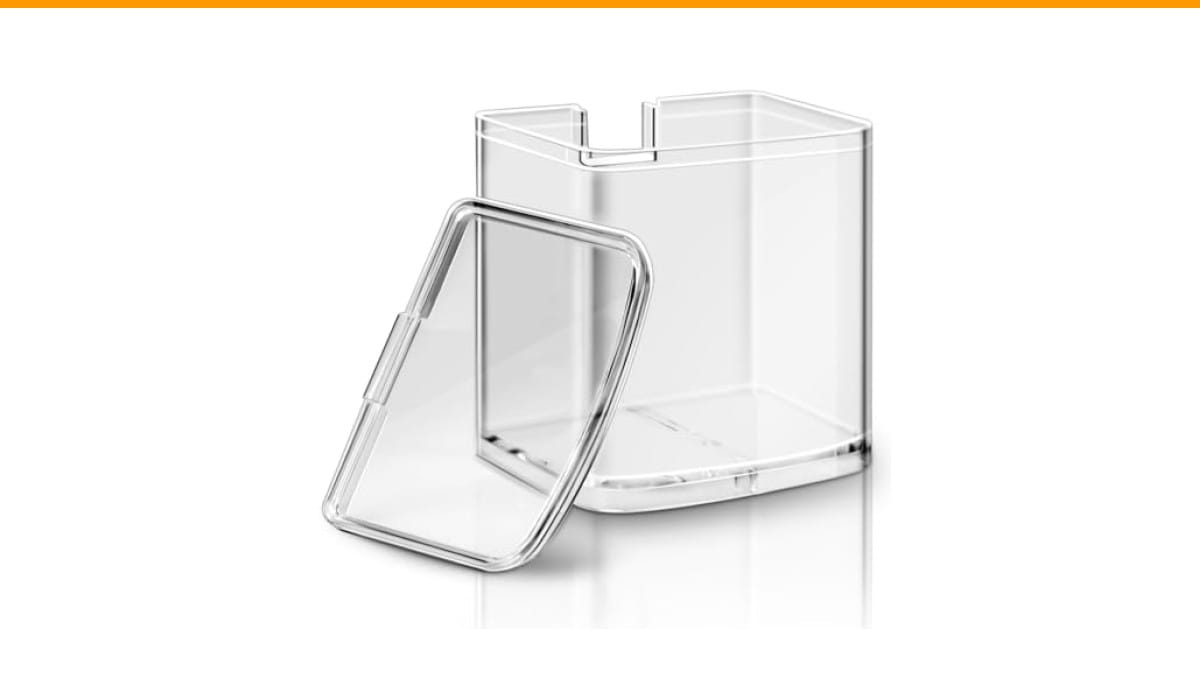
DBM-8GC Grind Chamber With Lid for Cuisinart…
- Fits for Cuisinart Burr Coffee Grinder Parts- Part Number DBM-8GC, this grind chamber with lid is compatible with Cuisinart coffee…
- Storage Function - This replacement coffee grind chamber is ideal for storing coffee grounds, effectively replacing worn or cracke…
- Premium Material - Crafted from lightweight and durable polystyrene(PS) material, this food processor parts for Cuisinart automati…
As an Amazon Associate I earn from qualifying purchases.
If your grinder’s plastic grind chamber is cracked or warped from years of use, that’s a common and cheap fix. A replacement like the DBM-8GC grind chamber with lid fits Cuisinart DBM-8P1 models and restores the seal that keeps grounds from spilling into the mechanism. But a broken chamber isn’t the same as a dead motor, so let’s figure out which problem you actually have.
Safety First: Unplug and Inspect Before You Do Anything
Unplug the machine. Not the switch, not the button — pull the cord from the wall. You’re going to poke around inside, and a capacitor can hold a charge long after the unit is off. That’s not paranoia; it’s the difference between a quick fix and a trip to urgent care.
Once it’s unplugged, look at the whole unit. Check the power cord for chew marks, kinks, or melted sections. Pets love cords, and a damaged cord is a fire hazard, not a repair project. If you see exposed wire, stop here and replace the grinder.
Next, open every compartment. Remove the bean hopper, the grind chamber, and any removable parts. Look for a foreign object — a stray bean, a paper clip, a fragment of a plastic spoon — lodged in the chute or between the burrs. More often than you’d think, a single hard object jams the mechanism and trips the thermal protection.
Also check the bottom of the unit. Some grinders have a reset button or a small access panel for the thermal fuse. You’ll deal with that later, but knowing where it is now saves time.
Finally, smell the unit. A burnt, acrid odor near the motor housing means the windings overheated. That smell doesn’t go away, and the motor won’t recover. If you smell it, skip the rest of this guide and plan for a replacement.
Quick Diagnostic Flowchart: Is It Power, Motor, or a Jam?
Here’s the mental model that solves most problems. Ask three questions in order:
- Does anything light up? If the display or indicator lights come on, the machine has power. Your problem is downstream — a jam, a safety interlock, or a motor fault.
- Do you hear a hum or click? A hum means the motor is getting power but can’t spin. That’s a jam or a seized bearing. A click means a relay is engaging, but the motor isn’t receiving power — possibly a failed thermal fuse.
- Is it completely dead? No lights, no sound, no response. That points to the outlet, the cord, or the main circuit board.
This simple flowchart eliminates guesswork. Most people skip straight to “the motor is broken” without checking the outlet, and they end up replacing a perfectly good machine.
If your machine has power but the buttons are unresponsive, that’s a different issue. We have a separate guide for Cuisinart button problems that covers control board failures.
Step 1: Test the Outlet and Power Cord (With a Multimeter)
You’ve heard “try another outlet” a hundred times. It’s good advice, but it’s not enough. A wall outlet can look fine and still deliver no voltage. You need a multimeter — a $15 tool that pays for itself the first time you use it.
Set the multimeter to AC voltage (the V~ setting). Stick the probes into the outlet slots. You should read between 110 and 120 volts in North America. If you get zero, the outlet’s breaker tripped or the wiring is bad. Check the breaker panel and reset any tripped breakers or GFCIs.
If the outlet reads fine, test the grinder’s power cord. Unplug it, set the multimeter to continuity (the symbol that looks like a sound wave), and touch one probe to each prong of the plug. You want a beep or a near-zero resistance reading. No beep means a broken wire inside the cord — replace the cord if it’s detachable, or the whole unit if it’s hardwired.
One more test: plug the grinder in and check the voltage at the point where the cord enters the machine. If you have voltage there but nothing happens when you press the switch, the problem is internal. That’s where the next steps come in.
Don’t own a multimeter? You can still test the outlet with a simple plug-in nightlight or phone charger. If those work, the outlet is fine. It’s not as precise, but it’s a solid first check.
Step 2: Check the Safety Interlock and Hopper Position
Many grinders have a safety interlock — a small switch that only allows power when the hopper and grind chamber are seated correctly. This prevents the machine from running with an open chamber, which would fling coffee grounds everywhere.
If your grinder has one, and the hopper isn’t fully twisted into place, the machine stays dead. It’s a common issue, especially after cleaning. You reassemble everything, but the hopper doesn’t click into its locked position, and the machine refuses to start.
Check the interlock switch itself. It’s usually a small plastic tab that gets depressed when the hopper is seated. Over time, that tab can stick or break. If it’s stuck in the released position, the switch never closes. A drop of food-grade silicone lubricant on the tab often fixes it.
Also, inspect the hopper’s locking lugs. If one is chipped or worn, the hopper won’t seat fully. You might be able to shim it with a small piece of tape, but a cracked hopper is a replacement part.
This step is quick, and it’s the second most common cause of a dead grinder after a tripped breaker. If your machine has a separate grind chamber that slides in and out, check that it’s fully seated as well. The same interlock logic applies.
Step 3: Clear the Jam and Clean the Burrs or Blades
Now we get to the mechanical side. A jammed grinder draws high current, which trips the thermal fuse or the overload protector. The machine powers off and stays off until the jam is cleared and the protection resets.
Start with the hopper. Remove it and empty any beans. Look down into the burr chamber. If you see beans packed tight, use a soft brush or a wooden skewer to dislodge them. Never stick a metal tool into the burrs — you’ll damage the cutting edges and possibly break a burr tooth.
For blade grinders, the process is simpler. Remove the lid, lift out the blade assembly, and clear any debris from the shaft. Check that the blade spins freely by hand. If it binds, there’s a foreign object wedged underneath.
Once the jam is clear, clean the burrs or blades thoroughly. Coffee oils and fine grounds build up and create friction, which makes the motor work harder. A clean grinder runs cooler and is less likely to trip the thermal protection.
For a deep clean, remove the upper burr if your model allows it. Brush off the burrs with a stiff brush, and wipe the chamber with a dry cloth. Don’t use water on the burrs — it promotes rust. If you have a burr grinder, this is also a good time to check the burr alignment. Misaligned burrs cause jams and uneven grinding.
After cleaning, reassemble everything and try again. If the machine still won’t start, move on to the reset procedure.
Cleaning is also preventive. A grinder that’s maintained regularly won’t jam as often. We have a full guide on cleaning frequency that applies to grinders too.
Step 4: The Power Cycle Reset and Thermal Fuse Check
Most grinders have a thermal overload protector — a small device that breaks the circuit when the motor gets too hot. It’s a safety feature, but it can be annoying because it doesn’t always reset automatically.
Here’s the reset procedure: unplug the machine, wait 30 minutes for it to cool completely, then plug it back in. That’s it. Many people skip the waiting part and try again after five minutes, which doesn’t work because the fuse hasn’t cooled.
If the machine still doesn’t turn on after a full cool-down, you may have a blown thermal fuse. This is a one-time device that permanently breaks when overheated. Replacing it requires opening the machine, locating the fuse (usually a small white or black cylinder near the motor), and soldering in a new one.
This repair is doable if you’re comfortable with a soldering iron. The fuse itself costs a few dollars. But it’s a sign that the motor ran too hot, and the underlying cause — a dirty grinder, a jam, or a failing motor — will likely return.
Before you buy a fuse, check the motor’s resistance with your multimeter. Set it to ohms and probe the motor terminals. A healthy motor reads a few ohms. An open circuit (infinite resistance) means the motor windings are burned out, and a new fuse won’t help.
Step 5: Listen to the Motor — What the Sounds Tell You
If your grinder does turn on but behaves oddly, the sound is your best diagnostic tool. Here’s what different noises mean.
Grinding noise but no output
You hear the burrs spinning, but no ground coffee comes out. This usually means the chute is clogged. Grounds accumulate, pack tight, and block the exit. The motor keeps running, but the coffee has nowhere to go.
Stop the machine immediately. Running it with a clogged chute stresses the motor and can burn it out. Unplug, remove the grind chamber, and clean the chute with a pipe cleaner or a long skewer. Check the grind chamber’s exit hole — it’s often the clog point.
Also, check the grind size setting. If you set it too fine, the ground coffee can pack into a solid mass that won’t move. This is common with oily beans. Coarsen the setting and try again.
Complete silence
No sound at all when you press the button means the motor isn’t receiving power. You’ve already checked the outlet and the cord. The next suspects are the switch, the thermal fuse, or the circuit board.
Test the switch with your multimeter. With the machine unplugged, remove the switch and check for continuity when you press it. No continuity means a failed switch — a common part that’s cheap to replace.
If the switch is fine, the thermal fuse is the next suspect. If that’s fine, you’re looking at a circuit board failure, which is usually not worth repairing on a budget grinder.
Pay attention to intermittent behavior, too. If the grinder works sometimes but dies at other times, it’s likely a loose connection or a failing switch contact. These are harder to diagnose but follow the same testing path.
Brand-Specific Fixes: Cuisinart, Breville, and De’Longhi
Different brands have different quirks. Here’s what to look for on the three most common brands in home kitchens.
Cuisinart grinders, particularly the DBM-8 series, are notorious for two issues. First, the grind chamber’s locking tab breaks, which prevents the interlock from closing. The chamber is a wear item, and a replacement like the DBM-8GC is an easy fix. Second, the thermal fuse trips if the unit runs too long. If your Cuisinart is dead after a heavy grinding session, wait 30 minutes and try again. If the grind chamber itself is cracked, that’s a separate problem — see our Cuisinart won’t turn on guide for more.
Breville grinders, especially the Smart Grinder Pro, have a different failure mode. The upper burr carrier can become misaligned, causing the burrs to lock up. The machine detects the jam and displays an error or simply refuses to start. To fix it, remove the upper burr, clean both burrs, and reseat the carrier until it clicks firmly. Breville also has a reset procedure that involves holding the power button for 10 seconds.
De’Longhi grinders often have a similar safety interlock on the bean hopper. The hopper must be twisted to the locked position, or the machine stays dead. The interlock tab can also stick. A quick spray of food-safe lubricant on the tab usually resolves it. De’Longhi machines also have a burr adjustment dial that can become clogged with fine grounds, preventing the burrs from spinning. Clean the dial area thoroughly.
If you own a different brand, the diagnostic process is the same. The components — outlet, cord, interlock, thermal fuse, motor — are universal. Only the location and shape of the parts differ.
Repair vs. Replace: The Cost and Age Rule of Thumb
You’ve done the diagnostics, and the problem is a burned-out motor or a dead circuit board. Now you face the real question: fix it or buy a new one?
Here’s a simple rule: if the grinder is under three years old and the repair costs less than half the price of a new equivalent, fix it. If it’s older than three years, replace it. The math rarely favors repairing an old grinder, because other components are likely to fail soon after.
Consider the labor cost. A motor replacement on a grinder is not a 15-minute job. It requires disassembling the unit, possibly soldering, and reassembling. If you’re paying a repair shop, the labor alone can exceed the cost of a new budget grinder.
Also, think about the grind quality. Burrs wear out. A grinder that’s five years old with heavy use has dull burrs, which means inconsistent grind size. Even if you fix the motor, the coffee quality won’t be what it was. A new grinder with fresh burrs will produce better coffee.
For a $30 blade grinder, don’t even think about repairing it. The motor, switch, and housing are all cheap parts, but the time you spend is worth more than the machine. Replace it. For a $200 burr grinder, a $20 thermal fuse replacement makes sense. For a $500 espresso grinder, a $50 motor repair is a no-brainer.
One more factor: warranty. If your grinder is still under warranty, don’t open it. Opening the case voids the warranty, and you’ll lose your right to a free repair or replacement. Check the warranty period before you pick up a screwdriver.
Frequently Asked Questions
Why does my coffee grinder have power but the motor won’t spin?
This is almost always a jam or a seized motor. First, unplug the machine and try turning the burrs by hand. If they don’t move, something is wedged between them. Clear the jam. If the burrs spin freely but the motor still won’t turn, the motor’s start capacitor or winding may be dead. Test the motor’s resistance with a multimeter — infinite resistance means it’s burned out.
How do I reset my coffee grinder after it overheats?
Unplug the machine and let it cool for at least 30 minutes. Some models have a physical reset button on the bottom, usually near the thermal fuse. If there’s no button, the cool-down period is the reset. Plug it back in and try again. If it trips again quickly, there’s an underlying problem like a jam or a failing motor.
Can I use a different power cord for my grinder?
Only if the replacement cord has the same voltage and amperage rating as the original. Check the label on the machine for the wattage. A cord with a lower rating will overheat. If the cord is permanently attached to the machine, don’t try to splice it — replace the whole unit or hire a professional.
Why does my grinder work sometimes but not others?
Intermittent operation points to a loose connection or a failing switch. The most common spot is the switch itself — the internal contacts wear out and make poor contact. Another suspect is a loose wire connector on the circuit board. Both are easy to check with a multimeter. If you find a loose connector, reseat it and secure it with a zip tie.
Is it worth fixing a grinder that’s out of warranty?
It depends on the grinder’s age and price. For a budget grinder under $50, no. For a high-end burr grinder over $150, yes, if the repair is simple like a thermal fuse or a switch. A motor replacement on a $200 grinder is often worth it if you’re handy. Get a repair quote first and compare it to the cost of a new unit.
Final Verdict: Get Your Grinder Running Again
You don’t need to be an appliance technician to fix a dead coffee grinder. The process is logical, and most problems are simple.
- Always unplug before inspecting. Safety isn’t optional.
- Test the outlet with a multimeter before blaming the machine.
- Check the safety interlock — a half-seated hopper kills power completely.
- Clear any jams and clean the burrs to prevent overheating.
- Wait 30 minutes for a thermal reset before assuming the motor is dead.
- Listen to the sounds — a hum means a jam, silence means a power issue.
- Replace the grinder if it’s over three years old and the repair costs more than half the price of a new one.
If you’ve gone through all the steps and the machine is still dead, you’ve done your due diligence. Now you can shop for a replacement with confidence, knowing you didn’t give up on a fixable problem. And if the issue was a cracked grind chamber, a simple replacement part like the DBM-8GC is a ten-minute fix that gets you back to brewing.
Products related to this article
Sponsored / affiliate links. As an Amazon Associate I earn from qualifying purchases. I may earn additional commission from eligible campaigns.
 Belly Moka Coffee Maker Stovetop Espresso Maker 9 Cup Aluminum Moka Pot Percolator 15oz 450ml Easy Brewing for Electric Ceramic Stoves Home Camping Italian Cuban Café Classic Black
 Belly Moka Coffee Maker Stovetop Espresso Maker 6 Cup Aluminum Moka Pot Percolator 10oz 300ml Easy Brewing for Electric Ceramic Stoves Home Camping Italian Cuban Café Classic Silver
 HomeBeyond Espresso Coffee Maker 12 Cups, Classic Stovetop Espresso Maker, 600ml / 20oz Coffeemaker for Gas & Ceramic Stovetops (Silver)