You walk over, grind beans for your morning shot, and nothing happens. No hum, no grind, no light. The machine is dead silent. Before you start pricing out a new unit or booking an expensive repair, know this: a combined espresso machine and grinder that won’t power up usually has one of a handful of causes. Most of them you can diagnose at home in under 15 minutes with zero special tools, and many you can fix yourself for the cost of a part.
This guide walks you through a decision-tree approach. You’ll learn how to determine if the fault lies in the power supply, the grinder motor, a jammed burr set, or the brew switch interlock. I have spent years testing these all-in-one units, and I have seen a dead machine come back to life simply because someone seated the portafilter properly. Let’s get you sorted out.
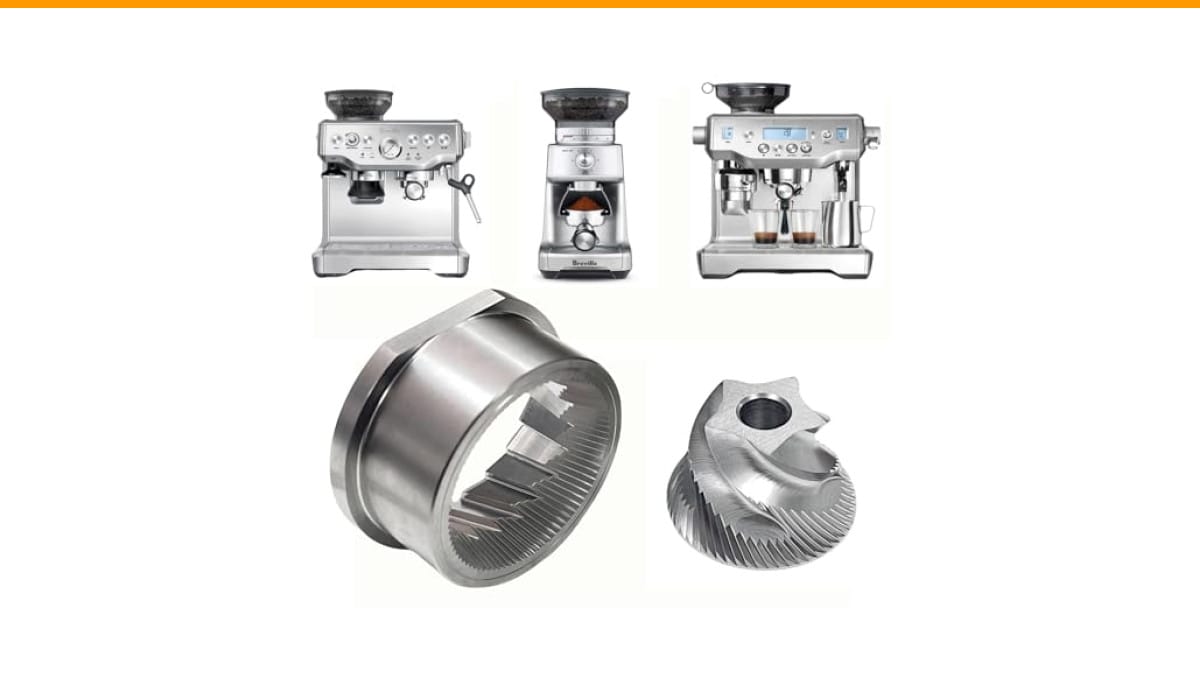
If your diagnosis ends with a damaged or worn burr set, a direct replacement is often the fastest fix. The Brewvana Conical Grinder Burr Set fits selected Breville models (870, 878, 880, 860, 840, 810, 450, 500) and uses high-grade stainless steel to keep grinding temperatures low, which preserves the bean’s oils. It is a straightforward swap if your current burrs are chipped or dull.
Safety First: Unplug and Diagnose
Before you touch anything inside the machine, unplug it from the wall. This is non-negotiable. A combined unit has a 120V motor and a heating element. Poking around with the power connected risks a serious shock and can damage the control board.
Once unplugged, check the power cord from end to end. Look for chew marks from pets, pinch points where the cord meets the machine base, and any dark spots that suggest overheating. A cord that feels loose at the plug or the machine housing is a common failure point on machines that get pulled across the counter frequently.
Test the outlet itself with a known working device, like a phone charger or a lamp. I have seen people replace a perfectly good machine only to find the GFCI outlet in the kitchen had tripped. If the outlet is dead, reset it at the breaker panel before proceeding.
If the cord looks fine and the outlet has power, you need a multimeter to check continuity through the cord. Set it to the ohms setting and test from the plug prongs to the wires inside the machine. No continuity means a broken wire, and that is a simple replacement job.
Is It the Machine or the Grinder? (A 2-Minute Test)
This is the single most useful test you can run. It isolates the entire problem to one subsystem.
- Plug the machine back in and turn the main power switch on.
- Watch the control panel. Does any light or display come on?
- If the panel lights up, the main board and power supply are working. The issue is in the grinder circuit or the brew circuit.
- Press the brew button without a portafilter in place. Does the pump run? Does water come out?
- If the brew side works but the grinder does not spin, the problem is isolated to the grinder motor, its wiring, or the burrs.
- If nothing lights up at all, you have a main power issue, a blown fuse, or a dead control board.
This simple test cuts your troubleshooting time in half. You are not guessing anymore; you are narrowing down the fault to a specific branch of the electrical system. For a deeper look at how these machines differ, check our automatic vs semi-automatic comparison to understand which components you are dealing with.
If the grinder is dead but the brew side works, you are likely dealing with a jammed burr set or a failed grinder motor. If the whole machine is dark, you are dealing with power delivery or a fuse.
Common Electrical Causes: Power, Fuses, and Tripped Breakers
Let’s start with the boring stuff because it is the most common. The main power switch on these machines can fail. It is a mechanical toggle that carries a lot of current. After years of use, the contacts inside can burn out. You flip the switch, and nothing happens. The switch feels the same, but it is dead.
To test the switch, you need a multimeter. Unplug the machine, remove the top panel, and locate the switch. Test for continuity across the terminals when the switch is in the ON position. No continuity means the switch is faulty. Replacing a switch is a cheap fix and takes about ten minutes.
Many Breville machines have an internal thermal fuse, not a resettable breaker. This fuse is a small cylindrical component with two wires. It is designed to blow if the machine overheats, usually from a blocked pump or a stuck solenoid valve. If it blows, the machine is completely dead. Test it with a multimeter for continuity. If it reads infinite resistance, it is blown and needs replacement.
You should also check the circuit breaker in your home. A machine that draws 15 amps on a circuit shared with a toaster and a kettle will trip the breaker. This happens more often than you think. Go to your panel, find the tripped breaker, reset it, and try the machine on a dedicated circuit.
If you suspect a deeper electrical issue, our guide on loud noise from an automatic espresso machine covers related motor and pump diagnostics that often accompany power failures.
The Grinder Motor: Thermal Overload and Reset Buttons
Grinder motors in these all-in-one machines are powerful but not invincible. They have a thermal overload protector. This is a small bimetallic switch that cuts power to the motor when it gets too hot. It is a safety feature, not a defect.
Why does it trip? Grinding very hard beans, grinding for a long continuous session, or a jammed burr set causes the motor to draw excessive current. The motor heats up, the thermal switch opens, and the motor stops. It does not matter if the rest of the machine has power; the grinder will not spin.
Here is the trick: the thermal overload resets automatically after the motor cools down. This typically takes 15 to 30 minutes. If your grinder stopped mid-grind and the machine has power, wait half an hour and try again. If it works, you have a thermal issue, not a dead motor. You need to find out why it overheated. Usually, it is a jammed burr or a dull set that is forcing the motor to work too hard.
Some machines have a manual reset button on the bottom or side of the grinder unit. Look for a small red or black button near the motor housing. If you find one, press it firmly. It should click. This is rare on Breville units, but it exists on some other brands. If the machine still does not turn on after cooling, the motor itself may be burnt out, which is a professional repair.
If your grinder has been struggling for weeks and you notice the grind size is inconsistent, the burrs are likely dull. Dull burrs increase motor load and heat. This is where a replacement set like the Brewvana burr set becomes relevant, as it restores proper cutting efficiency and reduces strain on the motor.
Jammed Burrs: How to Clear Them Without Causing Damage
A jammed burr is the most common mechanical cause of a grinder that will not turn. It happens when a small stone, a very hard bean, or a buildup of oily coffee residue locks the burrs together. The motor tries to turn, draws high current, and either trips the thermal overload or blows the fuse.
Here is the safe way to clear a jam. Unplug the machine. Remove the bean hopper. Look down into the burr chamber. You will see the upper burr. It is held in place by a retaining ring or a bayonet mount. Turn it counterclockwise to release it. This is the same procedure you use for cleaning, and it does not void the warranty.
Once the upper burr is off, inspect the surface for damage. Look for shiny spots, chips, or uneven wear. Use a soft brush to remove any coffee grounds trapped between the burrs. If you see a small stone wedged in there, carefully pry it out with tweezers. Do not use a metal screwdriver to force the burrs to turn. That will chip the cutting edges and ruin the set.
If the burrs are clean and undamaged, reassemble them and try the grinder again. If it still will not turn, the motor or its wiring is the problem. If the burrs are visibly worn or chipped, replace them. A damaged burr set will not grind properly even if you get the motor running again.
For machines that have been sitting unused for a while, the burrs can seize from old, oily coffee residue. This is common. A thorough cleaning of the grind chamber usually frees them up. If you have a Burr grinder that is completely seized, the process is the same as described here, and you can find more specifics in our grinder troubleshooting guide.
The Brew Switch Interlock: A Hidden Culprit
Here is a subtle one that catches many owners off guard. On several Breville models, the grinder will not run unless the brew switch interlock is satisfied. This is a safety mechanism. The machine uses a microswitch to detect that the portafilter is properly seated in the brew head.
If that microswitch is misaligned, dirty, or broken, the machine thinks there is no portafilter and refuses to power the grinder. The machine might still brew, or it might do nothing at all depending on the firmware.
To test this, look at the brew head where the portafilter locks in. You will see a small metal or plastic tab that gets pushed in when the portafilter is inserted. Press that tab manually with your finger. Now try running the grinder. If it spins, you have found the problem. The tab is either bent, sticky, or the switch inside is dead.
You can clean the tab and its housing with a cotton swab and some rubbing alcohol. If the tab is bent, gently bend it back into position. If the switch is broken, it is a small part that you can replace. This is not a hard repair, but it requires removing the top cover to access the switch wiring.
This interlock is also why you sometimes see the grinder work with one portafilter but not another. If your aftermarket portafilter is slightly smaller, it might not depress the tab far enough. Use the original portafilter to test this theory.
When to Call a Professional vs. DIY Repair
You can handle several repairs at home with basic tools: replacing the power cord, swapping a thermal fuse, replacing the main switch, and clearing a jammed burr. These are all safe and straightforward if you unplug the machine and use a multimeter.
You should call a professional if the control board is dead, the grinder motor has no continuity, or the machine trips the breaker immediately upon plugging in. A short circuit in the heating element or the wiring harness is dangerous. Do not attempt to repair the main control board at home. It is a complex piece of electronics with surface-mount components that require specialized soldering equipment.
Also, if you have replaced the thermal fuse and the machine blows it again within a week, you have a deeper issue. It is not a bad fuse; it is a failing motor or a shorted wire. A professional can run a load test on the motor to confirm.
When you take the machine to a repair shop, ask for a diagnosis before authorizing any work. A reputable shop will charge a bench fee, but they will also give you a clear answer on whether the repair is worth the cost. Sometimes it is not, and you are better off replacing the unit.
If you are considering a new machine, our best automatic espresso machine under $1000 guide covers reliable alternatives that have better serviceability.
Preventative Maintenance to Keep Your Grinder Running
Most dead grinders are the result of neglect. Coffee grinders need regular cleaning. The oils in coffee beans turn rancid and sticky. That residue builds up on the burrs, slows the motor, and eventually causes a jam. A consistent cleaning schedule prevents the majority of these failures.
Weekly Cleaning Routine
Once a week, remove the hopper and the upper burr. Use a stiff brush to sweep out all loose grounds from the burr chamber and the chute. Do not wash the burrs with water. Water causes rust. Dry brushing is sufficient for weekly maintenance.
Run a few grams of rice through the grinder once a month. Rice acts as a mild abrasive and pulls out the oily residue that sticks to the burrs. Grind it on the coarsest setting, then grind a small amount of fresh coffee to clear the rice dust out of the system.
Monthly Deep-Clean Checklist
Once a month, do a deeper inspection. Remove the burrs entirely. Check the cutting edges for dullness or chips. Use a vacuum with a narrow nozzle to remove any debris from the motor shaft area. Inspect the wiring connections for any signs of burning or loose terminals.
Check the alignment of the burrs. They should sit perfectly parallel. If you see uneven wear, one side is likely loose. Tighten the retaining ring firmly. A loose burr will cause inconsistent grind size and put extra load on the motor.
Pay attention to how the grinder sounds. A healthy grinder has a consistent, high-pitched whine. If it starts to sound labored, deep, or rattly, investigate before it fails completely. That sound is the motor straining, and it will eventually trip the thermal overload.
If your burrs are beyond sharpening, a replacement set is the correct fix. For Breville owners, the Brewvana burr set offers a direct fit and is designed to minimize heat buildup during grinding. It is not a magic upgrade, but it restores the grinder to its original performance level.
Frequently Asked Questions
Why does my espresso machine have power but the grinder won’t spin?
This points to a grinder-specific issue. Check the burrs for a jam first. Then listen for the motor. If the motor hums but does not spin, the burrs are locked. If the motor is silent, check the thermal overload, the brew switch interlock, and the wiring to the motor. The machine’s main power supply is fine since the lights work.
How do I reset the thermal overload on my grinder?
Most thermal overloads reset automatically. Unplug the machine and wait 30 minutes for the motor to cool. If your model has a manual reset button, it is usually a small red button on the motor housing or the bottom of the machine. Press it until it clicks. If the grinder still does not work after cooling, the motor is likely burnt out.
Can a clogged coffee grinder cause the whole machine to shut off?
Yes. A severe jam causes the motor to draw excessive current. This can trip the machine’s main circuit breaker or blow the thermal fuse, which kills power to the entire machine. Clearing the jam and resetting the breaker or replacing the fuse restores power.
Is it safe to use a multimeter on my espresso machine?
It is safe if you unplug the machine first. You are testing for continuity, which requires no live power. Never test for voltage on the internal components while the machine is plugged in unless you are a trained technician. The capacitors and the heating element can hold a dangerous charge.
How often should I replace the burrs on my espresso machine grinder?
For home use, every 2 to 3 years is typical. If you grind very dark, oily beans daily, you might need to replace them sooner. The signs are inconsistent grind size, a noticeable drop in grinding speed, and a motor that sounds strained. If you see visible chips or dull, shiny edges, replace them immediately.
What to Do Next: A Practical Checklist
- Unplug the machine before any inspection or cleaning. Always.
- Run the 2-minute test to determine if the fault is in the main board or the grinder circuit.
- Check the wall outlet and the circuit breaker before suspecting the machine itself.
- Test the main power switch and the thermal fuse with a multimeter for continuity.
- Clear any jammed burrs by removing the upper burr and brushing out debris.
- Press the brew switch interlock tab manually to rule out a faulty portafilter sensor.
- Replace worn or damaged burrs with a compatible set like the Brewvana conical burr set.
- If the motor is silent after all tests, call a professional. Do not attempt to repair a burnt-out motor.
Products related to this article
Sponsored / affiliate links. As an Amazon Associate I earn from qualifying purchases. I may earn additional commission from eligible campaigns.
 Coffee Espresso Machine Handle Replacement Parts, Cafe Bracket Handle for Lidl Silvercrest CM4621 CM4218 KF5002 KF500S Barista (for 51mm Portafilter Basket - Not included)
 Linnkyfloa Coffee Espresso Maker Handle Replacement for Stovetop Moka Pot or Percolator, Black Plastic for Spare Part Compatible with Italian(9-12 Cup)
 Wrenmor Replacement Handle For Coffee Espresso Moka Stove Pot, Black Plastic Accessory Compatible With 1/3/6/9/12 Cup Sizes For Easy Installation And Long-Lasting Use(1 Cup)