You walk over to your super automatic espresso machine, press the button for a cappuccino, and instead of that familiar hiss and steady stream, you get a dribble. Or nothing. Maybe the display flashes an error code you’ve never seen. It’s 7 AM, you’re not fully awake, and the last thing you want is to become an appliance repair technician.
Good news: most super automatic failures are not catastrophic. They’re mechanical or software hiccups you can fix at the kitchen counter with basic tools and a little patience. This guide walks through the five most common problems—weak flow, jammed brew unit, bad-tasting shots, clogged steam wand, and error codes—and gives you step-by-step fixes. You’ll also get a maintenance schedule that prevents most of these issues before they start.

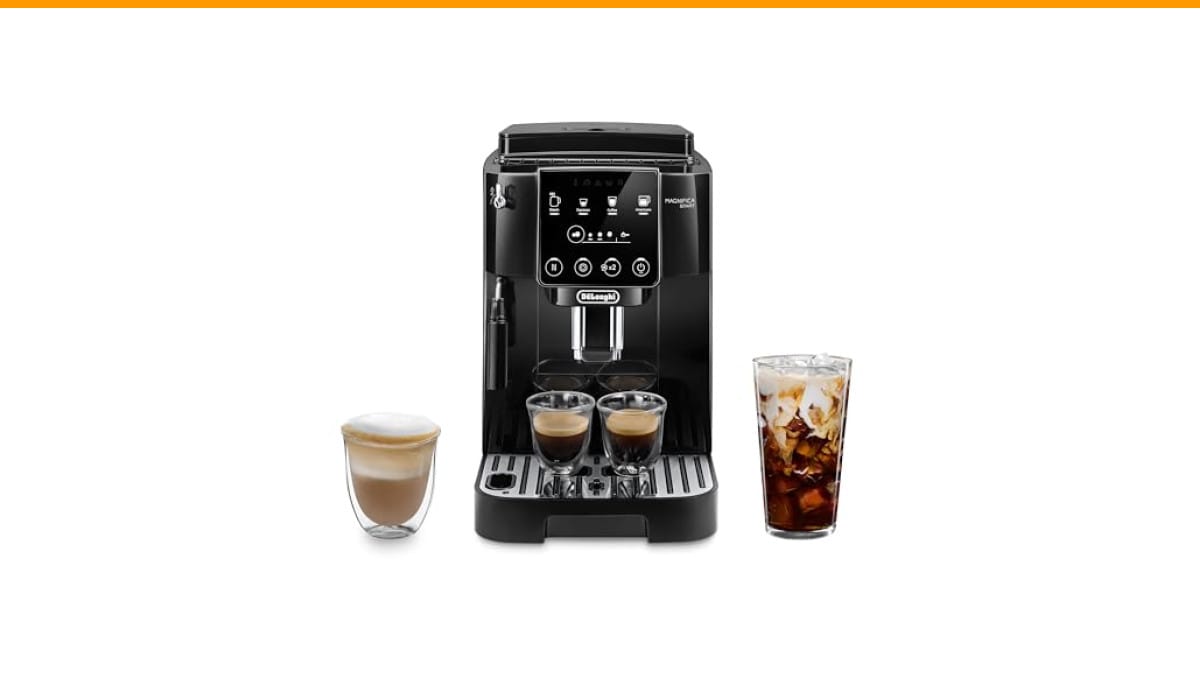
De'Longhi
De'Longhi Magnifica Start Automatic Espresso Machine, Milk…
- #1 Worldwide Espresso Machine Maker* *Independent Research Institute, Sales Leader, Full Year 2025
- 3 ONE-TOUCH RECIPES: Enjoy Espresso, Coffee, and Americano at the touch of a button. Easily adjust the intensity to fit your prefe…
- PERFECT GRINDING: 13 grind settings means all of your bean varieties are optimally prepared for extraction. The conical burr grind…
As an Amazon Associate I earn from qualifying purchases.
If you’re shopping for a machine that’s easier to maintain, the De'Longhi Magnifica Start Automatic Espresso Machine is a solid entry point. Its removable brew unit and dishwasher-safe parts make cleaning less of a chore, which directly reduces the most common failure points.
Fast Answer: The 5 Most Common Super-Automatic Failures
Here’s the short version. If you recognize your symptom, jump to that section.
- No water or weak flow – usually a water tank issue, airlock, or pump problem.
- Brew unit jammed or not returning – often a stuck grinder or a misaligned brew chamber.
- Sour, bitter, or watery shots – grind size, dose, or bean freshness.
- Steam wand weak or clogged – milk residue or scale inside the wand.
- Error codes and warning lights – descaling reminders, empty tray, or mechanical faults.
Each problem has a clear fix. Let’s go through them one by one.
Problem 1: No Water or Weak Flow From the Spout
You press the coffee button, hear the pump whir, but nothing comes out. Or the flow is a thin trickle that takes forever to fill a cup. This is the most common complaint, and it’s rarely the pump itself.
Check the water tank and inlet valve
First, remove the water tank and look at the bottom. There’s a small valve (usually a rubber flap or a spring-loaded ball) that opens when you insert the tank. If that valve is stuck closed, water can’t get through. Rinse it under warm water and push it with your finger to make sure it moves freely.
Also check the tank’s float—the little plastic piece that tells the machine when water is low. If it’s stuck, the machine might think the tank is empty even when it’s full. Clean it with a soft brush.
If the tank and valve are fine, the next suspect is the inlet tube. Some machines have a small filter at the end of the tube inside the tank. That filter gets clogged with scale or debris over time. Soak it in a descaling solution for 15 minutes, then rinse thoroughly.
Clear airlocks and prime the pump
An airlock happens when air gets trapped in the water line between the tank and the pump. This is common after you run the machine dry or after descaling. The pump spins but can’t pull water because it’s just compressing air.
To fix it, turn the machine off, remove the water tank, fill it with fresh water, and reinsert it firmly. Then run a hot water cycle (not coffee) for about 10 seconds. Repeat if needed. If your machine has a separate hot water spout, use that—it’s the easiest way to purge air.
If that doesn’t work, check the manual for a priming procedure. Some machines require you to hold a button for several seconds to force the pump to draw water. It’s the same principle as priming a garden hose after you turn it off—you need to get the water flowing again.
One more thing: if the machine has been sitting unused for weeks, the pump might need a few cycles to re-prime. Run three or four hot water cycles in a row.
Problem 2: The Brew Unit is Jammed or Not Returning
The brew unit is the heart of a super automatic. It grinds, compresses, extracts, and ejects the puck. When it jams, the machine usually displays an error message like “Brew unit blocked” or “Close door.” Sometimes it just makes a loud grinding noise and stops.
How to safely remove and reset the brew unit
Every super automatic has a removable brew unit, but the removal process varies by brand. Check your manual first. In most cases, you open the service door (usually on the right side or front), and the unit slides out after you press a release button.
Once it’s out, inspect it. The most common jam cause is coffee grounds stuck between the moving parts. Use a dry brush to sweep off any loose grounds. Then look at the gears and the piston—if there’s a clump of wet coffee stuck, remove it with a toothpick or a small screwdriver.
To reset, place the brew unit back in its housing and push it in until it clicks. Make sure the unit is in the correct position—there’s usually an alignment mark. Close the door and turn the machine on. If the machine still shows an error, repeat the process. Sometimes the unit needs to be manually moved to its home position. You can do this by rotating the gear on the side of the brew unit with your fingers until it stops at the starting point.
If you’re hearing a loud grinding noise, check the grinder burrs. A small stone or a hard bean can jam the burrs, which in turn blocks the brew unit. Remove the hopper and inspect the burrs. You might need to disassemble the grinder to clear the obstruction. See our guide on automatic espresso machine making loud noise for more details.
When to replace the brew unit gasket
The gasket is the rubber ring that seals the brew chamber during extraction. Over time, it wears out and stops sealing properly. You’ll notice wet pucks, coffee leaking into the drip tray, or a drop in pressure.
Replacing the gasket is a cheap fix—usually $10 to $20 for the part. You can do it yourself with a flathead screwdriver to pop out the old ring and press in the new one. It’s worth trying before you consider replacing the entire brew unit, which can cost $150 or more.
If the brew unit itself is cracked or the gears are stripped, that’s a different story. In that case, replacement is the only option. But that’s rare. Most “jammed” brew units just need a good cleaning and a reset.
Problem 3: Sour, Bitter, or Watery Shots
Your machine works fine, but the coffee tastes off. That’s frustrating because the machine is doing its job—it’s just not doing it the way you want. The fix is usually in the grind or the beans.
Adjusting grind size and dose via the menu
Super automatics have a grind size dial (often inside the hopper) and a menu setting for dose. If your shots are sour, the grind is too coarse. Water passes through too fast, under-extracting the coffee. If they’re bitter, the grind is too fine, over-extracting.
Turn the grind dial one notch finer (for sour) or one notch coarser (for bitter). Then pull a shot and taste it. Wait—don’t taste it immediately. Let it cool for a minute. The first sip after a grind change can be misleading. Give it three or four shots before you decide.
Dose is easier to adjust in the menu. Most machines let you set the amount of ground coffee per shot. If your shot is watery, increase the dose. If it’s too strong, decrease it. A typical dose for a double shot is 14 to 18 grams of ground coffee, but super automatics often default to a lower dose to save beans. Check your machine’s settings.
One more thing: extraction time matters. A proper shot takes 25 to 30 seconds. If your machine is pulling a shot in 15 seconds, it’s under-extracting. If it takes 40 seconds, it’s over-extracting. Adjust the grind accordingly.
The impact of stale beans and hopper storage
You can adjust everything perfectly, but stale beans will still taste flat. Coffee beans start losing flavor within two weeks of roasting. If you’re buying a big bag and leaving it in the hopper for a month, you’re not doing yourself any favors.
Store beans in an airtight container away from light and heat. Only put enough in the hopper for a few days. The hopper is not a storage container—it’s a dispenser. If you’re not using the machine for a few days, empty the hopper back into the container.
Also, check the roast date on the bag. If there isn’t one, buy from a roaster that prints it. Fresh beans make a bigger difference than any machine setting.
If your coffee tastes burnt or ashy, that’s a different issue. We have a separate guide on why espresso tastes burnt that covers it.
Problem 4: Steam Wand is Weak or Clogged
The steam wand is the second most common failure point. If it’s producing weak steam or no steam at all, you’ve got a clog or a scale problem.
Cleaning the tip and checking for milk residue
Milk leaves behind protein and fat residue that hardens inside the wand. If you don’t purge the wand after each use, that residue builds up and restricts steam flow.
Remove the tip (most unscrew) and soak it in a solution of warm water and a drop of dish soap. Use a paperclip or a fine needle to poke out any hardened milk. Replace the tip and run the steam for a few seconds to blow out any remaining gunk.
If the wand has a rubber sleeve or a plastic cover, remove that and clean it separately. Those parts get crusty fast.
Addressing scale buildup in the thermoblock
Scale—calcium and magnesium deposits—builds up inside the thermoblock (the heating element that makes steam). This reduces steam pressure and can eventually block the wand entirely.
Run a descaling cycle according to your machine’s manual. Most machines have a dedicated descale mode. Use a descaling solution specifically formulated for espresso machines. Do not use vinegar—it can damage the internal seals.
If descaling doesn’t restore steam pressure, the thermoblock might be too far gone. That’s a professional repair, but it’s rare if you descale regularly. The maintenance schedule below tells you how often to do it.
Problem 5: Error Codes and Warning Lights
Error codes are the machine’s way of telling you exactly what’s wrong—if you know what they mean. Most codes are not fatal.
The “Descale” and “Clean” cycle reset
The most common error is “Descale” or “Clean.” This appears when the machine has counted a certain number of brew cycles and decided it’s time for maintenance. You can’t skip it—you have to run the cycle to clear the code.
Follow the manual’s instructions for the descale cycle. It usually involves adding descaling solution to the water tank, placing a container under the spout, and pressing a button. The machine runs a series of cycles, then prompts you to rinse. After that, the code clears itself.
If the code doesn’t clear, you might need to reset the machine. Turn it off, unplug it for 30 seconds, and plug it back in. That often resets the software.
A quick reference for common brand-specific codes
Here are the most common codes for the big three brands. Always check your manual for the exact code.
| Brand | Code / Message | Meaning | Fix |
|---|---|---|---|
| De’Longhi | “Descale” | Scale buildup detected | Run descale cycle |
| De’Longhi | “Close door” | Brew unit door open | Close door securely |
| Jura | “Maintenance” | Brew unit needs cleaning | Run cleaning cycle |
| Jura | “Empty grounds” | Drip tray full | Empty and clean tray |
| Philips | “Calc clean” | Descaling required | Run descale cycle |
| Philips | “Brew unit blocked” | Brew unit jammed | Remove and clean brew unit |
| Gaggia | “Priming” | Air in the system | Run hot water cycle |
If you see a code not on this list, look it up in your manual or online. Most codes are self-explanatory once you know what to look for.
The Maintenance Schedule That Prevents 90% of Issues
Most of the problems above are avoidable with a simple routine. Here’s what I do, and it works.
- Daily: After each use, purge the steam wand for 3 seconds. Empty the drip tray and knock box (if you have one). Wipe down the exterior.
- Weekly: Remove and rinse the brew unit under warm water. No soap—just water. Let it dry completely before reinserting. Clean the water tank with a soft sponge.
- Monthly: Run a cleaning cycle with a cleaning tablet (or the machine’s built-in program). Descale if your water is hard—check your manual for the recommended frequency.
- Quarterly: Deep clean the grinder burrs. Brush out any residual coffee oil. Check the brew unit gasket for wear.
- Annually: Replace the brew unit gasket if you use the machine daily. It’s cheap insurance against leaks.
If you skip descaling, scale will eventually clog the thermoblock and the brew unit. That’s the #1 cause of early machine failure. It’s not hard to do—it just takes 20 minutes. We have a full guide on how to descale a coffee machine if you need a refresher.
Also, don’t forget to clean the drip tray and the area under the brew unit. Coffee oils and grounds accumulate there and can cause mold or bad odors.
Frequently Asked Questions
Why does my super automatic espresso machine have a wet puck?
A wet puck usually means the brew unit isn’t sealing properly. Check the gasket for wear. If it’s cracked or flattened, replace it. Also, make sure the grind isn’t too fine, which can cause the puck to stick to the top of the brew unit. Try a coarser grind and see if that helps.
How often should I descale my super automatic?
It depends on your water hardness. If you have soft water, every 3–4 months. If you have hard water, every 1–2 months. Your machine will prompt you when it’s time, but don’t ignore the prompt. Descaling is the single most important maintenance task for a super automatic.
Can I use vinegar to descale my espresso machine?
No. Vinegar is acidic and can damage the internal seals and the thermoblock. Use a commercial descaling solution designed for espresso machines. It’s worth the few extra dollars to avoid a costly repair.
Why does my machine make a loud noise during grinding?
Loud grinding usually indicates a jammed burr or a foreign object (like a stone) in the beans. Turn off the machine, remove the hopper, and inspect the burrs. Clean out any debris. If the noise persists, the burrs might be worn and need replacement.
How do I reset my super automatic espresso machine?
Most machines have a reset option in the menu. If not, unplug the machine for 30 seconds and plug it back in. That clears minor software glitches. For a full factory reset, check your manual—it usually involves holding a specific button for several seconds.
When to Call a Professional vs. DIY
You can handle most issues with the steps above. But there are times when you should stop and call a technician.
- DIY: Cleaning the brew unit, clearing an airlock, adjusting grind settings, running descale cycles, replacing the gasket.
- Professional: Replacing the thermoblock, repairing the pump, fixing a cracked brew unit, or any electrical issue (like a short circuit or a burning smell).
If you’re not comfortable opening the machine beyond the service door, don’t. A professional repair is cheaper than a new machine, but only if you catch the problem early. If you ignore a minor issue, it can turn into a major one.
One last tip: keep your machine’s manual in a drawer near the machine. You’ll reference it more often than you think.
Products related to this article
Sponsored / affiliate links. As an Amazon Associate I earn from qualifying purchases. I may earn additional commission from eligible campaigns.
 Coffee Espresso Machine Handle Replacement Parts, Cafe Bracket Handle for Lidl Silvercrest CM4621 CM4218 KF5002 KF500S Barista (for 51mm Portafilter Basket - Not included)
 Linnkyfloa Coffee Espresso Maker Handle Replacement for Stovetop Moka Pot or Percolator, Black Plastic for Spare Part Compatible with Italian(9-12 Cup)
 Wrenmor Replacement Handle For Coffee Espresso Moka Stove Pot, Black Plastic Accessory Compatible With 1/3/6/9/12 Cup Sizes For Easy Installation And Long-Lasting Use(1 Cup)