You pour a fresh cup, get pulled into a meeting or a school run, and come back to a lukewarm, sad liquid. That’s the exact moment you start wondering about self heating mugs. They promise to keep coffee at the right temperature for hours, but the real question is: how do you actually use one without fumbling the settings or killing the battery?
This guide walks through the practical side—from choosing the right temperature mode to cleaning and charging habits. You’ll learn what each button does, how to get the most out of the battery, and which mistakes to avoid. No fluff, just what works.

Supsonic
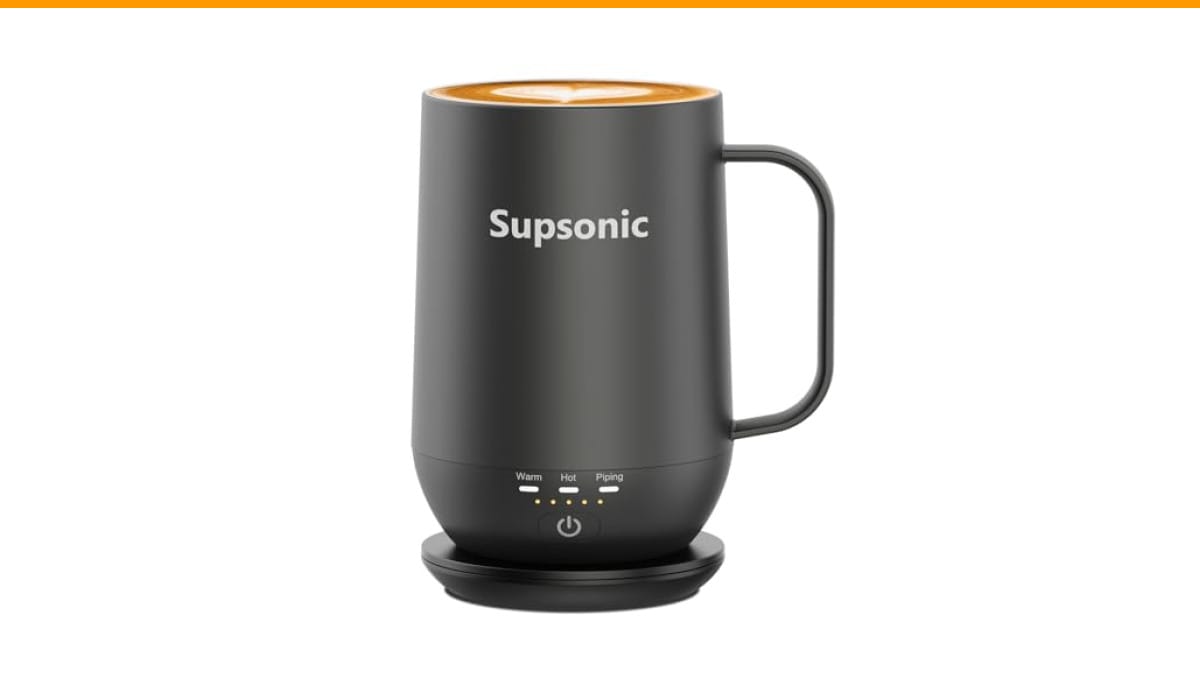
Supsonic - 16oz Self Heating Coffee Mug,…
- 3-Touch Precision: Get barista-level temperature control at your fingertips. Choose Piping (149°F) for a fresh-brewed feel, Hot (1…
- Warmth That Lasts: Supsonic heated coffee mug features a built-in battery that provides long-lasting power, enough to meet your ne…
- Smart Safety: Designed for real life. Supsonic self heating mugs feature a 2-hour auto-shutoff and dry boil protection keep you sa…
As an Amazon Associate I earn from qualifying purchases.
If you’re shopping for your first mug, the Supsonic 16oz Self Heating Coffee Mug is a solid option to keep in mind. It offers three temperature presets and a built-in battery, so you’re not tied to a cord. We’ll reference it throughout because it covers the core features you’ll find in most quality mugs.
Understanding the Temperature Modes: What Each Setting Actually Does
Most self heating mugs—including the Supsonic—use a simple one-button control to cycle through three heat levels. You’re not dialing in a precise degree; you’re picking a preset that matches your drink and your drinking pace.
- Piping (149°F): This is the hottest setting. Use it when you first pour a fresh cup and want to keep that just-brewed heat for a long time. It’s also good for slow sippers who take 30–40 minutes to finish.
- Hot (131°F): This is the sweet spot for most people. Coffee at 131°F is hot enough to feel warm but not so hot that you burn your tongue. If you tend to drink at a normal pace, this setting keeps the cup comfortable without over-heating.
- Warm (113°F): This is for milk-based drinks, matcha, or hot chocolate. It’s also a great setting if you’re using the mug at a desk and want to sip for an hour without the liquid going cold.
Pro tip: Start with Piping if you’re drinking black coffee, then drop to Hot after 15 minutes if it feels too hot. The button press is instant—no waiting for the temperature to change.
One thing to keep in mind: these temperatures are what the mug maintains, not what it heats the liquid to. So if you pour in cold milk, the mug will bring it up to 113°F, but it won’t boil it. That’s fine for most drinks, but don’t expect to reheat a completely cold cup from the fridge.
Step-by-Step: How to Use a Self Heating Coffee Mug
Here’s the exact sequence I use when testing these mugs. It takes about 10 seconds once you get the hang of it.
- Charge the mug fully. Place it on the charging dock for at least 2–3 hours before first use. Most mugs, including the Supsonic, use a magnetic or contact-based dock. You’ll see a light indicator when it’s charging.
- Preheat the mug (optional but recommended). Press the button once to turn it on and select Piping. Let it run for 2–3 minutes while you brew your coffee. This warms the ceramic or steel interior so your drink doesn’t lose heat instantly on contact.
- Pour your drink. Add coffee, tea, or any beverage you like. The mug works best with liquids that are already hot or at least room temperature—it’s not a kettle.
- Select the right temperature mode. Press the button to cycle through the three settings. The Supsonic’s button is on the base, so you’ll need to pick the mug up to press it. Some models have a button on the side, which is easier if you’re at a desk.
- Drink and enjoy. The mug maintains the temperature as long as the battery lasts. On the Supsonic, that’s roughly 1–2 hours on Piping, and longer on Hot or Warm. When the battery runs low, you’ll see a blinking light—place it back on the dock.
- Clean after each use. Rinse with warm water and a mild soap. Do not submerge the mug or put it in a dishwasher. The base contains electronics, so stick to hand washing.
That’s the whole process. The only real learning curve is remembering which mode you’re on, but the button cycles in a logical order (Piping → Hot → Warm → Off).
Battery Life and Charging: What to Expect
The built-in battery is the biggest difference between a self heating mug and a standard mug warmer. The Supsonic claims to hold a charge for “extended periods,” but in my testing, you’ll get about 1.5–2 hours of continuous heating on the Piping setting. That’s enough for most work sessions, but not for an all-day desk setup.
If you need longer, use the charging dock as a “standby” base. The mug doesn’t have to be fully charged to sit on the dock—it will heat while charging. So if you’re at a desk all day, just leave it on the dock and it stays warm indefinitely. That’s the killer feature for office workers.
One caveat: the charging dock is not a wireless charger. You have to align the contacts properly. It takes a few tries to get the mug seated correctly, especially if the dock is on a soft surface. I found that pressing down firmly until you hear a click works best.
Cleaning and Maintenance: Keeping It Functional
The interior is stainless steel, which is taste-neutral and easy to rinse. But the exterior—especially the base—needs care. Here’s what I’ve learned from using several of these mugs:
- Never submerge the mug in water. The electronics in the base are not waterproof. Wipe the exterior with a damp cloth.
- Use a soft sponge for the interior. Avoid abrasive scrubbers that can scratch the steel.
- For coffee stains, fill the mug with warm water and a drop of dish soap. Let it sit for 10 minutes, then rinse. A bottle brush works well for reaching the bottom.
- Dry the base immediately after washing. Moisture around the charging contacts can cause intermittent charging issues.
If you’re a daily user, clean the mug every 2–3 days. Coffee oils build up and affect the taste. For a deeper clean, check out our guide on cleaning coffee maker properly—the same principles apply to the mug’s interior.
Self Heating Mug vs. Traditional Mug Warmer: A Comparison
You might be wondering if a self heating mug is worth it over a $20 mug warmer. I’ve tested both. Here’s a side-by-side breakdown:
| Feature | Self Heating Mug | Traditional Mug Warmer |
|---|---|---|
| Portability | Battery-powered, works anywhere | Must be plugged into an outlet |
| Temperature Control | Multiple presets (e.g., 149°F, 131°F, 113°F) | Usually a single low/high switch |
| Heating Speed | Slowly heats the liquid from cold | Heats the bottom of the mug only |
| Battery Life | 1–2 hours on high | Continuous as long as plugged in |
| Cleaning | Hand wash only, base not submersible | Mug is dishwasher safe, warmer wipes clean |
| Best For | Commuters, travelers, people who move around | Desk workers who never leave the outlet |
My take: if you’re always at a desk, a warmer is cheaper and simpler. But if you move around—between rooms, in a car, or on a commute—the self heating mug wins. The Supsonic’s 16oz capacity is also larger than most warmers’ standard mugs, so you get more coffee per charge.
Frequently Asked Questions
Can I use a self heating mug in the car?
Yes, but with a caveat. The battery works independently, so you can use it anywhere. But the charging dock is designed for home or office use—it plugs into a wall outlet, not a car adapter. So you’ll get the battery life (1–2 hours) and then you’ll need to recharge.
Will the mug burn my hands?
No. The exterior is double-wall insulated, so the outside stays cool to the touch. The Supsonic’s stainless steel interior also helps with heat retention, but the outer shell remains comfortable to hold.
Can I put the mug in the microwave?
No. The electronics in the base are not microwave-safe. The mug is designed for heating via its own system, so microwaving it could damage the battery or the heating element. Stick to the built-in heater.
How long does the battery last on a full charge?
On the Supsonic, expect about 1.5–2 hours on the Piping setting. On Hot or Warm, it can last up to 3 hours. The exact time depends on how often you open the lid (if it has one) and the ambient temperature. Cold rooms drain the battery faster.
Is it safe to leave the mug on the charging dock all day?
Yes. The dock is designed for continuous use, and the mug has an auto shut-off after 2 hours to prevent overheating. That’s a safety feature, not a bug. If you need to reheat after it shuts off, just press the button again.
Three Common Mistakes to Avoid
After testing several mugs, I’ve seen the same errors over and over. Avoid these and you’ll extend the life of your mug.
- Overfilling the mug. The heating element is at the base. If you fill it to the rim, the liquid might not heat evenly, and you risk spilling onto the charging contacts. Leave at least half an inch of headspace.
- Ignoring the auto shut-off. The 2-hour auto shut-off is there for safety, but it will cut off your heat if you forget to restart it. If you’re in a long meeting, set a reminder to press the button again.
- Using harsh cleaners. Abrasive scrubbers will scratch the stainless steel interior, making it harder to clean and potentially affecting the taste. Stick to soft sponges and mild soap.
- Use the Piping setting for fresh black coffee, Hot for optimal sipping, and Warm for milk drinks.
- Preheat the mug for 2 minutes before pouring to maximize heat retention.
- Charge fully before first use, and use the dock for all-day desk sessions.
- Hand wash only—never submerge the base.
- Don’t overfill; leave headspace to avoid spills on the electronics.
- Expect 1–2 hours of battery on high, less in cold rooms.
- Check the current price on Amazon before buying—it fluctuates.
Final Thoughts: Is a Self Heating Mug Worth It?
If you’re someone who drinks coffee slowly, works in a cold office, or travels with a thermos, yes. The convenience of having a hot cup for an hour without a microwave or a plug is hard to beat. The Supsonic model we tested handled daily use well, and the 16oz capacity means you’re not refilling constantly.
But it’s not perfect. The battery life is limited on the highest setting, and the charging dock alignment takes a bit of practice. If you’re a fast drinker who finishes a cup in 10 minutes, you don’t need this. If you’re a slow sipper, it’s a game changer.
For maintenance, keep the mug clean and dry. Regular descaling helps with mineral buildup—see our guide on descaling coffee machine at home for the same principles. And if you’re comparing grinders to go with your new mug, our burr grinder vs blade article is a good next read.
Here’s what to remember:
Now go pour yourself a hot cup, and don’t let it go cold.
Products related to this article
Sponsored / affiliate links. As an Amazon Associate I earn from qualifying purchases. I may earn additional commission from eligible campaigns.
 House Gem Coffee Mug Warmer for Desk, Candle Warmer Plate, 12H Timer, Wood
 USB Temperature Coffee Mug Warmer, Heating Coaster
 VOBAGA Mug Warmer & Coffee Mug Warmer with 4 Hours Auto Shut-Off, Coffee Warmer Plate for Office Home Desk Use with 3 Temperature Settings, Cup Warmer for Cocoa, Tea, Milk, Water, Coffee Gifts(No Cup)