You pour a fresh cup, sit down to answer one email, and by the time you look up your coffee is lukewarm. It’s a small tragedy repeated daily. A self heating coffee mug fixes that, but only if you use it correctly. Most people treat it like a regular thermos and end up disappointed with the temperature, the battery life, or the taste. That’s a shame because the technology works well when you understand the basics.
This guide walks through exactly how to use a self heating coffee mug: the right way to preheat it, which temperature setting fits which drink, how to maintain the battery, and what to do when cleaning. You’ll also learn why some common assumptions about these mugs are wrong. By the end, you’ll know how to get a consistently hot cup without fiddling with buttons or microwaves.

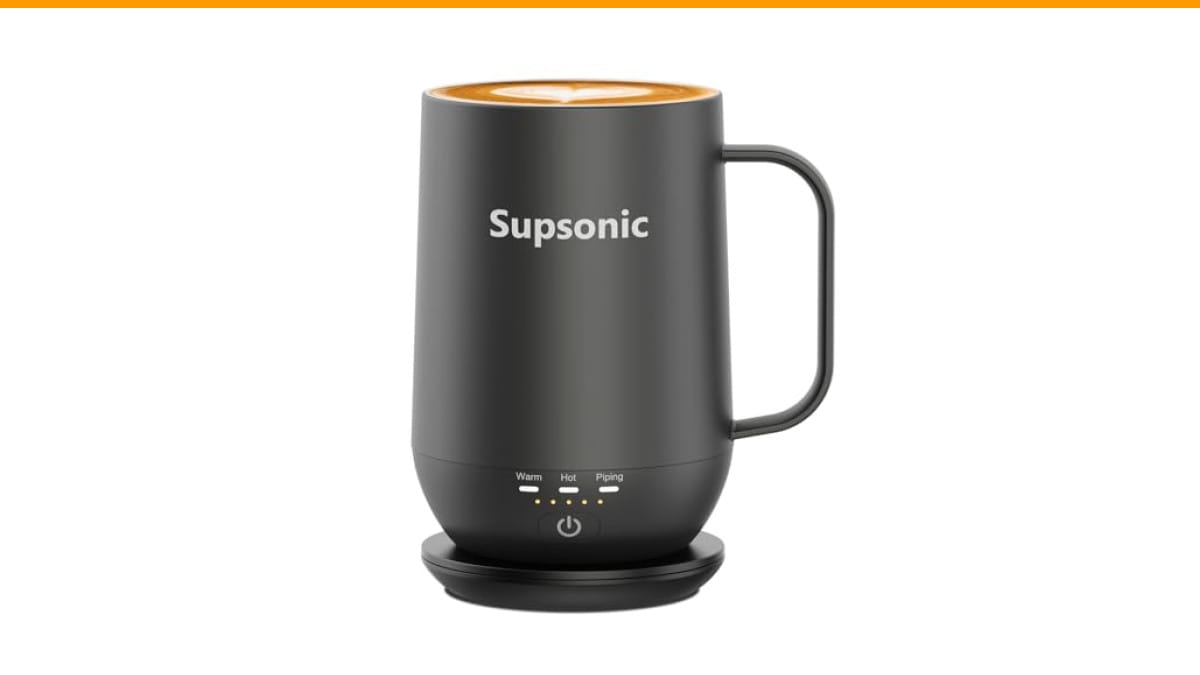
Supsonic
Supsonic - 16oz Self Heating Coffee Mug,…
- 3-Touch Precision: Get barista-level temperature control at your fingertips. Choose Piping (149°F) for a fresh-brewed feel, Hot (1…
- Warmth That Lasts: Supsonic heated coffee mug features a built-in battery that provides long-lasting power, enough to meet your ne…
- Smart Safety: Designed for real life. Supsonic self heating mugs feature a 2-hour auto-shutoff and dry boil protection keep you sa…
As an Amazon Associate I earn from qualifying purchases.
A solid example of the category is the Supsonic 16oz Self Heating Coffee Mug. It offers three touch-controlled temperature levels and a built-in battery, which makes it a useful reference point for the advice below. The principles apply to most self heating mugs on the market.
Myth #1: More Watts Means Hotter Coffee
People assume a higher wattage mug will heat coffee faster and keep it hotter. That’s not how these mugs work. The heating element in a self heating mug isn’t designed to boil liquid. It’s designed to maintain a target temperature. A 10-watt element versus a 15-watt element might differ in how quickly it recovers after a sip, but both will hold coffee at roughly the same steady state.
What actually matters is the insulation and the lid. A mug with double-wall vacuum insulation loses less heat to the air, so the heating element doesn’t have to work as hard. The lid matters too. An open or poorly sealed lid lets steam escape, which drops the temperature rapidly. If your coffee isn’t staying hot, check the lid seal before blaming the heating element.
The real number to pay attention to is the target temperature range. Most mugs offer a low, medium, and high setting. The Supsonic, for example, goes up to 149°F. That’s plenty hot for drinking. Anything above 160°F risks burning your mouth and can scald milk, so a higher max temperature isn’t an advantage.
Myth #2: You Should Turn It On After Pouring Coffee
That seems logical, but it’s backwards. Cold ceramic or stainless steel absorbs heat from your coffee the moment you pour. If the mug starts cold, the first few minutes are spent just warming the mug itself, which cools your coffee down. By the time the heating element catches up, you’ve already lost several degrees.
The correct sequence is simple. Turn the mug on and select your desired temperature before you pour. Give it two to three minutes to preheat the interior surface. Then pour your coffee. The mug is already at 149°F, so your coffee stays at its initial temperature instead of dropping to meet the mug’s temperature. This makes a noticeable difference, especially with smaller 8-ounce pours.
One caveat: don’t preheat an empty mug for longer than five minutes. Most mugs have dry boil protection that shuts off automatically, but you’re still wasting battery. Preheat, pour, drink. That’s the routine.
Choosing the Right Temperature for Your Drink
Not all drinks belong at the same temperature. Using the hottest setting for everything is a common mistake. Here’s a practical breakdown based on what works in testing:
- 149°F (Piping): Best for black coffee, Americanos, and tea you plan to sip slowly. This is the setting for a long work session where you want the coffee to stay hot for over an hour.
- 131°F (Hot): Ideal for coffee with milk or cream. Dairy proteins start to scald and develop a cooked taste above 140°F. At 131°F, your latte stays smooth and sweet.
- 113°F (Warm): Use this for milk, hot chocolate, or a delicate matcha. It’s also the right setting if you’re drinking something that already came out of a carafe and you just want to keep it from getting cold.
Consider the drink’s starting temperature too. If you pour boiling water for tea, the mug will drop it to the selected setting within a minute. That’s fine. If you pour cold milk, the mug will heat it up, but it takes longer. Start with a warm base whenever possible.
Battery Life and Charging: Realistic Expectations
Battery life is the biggest source of frustration with self heating mugs. People expect a full day of use and get three hours. That’s a misunderstanding of how the tech works. Maintaining 149°F continuously draws significant power. A typical built-in battery in a 16oz mug lasts between three and five hours on the highest setting, and closer to six or seven hours on the warm setting.
Most mugs, including the Supsonic, come with a charging dock. The dock is the key to all-day use. Keep the mug on the dock whenever you’re not drinking. Between meetings, put it back. The mug charges and heats simultaneously, so you don’t lose temperature while topping up the battery. This makes the dock less of an accessory and more of a necessity.
Battery health matters too. Lithium-ion cells degrade faster if you regularly drain them to zero. Try to charge the mug when it hits 30% rather than waiting for the low battery light. And don’t leave it on the charger overnight every single day; a few hours of charging is enough to reach full capacity.
Cleaning and Maintenance Without Breaking the Electronics
Here’s the part most people get wrong. You cannot submerge a self heating mug in water. The heating element and battery are inside the base, and water will destroy them. Every manufacturer states this clearly, yet it’s the most common cause of failure.
Instead, wipe the interior with a damp cloth and mild dish soap. Rinse the cloth well and wipe again to remove soap residue. For stubborn coffee stains, use a soft sponge. Avoid abrasive pads that can scratch the stainless steel interior. The exterior can be wiped down with a damp cloth, but keep water away from the charging contacts on the bottom.
If you switch between coffee and tea, the taste-neutral stainless steel interior should prevent flavor transfer. But if you notice a lingering smell, fill the mug with warm water and a tablespoon of baking soda, let it sit for fifteen minutes, then rinse. This is gentler than vinegar and won’t leave a residue. For deeper cleaning routines, check our guide on cleaning coffee maker habits—the same principles of regular maintenance apply.
Comparing Self Heating Mugs vs. Regular Travel Mugs vs. Mug Warmers
It helps to see how these devices stack up against the alternatives. Each has a place, but they solve different problems.
| Feature | Self Heating Mug | Insulated Travel Mug | Electric Mug Warmer |
|---|---|---|---|
| Holds temperature | Yes, set point maintained | Yes, but cools over time | Yes, but only at the base |
| Portability | High, battery powered | Very high, no power needed | Low, requires outlet |
| Temperature control | Multiple settings (e.g., 113°F to 149°F) | None | Usually one or two settings |
| Battery life | 3-7 hours depending on setting | N/A | N/A (corded) |
| Best for | Desk work, long commutes, slow sippers | Commuting, outdoor use | Keeping a mug warm at a fixed desk |
| Cleaning difficulty | Hand wash only, no submersion | Often dishwasher safe | Cleaning the mug is easy, the plate is not |
The self heating mug wins for anyone who drinks over a long period in one location. A regular travel mug is better if you’re moving around and don’t need to control temperature. A mug warmer is a cheaper alternative, but it only heats the bottom of the cup, leaving the top cold. The self heating mug heats the entire interior surface, which is more consistent.
Common Mistakes That Shorten the Mug’s Life
You can avoid most problems by following a few simple rules. First, never microwave the mug. The electronics will fry. Second, don’t put it in the dishwasher, even on a gentle cycle. The water pressure and heat will damage the seals. Third, avoid dropping it. The battery connections are sensitive, and a hard fall can loosen them.
Another mistake is leaving the mug on the highest setting when you don’t need it. If you’re drinking a latte with milk, the 149°F setting will scald it. Use the lower setting and save battery. Also, don’t leave the mug on the charging dock indefinitely after it’s full. Most smart mugs stop charging automatically, but it’s better practice to unplug once charged.
Finally, remember that a self heating mug is a device, not a thermos. It needs a little care. The same way you’d maintain coffee machine parts to extend their life, a few minutes of attention here pays off.
Safety Features You Should Actually Use
Self heating mugs come with safety features that many people ignore. The 2-hour auto shutoff is the most important. If you get distracted and leave the mug on, it turns itself off, preventing battery drain and potential overheating. This is standard on the Supsonic and most reputable brands.
Dry boil protection is another feature to understand. It detects when there’s no liquid in the mug and stops heating. This protects the heating element from burning out. If your mug ever turns off unexpectedly, check if it’s empty first.
One note: these safety features are reactive, not preventive. They won’t stop you from burning your tongue if you take a sip right after switching to the high setting. Give the mug a minute to stabilize after changing modes. The thermal mass of the liquid takes time to adjust.
Frequently Asked Questions
How long does a self heating coffee mug actually keep coffee hot?
It depends on the battery and the temperature setting. On the highest setting (around 149°F), expect 3 to 5 hours of continuous heating. On the warm setting (around 113°F), you can get closer to 6 or 7 hours. The mug won’t heat coffee indefinitely; it maintains a set temperature until the battery runs out. If you need all-day warmth, use the charging dock between drinks.
Can I put milk or creamer in a self heating mug?
Yes, but use the lower temperature setting. Milk proteins start to denature and taste cooked above 140°F. Set the mug to 131°F or lower for anything with dairy. Black coffee can handle the higher setting without issue.
Is it safe to leave a self heating mug on overnight?
Most mugs have a 2-hour auto shutoff, so it will turn itself off. Leaving it on the charging dock overnight is generally safe because the charging circuitry stops when the battery is full. However, it’s not necessary and can slightly degrade battery health over time. Unplug it once charged.
How do I clean a self heating mug without breaking it?
Hand wash only. Wipe the interior with a damp cloth and mild soap. Never submerge it, never put it in the dishwasher, and never use abrasive scrubbers. For the exterior, wipe with a damp cloth and dry immediately. Keep water away from the charging contacts on the bottom.
Why does my coffee taste like plastic?
That’s usually a new-mug smell, not a defect. Wash the interior thoroughly with warm soapy water before first use. If the smell persists, try the baking soda method described earlier. Some mugs have a silicone seal in the lid that can absorb odors; washing the lid separately helps. If the taste continues after a week, contact the manufacturer.
What to Do Before You Buy
Before purchasing, check the capacity. A 16oz mug is large enough for a standard coffee shop drink, but not for a grande with room for milk. Also check the battery capacity rating, usually listed in mAh. Higher mAh generally means longer runtime, but it also means a heavier mug. The Supsonic weighs more than a standard ceramic mug, which is the trade-off for the built-in battery.
Consider the charging method. Some mugs use a USB cable plugged directly into the base, while others use a dock. The dock is easier for desk use because you can set the mug down without fumbling with cables. If you plan to travel, check whether the mug charges via USB-C or a proprietary connector. Proprietary connectors are a pain to replace if lost.
Finally, think about the lid. A good lid should be spill-resistant but easy to drink from. The Supsonic includes a lid, but not all mugs do. Factor that into your decision. A mug without a lid loses heat much faster, even with the heater running.
Putting It All Together: A Quick Routine
Here’s a simple workflow for getting the most out of your self heating mug, based on testing different methods:
- Place the mug on the charging dock and turn it on. Select your temperature.
- Wait 2-3 minutes for the interior to preheat. Meanwhile, brew your coffee.
- Pour your coffee into the preheated mug. Put the lid on.
- Drink at your pace. The mug maintains the set temperature.
- Between sips, return the mug to the dock to keep the battery topped up.
- At the end of the day, wipe the interior with a damp cloth. Let it air dry with the lid off.
- Charge the mug fully before storing it for the next day.
This routine takes less than a minute of active effort and prevents most of the common issues people encounter. The preheating step is the one most people skip, and it makes the biggest difference in initial temperature retention.
Final Thoughts on Getting the Most Out of Your Mug
- Always preheat the mug before pouring coffee. It’s the single most effective habit.
- Match the temperature setting to the drink. Use 149°F for black coffee, 131°F for dairy, 113°F for milk or matcha.
- Keep the mug on its charging dock when not in use to maintain battery life throughout the day.
- Never submerge the mug in water. Hand wash only.
- Use the 2-hour auto shutoff to your advantage. It’s a safety net, not a nuisance.
- Check the lid seal periodically. A worn seal allows heat to escape and drains the battery faster.
- Don’t expect the mug to heat cold liquid quickly. It maintains temperature, it doesn’t boil water.
Self heating mugs are a practical tool for anyone who drinks coffee slowly. They’re not magic, and they won’t turn cold coffee into a fresh brew. But used correctly, they eliminate the lukewarm sip problem entirely. The preheating habit and the right temperature setting make all the difference. Once you get those two things right, you’ll wonder why you put up with cold coffee for so long.
If you’re troubleshooting other coffee equipment issues, the same logic applies—regular care prevents most problems. Check our guide on descaling coffee machine routines and cleaning coffee grinder steps to keep your whole setup in good shape.
Products related to this article
Sponsored / affiliate links. As an Amazon Associate I earn from qualifying purchases. I may earn additional commission from eligible campaigns.