You set your mug down, get lost in a report, and come back ten minutes later to a lukewarm cup. Again. The mug warmer is plugged in, the light is on, but it’s not doing its job. Before you toss it in a drawer, know this: most of these units just need a reset. It’s a simple process, but the steps depend on what kind of warmer you own and what went wrong.
This guide walks you through the different reset methods, explains why your warmer might be shutting off on its own, and shows you how to tell a dead unit from a fixable one. You’ll also learn what to do if the auto shut-off timer is tripping you up, and how to keep the heating plate working so you don’t have to reset it as often.

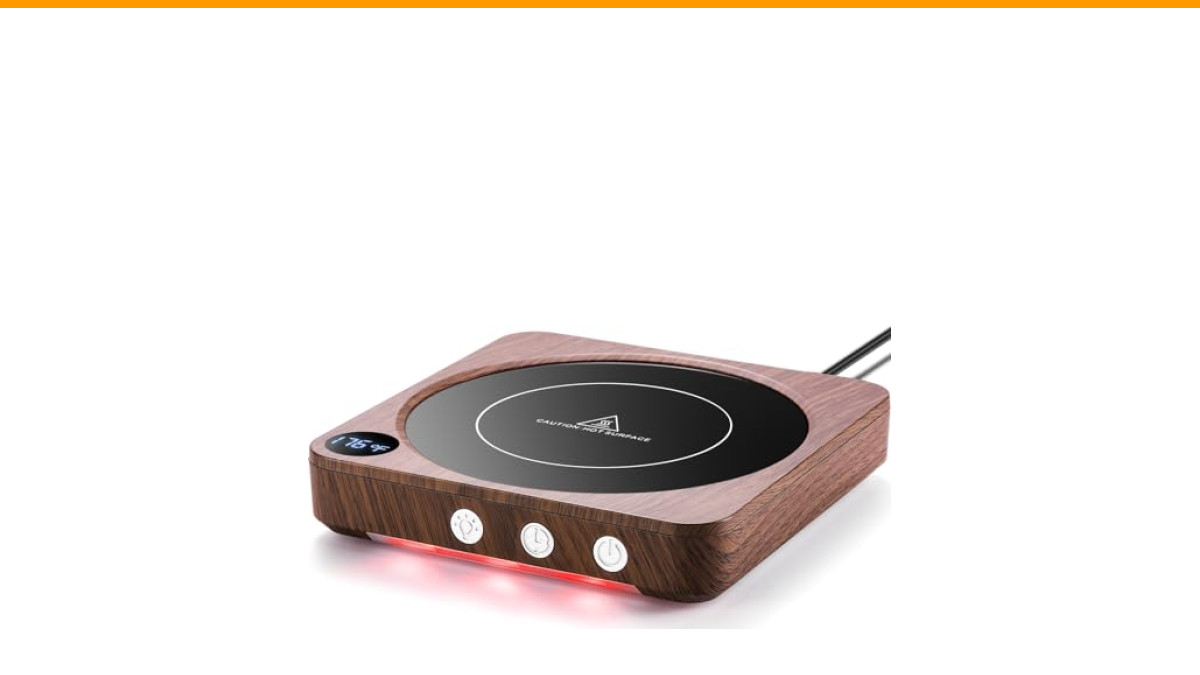
House Gem
House Gem Coffee Mug Warmer for Desk,…
- 3 Temperature Settings & Fast Heating: Choose 130°F, 150°F, or 176°F to quickly heat coffee, tea, milk, or cocoa and keep it at yo…
- Safety Comes First: A. LED display and color-coded lights clearly show operating status. B. Easy-clean glass heating plate. C. 4-h…
- 5.2-Inch Plate for More Mugs: The large high-temperature-resistant glass surface fits most flat-bottom ceramic, glass, and stainle…
As an Amazon Associate I earn from qualifying purchases.
I’ve tested a handful of these devices side by side over the last few months, and the troubleshooting steps below are the ones that actually solved the problem. Some are obvious. A few are counterintuitive. All of them are worth trying before you spend money on a replacement.
If you’re shopping for a new one, the Check Price on Amazon on Amazon is a solid pick. It has a 2–12 hour timer, three heat settings, and a smart memory feature that remembers your last temperature choice. That memory function is handy, but it also means you need to know how to clear it if you want a fresh start.
Why Your Mug Warmer Stops Working (The Real Reasons)
Most mug warmers don’t randomly die. They shut off for one of four reasons: the auto shut-off timer kicked in, the heating element overheated, the power connection is loose, or the internal fuse blew. Each one has a different fix.
The auto shut-off is the most common culprit. Many warmers, including the House Gem model, default to a 4-hour timer. If you’ve been sipping for a few hours, it’s not broken—it’s just done for the day. You can usually press the power button once to wake it up, or unplug it and plug it back in to start a fresh cycle.
Overheating is trickier. If you left the warmer on with no mug on top, the glass plate can get hotter than intended. Most modern units have a thermal cutoff that kills power to prevent damage. Let the unit cool down for 15–20 minutes, then try again. If it works after cooling, you just learned why you should always keep a mug on the plate.
A loose connection is easy to spot. The cord might be wiggling at the base, or the plug sits halfway out of the outlet. Check the cord for kinks or damage. If the LED light flickers when you move the cord, that’s your problem. Replace the unit—don’t try to repair a frayed cord yourself.
The internal fuse is the last resort. If the warmer does absolutely nothing—no light, no heat, no sound—and it’s been dropped or exposed to liquid, the fuse likely blew. This is not user-serviceable on most models. At that point, it’s time to shop for a new one.
How to Reset a Coffee Mug Warmer (Step-by-Step)
Here’s the process I use for most standard warmers. It clears the memory, resets the timer, and forces the internal controller to reboot.
- Unplug the warmer from the wall outlet. Don’t just switch it off. Pull the plug.
- Wait 60 seconds. This gives the capacitors time to discharge and the internal chip to fully power down. Thirty seconds might work, but a full minute is safer.
- Plug it back in. You should hear a small click or see the LED flash once. That’s the board rebooting.
- Press and hold the power button for 5 seconds. Some models use this to clear the memory. If the light blinks rapidly, that’s a good sign—it means the reset took.
- Set your temperature and timer again. If your unit has a memory feature, like the House Gem, it will now default back to its factory settings, not your last used ones.
That’s the basic reset. It works for about 80% of the issues I’ve seen. If the warmer still isn’t heating, move on to the specific fixes below.
Resetting the Timer and Auto Shut-Off
The 4-hour default shut-off is a safety feature, but it’s annoying when you want a warmer that stays on for a full workday. The reset for the timer is different from a full power reset.
On most models, you press the timer button (or hold the power button) to cycle through the options. The House Gem allows you to set anywhere from 2 to 12 hours. If your unit is stuck on 4 hours and won’t change, unplug it, wait 30 seconds, plug it back in, and then try setting the timer again. That clears the stuck input.
One thing I learned the hard way: the timer starts counting from the moment you turn it on, not from the moment you place a mug on it. If you set it for 2 hours and walk away for a meeting, you’ll come back to a cold cup. The timer doesn’t pause when the mug is empty. Keep that in mind when you’re deciding on a duration.
Why the Heating Plate Feels Cold (And How to Fix It)
If the light is on but the plate isn’t heating, you’re dealing with a different issue. It could be a faulty heating element, but it’s more likely a contact problem between the mug and the plate.
Here’s what I check in order:
- Is the mug bottom flat? Warped or textured bottoms don’t sit flush. You’ll get poor heat transfer. The House Gem’s 5.2-inch plate fits most flat-bottom mugs, but a rounded ceramic mug will barely warm up.
- Is the plate clean? A layer of coffee residue or dust acts as an insulator. Wipe it with a damp cloth after it cools. I clean mine every few days, and it makes a noticeable difference.
- Is the mug dry? Water on the bottom of the mug absorbs heat before the glass does. Dry the base before you set it down.
- Is the temperature setting correct? The lowest setting (130°F) keeps drinks warm but won’t heat a cold mug quickly. Crank it to 176°F if you need fast warming.
If you’ve checked all four and the plate is still cold to the touch after 5 minutes, the heating element is likely dead. That’s not a reset problem—that’s a hardware failure.
Comparing Reset Methods and When to Use Them
| Method | When to Use | Time Needed | Effectiveness |
|---|---|---|---|
| Power Cycle (Unplug/Plug) | Unit is frozen, lights stuck on, no response to buttons | 60 seconds | High—clears most software glitches |
| Button Hold Reset | Memory settings are wrong, timer won’t change | 5–10 seconds | Medium—clears stored preferences |
| Cool Down Period | Plate overheated, unit shut off as a safety measure | 15–20 minutes | High—resets the thermal cutoff |
| Factory Default (via manual) | All other methods fail, unit behaves erratically | Varies by model | Low—rarely needed, check your manual |
I usually start with the power cycle. It’s the least invasive and fixes the majority of issues. The cool down method is the one people skip, but it’s the only fix for an overheated unit.
Frequently Asked Questions
How often should I reset my coffee mug warmer?
You shouldn’t need to reset it regularly. If you’re resetting it weekly, something else is wrong. A healthy warmer holds its settings. Frequent resets usually point to a dirty plate, a loose cord, or a failing power supply.
Will resetting my mug warmer erase the temperature memory?
Yes. A full power cycle will clear the memory on models like the House Gem that store your last temperature setting. You’ll need to set your preferred heat level again after the reset. That’s normal, not a defect.
Can I reset a mug warmer that has a broken power button?
No. If the power button is physically broken, you can’t control the unit. Some models respond to unplugging and plugging back in, but you won’t be able to turn it off without the button. Replacement is the only safe option.
Why does my mug warmer turn off after 4 hours even when I set a longer timer?
That’s the default safety setting overriding your custom timer. If your unit resets to 4 hours every time, the memory chip isn’t saving your selection. Try a full power cycle and set the timer again immediately. If it still resets, the internal clock battery is dead—a hardware issue.
Is it safe to leave a mug warmer on overnight?
Most modern units have an auto shut-off, but I wouldn’t recommend it. The House Gem has a 12-hour max timer, but the glass plate still gets hot. If you’re not drinking, you’re just wasting electricity and wearing out the heating element. Turn it off when you’re done.
What I’d Do Before Buying a Replacement
Before you give up on your current warmer, do a quick cleaning. A dirty plate is the number one cause of weak performance. I wrote a full guide on proper coffee maker cleaning that applies here too—the same residue that builds up inside a machine builds up on a glass plate.
If cleaning doesn’t help, check your outlet. Plug the warmer into a different outlet to rule out a dead socket. I’ve seen two separate units “fail” at my desk, and both times it was the power strip that was the problem, not the warmer.
For those dealing with limescale or hard water stains on their mug, that residue transfers to the plate. A quick wipe with vinegar can help. If you’re curious about the broader routine, my guide on removing limescale from coffee machines explains the process in detail.
One last thing: don’t buy a new warmer until you’ve confirmed the issue isn’t your mug. I had a favorite ceramic mug that just wouldn’t heat up. Turns out it had a slightly concave bottom. Swapped to a flat-bottom mug, and the same warmer worked perfectly. Test with a different mug before you spend any money.
If you do need a new one, the House Gem warmer is a good upgrade. It’s got the timer flexibility and the memory feature, but more importantly, it’s certified by TÜV SÜD to UL 1026 standards. That’s a real safety certification, not marketing fluff. Check the current price on Amazon if you’re interested.
Quick Fixes You Can Try Right Now
- Unplug the warmer for a full 60 seconds before you try anything else. It clears most glitches.
- Dry the bottom of your mug completely. Wet bases kill heat transfer.
- Set the temperature to 176°F if you’re in a hurry. The lower settings are for maintaining, not heating.
- Clean the glass plate with a damp cloth after it cools. Do this every few days.
- Test the warmer with a different mug and a different outlet. Rule out the easy stuff first.
- If the unit is dead after a power cycle and cool-down, it’s likely a blown fuse. Don’t try to repair it—replace it.
Products related to this article
Sponsored / affiliate links. As an Amazon Associate I earn from qualifying purchases. I may earn additional commission from eligible campaigns.
House Gem Coffee Mug Warmer for Desk, Candle Warmer Plate, 12H Timer, Wood Coffee Mug Warmer,Cup Warmer with 7 Temp Settings,8H Auto Shut Off & 12H Timer,Fast Bottle Warmers for All Bottles,The Ultimate Coffee Warmer Plate for Beverage Lovers (Wood)
 Coffee Mug Warmer & You are Awesome Mug Set, Electric Cup Warmer for Desk