Your compact espresso machine starts acting up—maybe the buttons blink in a pattern you’ve never seen, or the pump runs but no water comes out. You pull the manual off the shelf, but the troubleshooting section is thin. Most of the time, a simple reset clears the error and gets you back to pulling shots.
This guide walks you through the exact steps to reset a compact espresso machine, whether it’s a semi-automatic, super-automatic, or pod-based model. You’ll learn the difference between a soft reset and a factory reset, when each is appropriate, and how to avoid the common mistakes that send people hunting for a repair shop. By the end, you’ll have a clear action plan for the next time your machine acts up.

ACTIVE
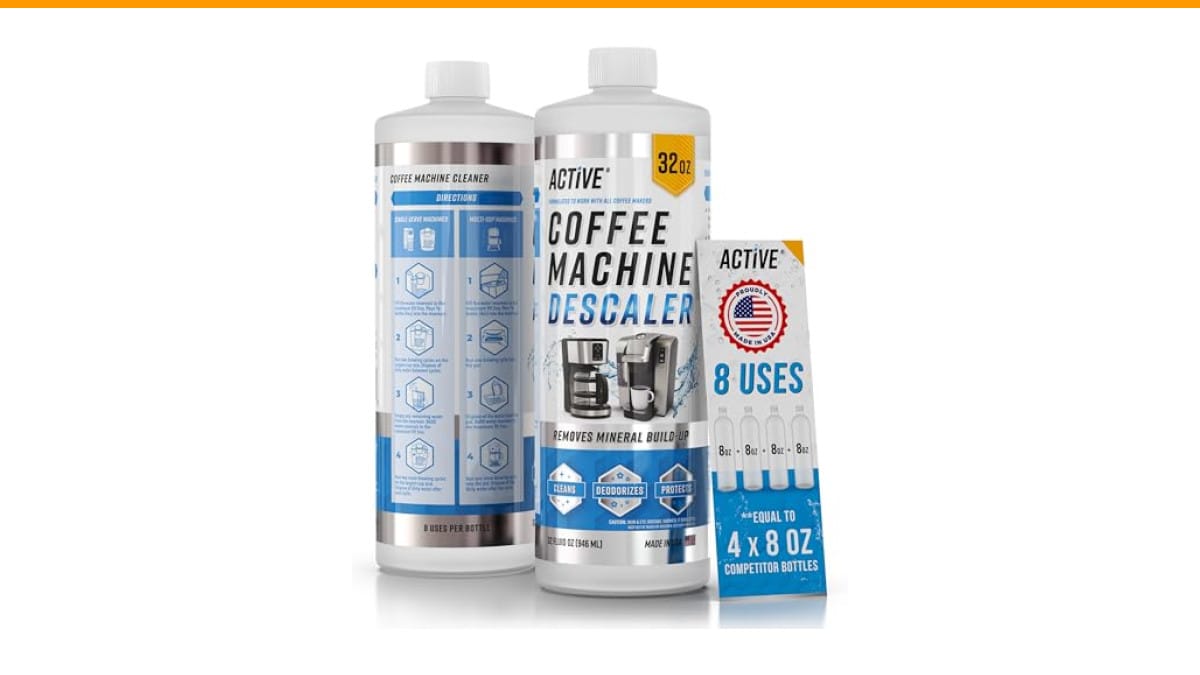
ACTIVE Coffee Machine Descaler Descaling Solution -…
- 8 Uses Value-Size Bottle: Same as 4 x 8oz bottle kit of other products! Less Waste, Better Value!
- Works with All Coffee Machines: Our Coffee Maker Descaler is compatible with Nespresso pod and K-cup brewer, multi-cups drip coffe…
- Descaling and Cleaning Formula: ACTIVE Coffee Descaler and Cleaner, a natural Calcium & Scale Remover. Compare to Descaling Tablet…
As an Amazon Associate I earn from qualifying purchases.
If your machine has been running for a while and you suspect scale buildup is behind the problem, a good descale is often the real fix. A product like ACTIVE Coffee Machine Descaler works with most compact espresso machines and can be used as part of the reset and maintenance routine. It’s a citric-acid based formula that removes calcium and oil buildup, which can cause pressure errors and slow flow.
Before You Reset: Check the Basics
Resetting won’t fix a machine that’s out of water or has a jammed portafilter. Take 30 seconds to rule out the obvious stuff first.
- Water tank: Is it full? Many compact machines won’t start a cycle if the tank is low or not seated properly.
- Portafilter and basket: Remove them and check for clogs. Old coffee grounds can block flow and trigger a pressure sensor.
- Drip tray: A full drip tray can trip a float switch and stop the machine.
- Power cord and outlet: Plug something else into the same outlet to confirm it’s live.
If all that checks out, then a reset is worth trying. Keep in mind that a reset doesn’t replace cleaning—if your machine is due for a deep clean, do that first. You can find a thorough guide on deep cleaning on our site.
How to Perform a Soft Reset (Most Common Fix)
A soft reset is like restarting your phone. It clears temporary glitches without wiping your settings. This should be your first move for most error codes, unresponsive buttons, or a machine that just stops mid-cycle.
- Turn off the machine using the power switch. If it’s unresponsive, unplug it from the wall.
- Wait 60 seconds. This gives the internal capacitors time to discharge and the control board to fully reset.
- Plug the machine back in (if you unplugged it) and turn it on.
- Run a blank shot with no coffee in the portafilter to re-prime the pump and clear any air locks.
That’s it. In my experience, a soft reset resolves about 70% of random glitches. If the machine still shows an error, move on to a factory reset.
Factory Reset: When and How to Do It
A factory reset restores the machine to its original settings. It wipes your custom shot volumes, temperature preferences, and any saved profiles. Use this only when a soft reset doesn’t work, or when you’re selling the machine and want to clear your personal data.
The exact button combination varies by brand, but here are the most common patterns:
- De’Longhi: Hold the power button and the 2-cup button simultaneously for 5 seconds.
- Breville: Press and hold the power button until the machine beeps twice, then release.
- Nespresso: Press and hold the brew button for 8 seconds until the light blinks rapidly.
- Gaggia: Hold the steam button and the brew button together for 10 seconds.
If you don’t see your brand here, check your manual or look for a small pinhole button on the back or bottom of the machine. Some models have a recessed reset button you can press with a paperclip.
After a factory reset, you’ll need to reprogram your shot sizes and any other preferences. It’s a bit of a hassle, but it’s the most reliable way to clear persistent errors.
Resetting After Descaling
Many compact machines have a descaling cycle that locks the machine until you complete it. If you’ve descaled but the machine still shows the descale indicator, you may need to reset that specific flag.
- Fill the water tank with fresh water.
- Enter the descaling mode again (usually by holding a button for 5 seconds).
- Run a full water-only cycle to rinse the system.
- Exit descaling mode by pressing the same button combination.
If that doesn’t clear the indicator, check if your machine has a dedicated reset sequence in the manual. Some models require you to turn the machine off and unplug it for 30 minutes after descaling to reset the counter.
Using a quality descaler like the ACTIVE Coffee Machine Descaler helps prevent the need for frequent resets in the first place. It’s a 32-ounce bottle that gives you 8 uses, which works out to be more economical than buying single-use packets.
Comparing Reset Methods
| Method | What It Does | Time Required | When to Use |
|---|---|---|---|
| Soft Reset | Clears temporary glitches without losing settings | 1-2 minutes | Unresponsive buttons, mid-cycle stops, minor errors |
| Factory Reset | Restores original settings, wipes custom profiles | 5-10 minutes + reprogramming | Persistent errors, preparing to sell, after major repairs |
| Descale Cycle Reset | Clears the descale indicator after cleaning | 10-20 minutes | After descaling, if the indicator stays on |
| Unplug and Wait | Fully drains power, resets the control board | 30 minutes | When a soft reset doesn’t work, or as a first step before factory reset |
Each method has its place. A soft reset is your daily driver. The unplug-and-wait trick is a close second—it’s surprising how often a 30-minute power drain fixes things that a 60-second reset doesn’t.
Common Mistakes to Avoid
Here are the three mistakes I see most often when people try to reset their compact espresso machine:
- Resetting before checking the basics. I’ve seen people factory reset a machine that just had an empty water tank. Save yourself the hassle—check the simple stuff first.
- Using the wrong reset combination. Pressing random buttons can trigger a different mode or lock the machine further. Always look up the exact sequence for your model.
- Skipping the descale. If your machine has been acting up for a while, a reset won’t fix scale buildup. The machine will just re-error after a few shots. Descale first, then reset if needed.
If you’re dealing with a machine that makes loud noises or leaks water, a reset won’t help those. Check our guides on loud noise and water leaks for those specific issues.
Frequently Asked Questions
Why won’t my compact espresso machine turn on at all?
Check the outlet and the power cord first. If those are fine, it could be a blown fuse or a faulty power switch. A reset won’t help if the machine has no power. Try the unplug-and-wait method for 30 minutes—if it still won’t turn on, you likely need a repair.
How do I reset a Nespresso compact machine?
For most Nespresso models, turn off the machine, then press and hold the brew button for 8 seconds until the light blinks rapidly. Release the button, and the machine will reset. For Vertuo models, the process is similar but may require holding the button for 15 seconds. Check your manual for the exact time.
Will a factory reset erase my custom shot settings?
Yes, a factory reset restores all settings to their defaults. You’ll lose your custom shot volumes, temperature preferences, and any saved profiles. You’ll need to reprogram them after the reset.
My machine still shows an error after resetting. What’s next?
If a soft reset and a factory reset both fail, the issue is likely hardware-related. Common culprits include a faulty pressure sensor, a clogged solenoid valve, or a worn pump. At that point, consult a professional repair service or check if your machine is still under warranty.
Can I use vinegar to descale my compact espresso machine?
You can, but I don’t recommend it. Vinegar can leave a residual taste and its acidity can damage some internal seals over time. A dedicated descaler like the ACTIVE Coffee Machine Descaler is formulated to dissolve scale without harming the machine, and it rinses clean.
What to Do After a Successful Reset
- Run a blank shot to flush any residual cleaner or water from the system.
- Reprogram your preferred shot volume and temperature.
- Check the water filter—if it’s old, replace it.
- Clean the portafilter and group head to prevent future clogs.
- Set a regular descaling schedule based on your water hardness (every 1-3 months is typical).
- Keep the manual handy—you may need the reset sequence again.
- If the problem recurs, consider a deeper clean or professional service.
Resetting your compact espresso machine is one of those small skills that saves you a lot of frustration. Try the soft reset first, move to a factory reset if needed, and always pair it with proper maintenance. For more on keeping your machine in top shape, check our guide on long-term maintenance.
Products related to this article
Sponsored / affiliate links. As an Amazon Associate I earn from qualifying purchases. I may earn additional commission from eligible campaigns.
 Coffee Espresso Machine Handle Replacement Parts, Cafe Bracket Handle for Lidl Silvercrest CM4621 CM4218 KF5002 KF500S Barista (for 51mm Portafilter Basket - Not included)
 Quick Heating Cup Warmer, Three Temperature Settings, Splashproof and Portable, for Coffee, Milk, Lightweight ABS Material
 Coffee Mug Warmer & You are Awesome Mug Set, Electric Cup Warmer for Desk