It’s 6:45 AM. You stagger into the kitchen, hit the brew button on your 12 cup coffee maker, and nothing happens. No gurgle, no clicking, no glowing red light. Just silence. Before you assume the machine is dead and start shopping for a replacement, know this: most ‘won’t turn on’ cases trace back to a handful of simple, fixable causes.
This guide walks you through a tiered diagnostic approach. You’ll start with zero-tool checks that take sixty seconds. Then you’ll move into internal testing with a multimeter. By the end, you will know exactly what is broken, whether you can fix it, and—most importantly—when you shouldn’t bother trying.

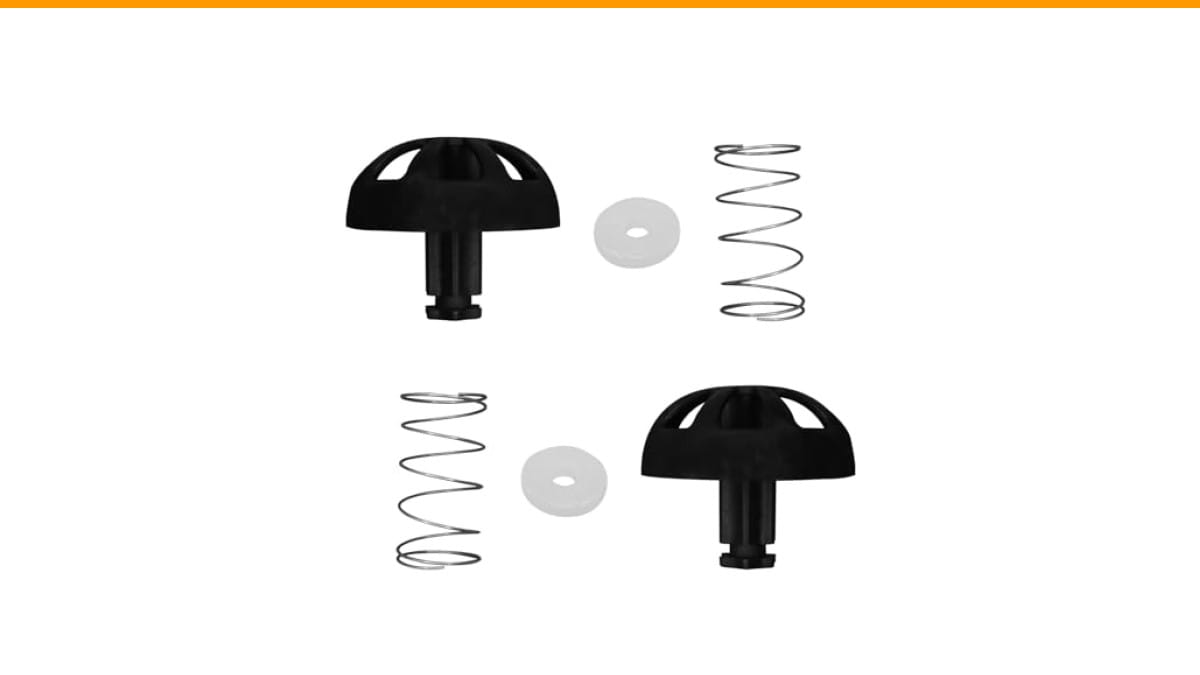
SURPOUF
2-Pack Coffee Replacement Brew Basket Spring Loaded…
- The coffee machine spring stop kit is located at the bottom of the coffee replacement brewing basket and is suitable for 112435-00…
- We have learned from feedback from multiple users that they have received multiple complete coffee blues, but the springs at the b…
- This component has high compatibility and is suitable for models such as 49947, 49954, 49957, 49966, 49976 for Mr. Coffee; Black a…
As an Amazon Associate I earn from qualifying purchases.
If you get through the troubleshooting and find your brew basket’s spring-loaded stopper is worn out or missing, that’s a cheap, common repair. A replacement kit like this spring loaded stopper kit can restore a basket that won’t hold water in the chamber, which often gets mistaken for a heating problem. It’s worth checking while you have the machine apart.
Safety First: Unplug Before You Diagnose
This is not a suggestion. Unplug the coffee maker from the wall before you touch anything beyond the exterior casing. Water and electricity mix badly inside these machines, and you do not want to be the person who learns that firsthand.
Wait five minutes after unplugging. The large capacitor on the control board can hold a dangerous charge for a short time. Give it a few minutes to discharge naturally. If you plan to poke around the wiring with a multimeter, that wait is non-negotiable.
Keep a towel nearby. Coffee makers hide water in places you would not expect, even when they look dry. If you spill any while working, let the area dry completely before reassembling.
The 60-Second Checks: Outlet, GFCI, and Power Cord
Most dead coffee makers are not actually dead. They are just not getting power. Start with the easiest possible explanations before you unscrew anything.
Testing the Outlet with a Phone Charger
Plug your phone charger into the same outlet. If it charges, the outlet is fine. If it does not, try a different outlet in the kitchen. This sounds too simple to work, but you would be surprised how often the problem is a dead socket.
Also check if the outlet is a GFCI (Ground Fault Circuit Interrupter) type. You will recognize it by the two small buttons in the center marked ‘Test’ and ‘Reset.’ Kitchens built in the last 20 years usually have these near the countertop. Press the ‘Reset’ button firmly until you feel it click. Then try the coffee maker again.
If the GFCI trips again immediately, you have a short somewhere in the machine or the outlet circuit. Do not keep resetting it and hoping for the best. Move to the next step.
Resetting the Circuit Breaker
Head to your electrical panel. Look for a breaker that has flipped to the middle position or sits slightly out of line from the others. Flip it fully to ‘Off,’ then firmly back to ‘On.’
A 12 cup coffee maker draws between 600 and 1200 watts depending on the model. That is usually 5 to 10 amps. If you have a toaster, microwave, and coffee maker all on the same circuit, you can trip a 15-amp breaker just by making breakfast. That is a common scenario, not a sign your machine is broken.
Pro tip: If the breaker trips every single time you brew, you have a circuit overload problem, not a coffee maker problem. Spread your appliances across different outlets on different circuits.
Internal Fixes: The Thermal Fuse and Wiring
If the outlet is fine and the machine still gets no power, the culprit is usually internal. The most common failure point is the thermal fuse—a small, white or black component that sits near the heating element. It is a one-time safety device. When the machine overheats, the fuse blows to prevent a fire. Once it blows, the coffee maker is dead until you replace it.
Accessing it requires removing the bottom plate. You will need a Phillips screwdriver, and sometimes a Torx bit. Turn the machine upside down on a towel and remove every screw you can find. Keep them organized—they are not all the same length.
How to Test a Thermal Fuse with a Multimeter
Set your multimeter to the continuity setting (the symbol that looks like a sound wave). Touch one probe to each end of the thermal fuse. If you hear a beep or see a reading near zero ohms, the fuse is intact. If you get no reading, the fuse is blown.
A blown thermal fuse tells you the machine overheated at some point. Replacing the fuse without addressing the cause means it will blow again. The usual cause is mineral scale buildup on the heating element, which insulates it and traps heat. That is why proper cleaning matters more than most people realize.
While you have the bottom off, inspect the wiring. Look for burned, melted, or discolored insulation. Check the connections where wires meet the heating element. A loose spade connector can cause intermittent power loss. Reconnect it firmly with pliers.
If you find a burned wire, do not just wrap it in electrical tape. That is a fire hazard. Replace the wire or the entire harness. If you are not comfortable soldering or crimping new connectors, this is the point to call a repair shop or buy a new machine.
The Control Panel and Circuit Board: When Buttons Fail
Sometimes the machine has power but the buttons do nothing. The clock might be blinking, or the indicator light is on, but pressing ‘Brew’ produces zero response. This is a control board problem, not a power problem.
First, check for a hidden reset feature. Some programmable models have a small pinhole reset button on the back or bottom. Press it with a paperclip for 10 seconds. This clears the internal microprocessor and often fixes frozen buttons.
If that does not work, the issue is likely a failed relay on the circuit board or a cracked solder joint. This is a more advanced repair. You can visually inspect the board for burnt components or swollen capacitors. If you see either, the board needs replacing.
Replacement control boards cost anywhere from $15 to $40 for most budget 12 cup models. The labor to install one is about 30 minutes of your time. If you are handy with a soldering iron, you can sometimes reflow a cracked joint and save the board. But do not expect this to work every time—it is a gamble.
If your machine is a digital model and it is acting up, check our guide on fixing unresponsive control buttons for model-specific tips.
The Hidden Fix: Descaling for Overheating Protection
Here is a scenario that catches people off guard. The machine turns on, the heating element gets hot, but then the whole unit shuts off mid-cycle. No error code, just silence. This is the thermal cut-off switch doing its job.
Hard water creates scale inside the boiler tube. That scale acts like a blanket, trapping heat and causing the temperature to spike past the safety threshold. The thermal fuse or thermal switch trips, and the machine shuts down to prevent damage.
The fix is descaling. Mix a solution of one part white vinegar to two parts water, or use a commercial descaling solution. Run it through a full brew cycle without coffee grounds. Then run two more cycles with plain water to rinse.
If the machine shut down due to overheating, descaling might reset the safety switch automatically once the unit cools down. Try that before you order any parts. For a deeper routine, follow our cleaning frequency guide to prevent this from recurring.
This is the cheapest fix in this entire article. A bottle of vinegar costs less than a dollar. It is worth trying before you spend money on a multimeter or replacement parts.
When to Call It Quits: Repair vs. Replace
Here is the honest math. A basic 12 cup coffee maker costs between $30 and $50. A replacement thermal fuse costs $5, but you have to spend an hour taking the machine apart. A new control board costs $30 plus shipping. A new heating element costs $20 to $25.
If the problem is the thermal fuse and you already own a multimeter, fix it. The repair takes 30 minutes and costs almost nothing. If the problem is the control board or the heating element, the parts cost nearly as much as a new machine.
There is also the opportunity cost. Your time is worth something. If you spend two hours repairing a $40 coffee maker, you are effectively paying yourself $20 an hour to do appliance repair. That is a bad deal unless you enjoy the work.
One exception: if your coffee maker is a higher-end model with a stainless steel carafe or programmable features you love, replacement parts might be worth it. A $70 machine is worth fixing if the repair costs $15. A $30 machine is not.
Also consider the safety angle. If the wiring inside shows signs of burning or melting, do not repair it. That is a fire hazard waiting to happen. Replace the machine immediately.
Before you toss it, check the warranty. Most budget coffee makers come with a one-year limited warranty. If you are within that window, contact the manufacturer. They will usually send a replacement without requiring you to return the broken unit.
Frequently Asked Questions
Why does my coffee maker have power but won’t heat?
If the indicator light is on but the water never gets hot, the heating element is likely burned out. You can test it with a multimeter by checking resistance across the two terminals. A good element reads between 10 and 20 ohms. An open circuit (infinite resistance) means it is dead. The other possibility is a failed thermostat that is stuck open, which prevents power from reaching the element.
Can a power surge permanently damage my coffee maker?
Yes. A power surge can fry the control board, especially on digital models with clocks and timers. The surge blows the small traces on the circuit board or destroys the microprocessor. This is not repairable by the average person. If a surge killed your machine, check if it is plugged into a surge protector. If it is not, that is your lesson for the next machine.
Is it worth replacing the thermal fuse myself?
If you can use a screwdriver and a multimeter, yes. The fuse itself costs a few dollars. The hardest part is getting the bottom plate off and finding the fuse. On most models, it is clipped right next to the heating element. Just make sure you buy the correct temperature rating—usually 240°F or 250°F. Installing the wrong rating can cause overheating.
Why does my coffee maker trip the GFCI outlet every time?
That means there is a ground fault—electricity is leaking to the metal frame or water is contacting a live wire. This is a serious safety issue. Do not keep resetting the GFCI. Unplug the machine and do not use it until you inspect the internal wiring. If you see any moisture inside, dry it thoroughly and test again. If it still trips, the machine is unsafe. Replace it.
How do I know if my coffee maker is in sleep mode?
Many programmable models have an auto-off or sleep mode that disables the brew button after a set time. Check the display. If it shows the clock but ignores button presses, press the ‘Program’ or ‘Clock’ button first to wake it up. Some models require you to hold the brew button for three seconds to start. Read your manual—this trips up more people than you would think.
What to Do Next: Your Action Plan
- Test the outlet with a phone charger first. It is the most common cause and takes ten seconds.
- Press the Reset button on the GFCI outlet and check the circuit breaker before opening anything.
- Unplug and wait five minutes before any internal inspection to let capacitors discharge.
- Test the thermal fuse with a multimeter. A blown fuse is a $5 fix if you are handy.
- Run a descaling cycle before ordering parts. Overheating shutdowns are often scale-related.
- Check the warranty before spending money on parts. A free replacement beats a paid repair.
- If the repair parts cost more than half the price of a new machine, buy a new machine. Your time is worth something.
Products related to this article
Sponsored / affiliate links. As an Amazon Associate I earn from qualifying purchases. I may earn additional commission from eligible campaigns.
 Quick Heating Cup Warmer, Three Temperature Settings, Splashproof and Portable, for Coffee, Milk, Lightweight ABS Material
 Coffee Mug Warmer & You are Awesome Mug Set, Electric Cup Warmer for Desk
 HomeBeyond Espresso Coffee Maker 12 Cups, Classic Stovetop Espresso Maker, 600ml / 20oz Coffeemaker for Gas & Ceramic Stovetops (Silver)